# Billing
The **Billing** page shows usage for the current billing cycle and provides payment management for the organization. Open it from **Organization settings > Billing** in the dashboard.
Enterprise organizations bill on Tokens Under Management (TUM); other tiers see per-feature usage meters. Both are described below.
## Access requirements
Viewing the **Billing** page requires the `org:read` scope, so both default Admin and Member roles can see usage. Billing actions, including adding a card and opening the customer portal, require `org:admin`, which only the [default Admin role](/docs/ai-control-plane/org-admin/roles-and-permissions) holds.
## Tokens Under Management
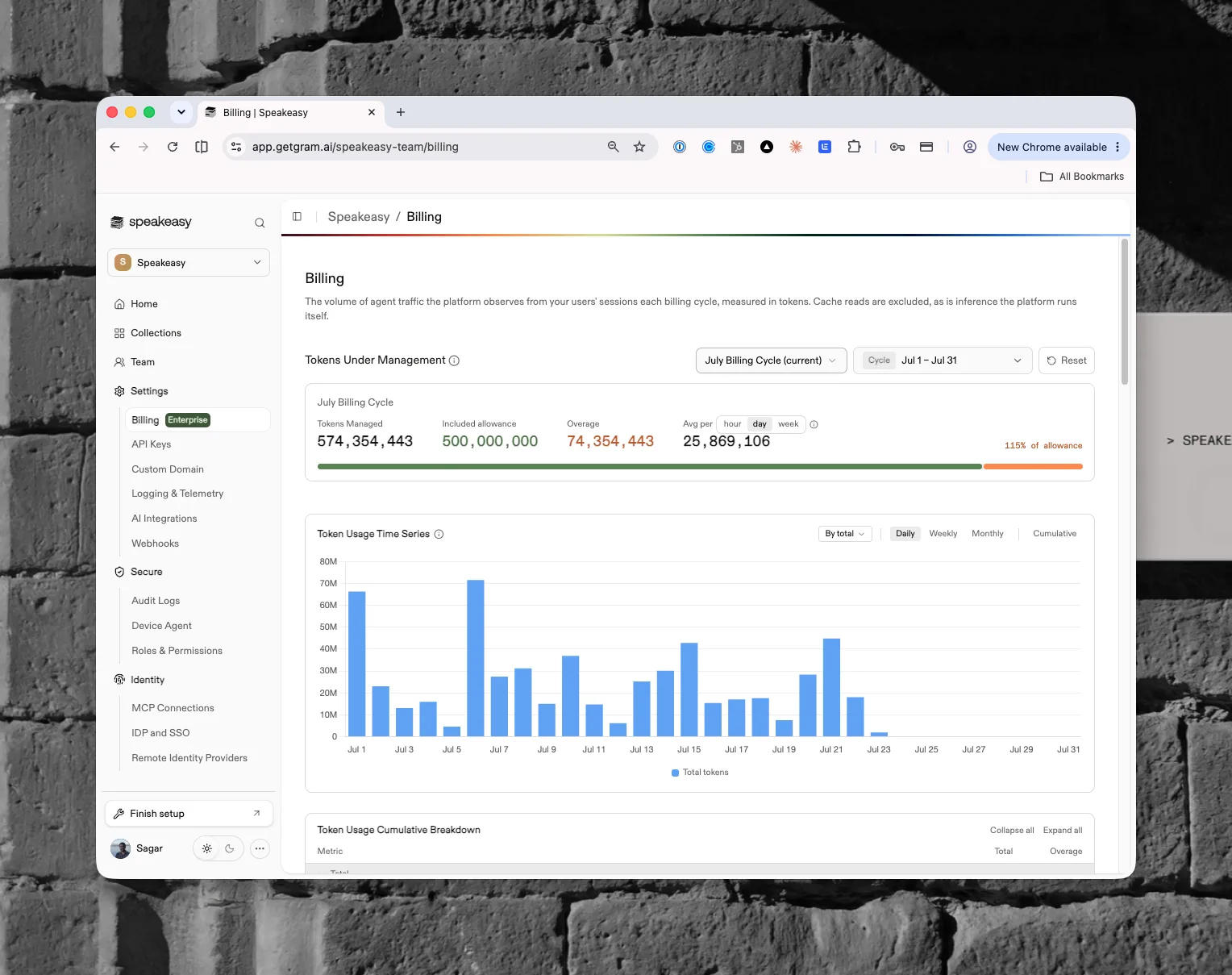
Tokens Under Management is the volume of agent traffic the platform observes from users' sessions each billing cycle, measured in tokens. It reflects the AI activity the platform governs, not the inference the platform itself runs. The page summarizes the cycle against the contracted allowance, charts usage over time, and breaks it down by team, user, model, and more.
### What counts
Every observed agent session contributes three token types:
- **Input tokens** — prompt content sent to the model
- **Output tokens** — content the model generates
- **Cache-write tokens** — new content written to a prompt cache for the first time
Observed sessions come from the instrumented agent platforms: Claude Code, Claude Cowork, Cursor, and Codex. Tokens attribute to the organization through its projects, and each session carries a snapshot of the user's identity (role, department, division) taken at the time of the event, which powers the breakdowns below.
### What doesn't count
- **Cache reads.** Re-reading cached content isn't new traffic; that content was already counted once, as a cache write, when first observed.
- **Inference the platform runs itself.** Risk-policy analysis, prompt-injection scanning, the playground, hosted chat, and the dashboard assistant all consume tokens on the platform's side and are excluded from TUM.
- **MCP tool calls.** Tool-call volume is metered separately and never converts into TUM.
### Billing cycles and the allowance
Cycles are monthly windows anchored to a contract-specific day of the month, in UTC. The summary card compares the cycle's **Tokens Managed** against the contracted **Included allowance**:
- **Overage** is any usage beyond the allowance; the meter shows the included portion in green and the overage in amber, with the total as a percentage of allowance
- **Avg per hour, day, or week** averages the cycle's tokens over the elapsed portion of an active cycle, or the full window of a closed one
Cycle totals finalize 72 hours after a cycle closes and become the invoiced record; until then, recent days can shift slightly as late-arriving telemetry lands.
### Reading the charts
The **Token Usage Time Series** chart plots tokens daily, weekly, or monthly, with a cumulative view for tracking a cycle's trajectory against the allowance. The **Token Usage Cumulative Breakdown** table splits the same usage by model, token type, agent, provider, account type, project, division, department, user, and role, each with its share of any overage (attributed by tokens recorded after the allowance ran out, prorated on the crossing day).
Users can hold multiple roles, and a session's tokens count under each. Role rows can sum to more than the total.
## Usage on self-serve tiers
Outside enterprise contracts, the **Usage** section summarizes the period against included allowances, with a progress meter for each:
- **Tool Calls** — calls processed this period across all MCP servers
- **Servers** — enabled MCP servers, billed on the maximum simultaneously active
- **Chat Based Credits** — credits used for chat and AI dashboard experiences
## Payment management
Admins see a top-up call to action when more capacity is needed. On self-serve tiers, admins manage payment through an embedded checkout using **ADD CARD**, or open the customer portal with **MANAGE BILLING**, which opens in a new tab.