MCP tool filtering: how Datadog proved the pattern and we shipped the solution

Nolan Di Mare Sullivan
Published · 7 min read
Tool Filtering Documentation
Learn how to configure tag-based tool filtering for your Speakeasy-hosted MCP server.
Read the DocsDatadog’s MCP server exposes 142 tools across 22 toolsets. If you’ve connected it to an AI agent, you already know the problem: the model’s context window fills up with tool definitions before it does anything useful.
Datadog’s own docs group those tools into toolsets and expose a toolsets query parameter to narrow them down, a tacit acknowledgment that loading all 142 at once is too many. Their endpoint takes a comma-separated list of toolsets:
https://mcp.datadoghq.com/api/unstable/mcp-server/mcp?toolsets=apm,llmobs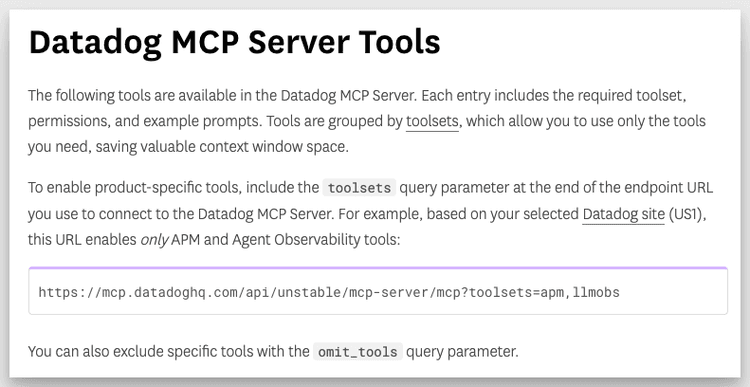
This is where every serious MCP server is heading. As a server adds capabilities, its tool list grows, and the context cost of simply listing those tools grows with it. Datadog is just early enough, and big enough, to make the pattern obvious.
The MCP community knows this needs solving. The spec has open discussions on tool filtering, tool groups, and namespacing, but none of them have landed yet. Rather than wait for consensus, we shipped tag-based tool filtering for Speakeasy-hosted MCP servers.
Why 100+ tool MCP servers overflow the context window
When an MCP client connects to a server, it receives the full tool list up front. For a server like Datadog’s, with 142 tools spanning metrics, logs, dashboards, monitors, incidents, and more, that’s a large number of tokens spent on tool definitions before the agent reads a single one.
The tokens are only half the cost. The bigger problem is noise. An agent handling incident response doesn’t need dashboard-creation tools in its context, and an agent querying metrics doesn’t need log-management endpoints in scope. Every irrelevant tool is one more thing the model has to consider and rule out, which degrades tool selection and wastes context.
We’ve written before about how dynamic toolsets solve this at the protocol level with progressive discovery and semantic search. Tag-based tool filtering solves a different but complementary problem: giving server operators explicit control over which tools a given client sees, before any dynamic discovery begins.
Where the MCP spec stands on tool filtering
The MCP community has floated several approaches: tool namespaces, capability negotiation, and server-side filtering hints. An open proposal for tool groups is one of the more developed examples, but it’s still a discussion thread without alignment from the community. The ideas are all reasonable, and they’re all still in discussion rather than shipped.
Teams are deploying MCP servers in production today, and they need a filtering primitive now. Datadog’s server makes the case on its own. When a single vendor’s MCP server is large enough to overflow most context windows, the ecosystem can’t wait for a standard to catch up.
How tag-based tool filtering works
Tag-based tool filtering is a first-class feature of Speakeasy-hosted MCP servers. The model is simple:
- Tools are tagged at the source, through OpenAPI operation tags or
tagsdefined in Speakeasy Functions code. - The MCP server URL accepts an optional
tagsquery parameter that filters the tool list it returns. - With no
tagsparameter, the server returns its full tool list, exactly as it does today. There are no breaking changes. - The install page surfaces the available tags, provides a pre-filled install URL for each one, and updates IDE configs automatically when a tag is selected.
- Filtered URLs are shareable, so you can send someone a link scoped to exactly the tools they need.
For a platform-sized server like Datadog’s, you might tag tools by domain and hand out a monitoring-and-alerting URL:
https://ai.speakeasy.com/mcp/your-org/your-server/default?tags=monitoring,alertsThat URL returns only the tools tagged monitoring or alerts. Multiple tags are treated as a union: a tool is included if it matches any of the requested tags, not all of them. The agent gets a focused toolset, the context window stays lean, and tool selection improves.
The diagram below shows how the same server returns different tool lists depending on the tags parameter:
flowchart LR
    A["MCP server<br/>142 tools, many tags"] -->|"?tags=monitoring,alerts"| B["Filtered list<br/>monitoring + alerts only"]
    A -->|"no tags param"| C["Full list<br/>all 142 tools"]
    B --> D["Lean agent context"]
    C --> E["Overflowing agent context"]
How tag precedence works
A tool’s effective tags decide which filters it shows up under. Source tags and tool variation tags combine with a clear precedence:
- Source tags are the default. Tags from your OpenAPI spec or Speakeasy Functions code persist across source updates, so they’re the right place to define sensible groupings.
- A tool variation that sets tags replaces the source tags. Use tool variations to reclassify a tool from the dashboard without touching code or redeploying. The variation’s tags become the tool’s complete set.
- An empty variation tag set hides the tool from every filter. The tool stays available on the unfiltered server but never appears under a
tagsfilter. - Untagged tools are excluded from every filter. A tool with no effective tags shows up only on the unfiltered server.
You define defaults at the source, then adjust from the dashboard when a tool needs to move groups.
What tool filtering changes in production
Filtering is what separates an MCP server that demos well from one that holds up in production:
- Agents load only the tools relevant to their task. No incident-response agent carrying dashboard-creation schemas it will never call.
- Context windows stay lean. Fewer tools means more room for reasoning and conversation.
- Operators control the surface area. Different clients see different subsets of the same API, without running a separate server for each.
- Install pages document themselves. Consumers see the available tool groups and pick what they need before they connect.
Tool filtering vs dynamic toolsets
Tool filtering and dynamic toolsets solve different parts of the same problem, and they compose well:
- Tool filtering is a server-operator decision and the access-control layer. It sets the maximum set of tools a given client URL will ever see.
- Dynamic toolsets are a runtime optimization. Within whatever filtered set is available, progressive discovery and semantic search further reduce what’s loaded into context at any given moment.
Together, they make MCP servers with hundreds of tools not just possible, but practical.
How to enable tool filtering
Tool filtering is available now on all Speakeasy-hosted MCP servers. To turn it on:
- Tag the tools you want to be filterable, through OpenAPI operation tags, Speakeasy Functions tags, or tool variations.
- Assign a tool variations group to the MCP server on its Settings tab. This tells the server which tags are available and populates the install page.
- Open the server’s install page to confirm the available tags and per-tag install URLs, then share a filtered URL or let clients self-select.
Props to the Datadog team for building the MCP server that made this problem impossible to ignore. The spec will catch up, and in the meantime we built the filtering primitive teams need today.
Frequently asked questions
Does tool filtering require a separate MCP server per client?
No. Filtering keeps a single server as the source of truth. Each client appends a tags parameter to the same server URL to scope down to the tools it needs.
What happens to untagged tools when a filter is applied?
Untagged tools are excluded from every tag filter. They appear only on the unfiltered server URL, the one with no tags parameter.
Is tool filtering a breaking change for existing servers?
No. A request with no tags parameter returns the full tool list, exactly as before. Filtering is opt-in per request.
How is tool filtering different from dynamic toolsets?
Tool filtering is set by the server operator and defines the maximum set of tools a client URL can see. Dynamic toolsets work at runtime within that set, using progressive discovery and semantic search to load only the tools needed at a given moment.
Where do tags come from?
Tags come from OpenAPI operation tags, tags defined in Speakeasy Functions code, or tool variations applied from the dashboard.