MCP approval workflow: fast, defensible reviews for unverified MCP servers

David Danialy
August 25, 2026 · 5 min read
Blocking an unreviewed MCP server leaves a decision for the security team. Someone needs that server to finish a task, and the reviewer needs to know what access it requests, who operates it, and whether to allow it. Gathering that evidence can take longer than making the decision. The wider problem and its controls are covered in shadow MCP and MCP security.
The MCP Approval Flow on the Speakeasy AI Control Plane brings the request, evidence, and access decision into the same review. When the Shadow MCP blocking policy blocks a tool call, the requester gets a link to explain why they need access. Reviewers can approve it for that person, a team, or a project, with the decision applied to the blocking policy.
How the MCP approval workflow works
The workflow starts with a blocked tool call and ends with a recorded decision:
- An agent calls a tool on an unreviewed MCP server, and a shadow MCP policy blocks the call. The person who hit the block gets a request link.
- The link opens a justification form asking why they need the server, without requiring a dashboard login.
- The request attaches to the server's review page under Secure → Shadow MCP, in the same table as your observed inventory. Servers awaiting a decision sort to the top. The elected reviewers are notified of the pending server.
- Your security team reviews the evidence and approves or denies the request, with optional scoping to the requester, a team, or a project.
- Approval writes the grant on the blocking policy in the same transaction. The requester retries the tool call and it runs through the MCP gateway, where the scoped decision is enforced and logged.
How can MCP server approval be scoped?
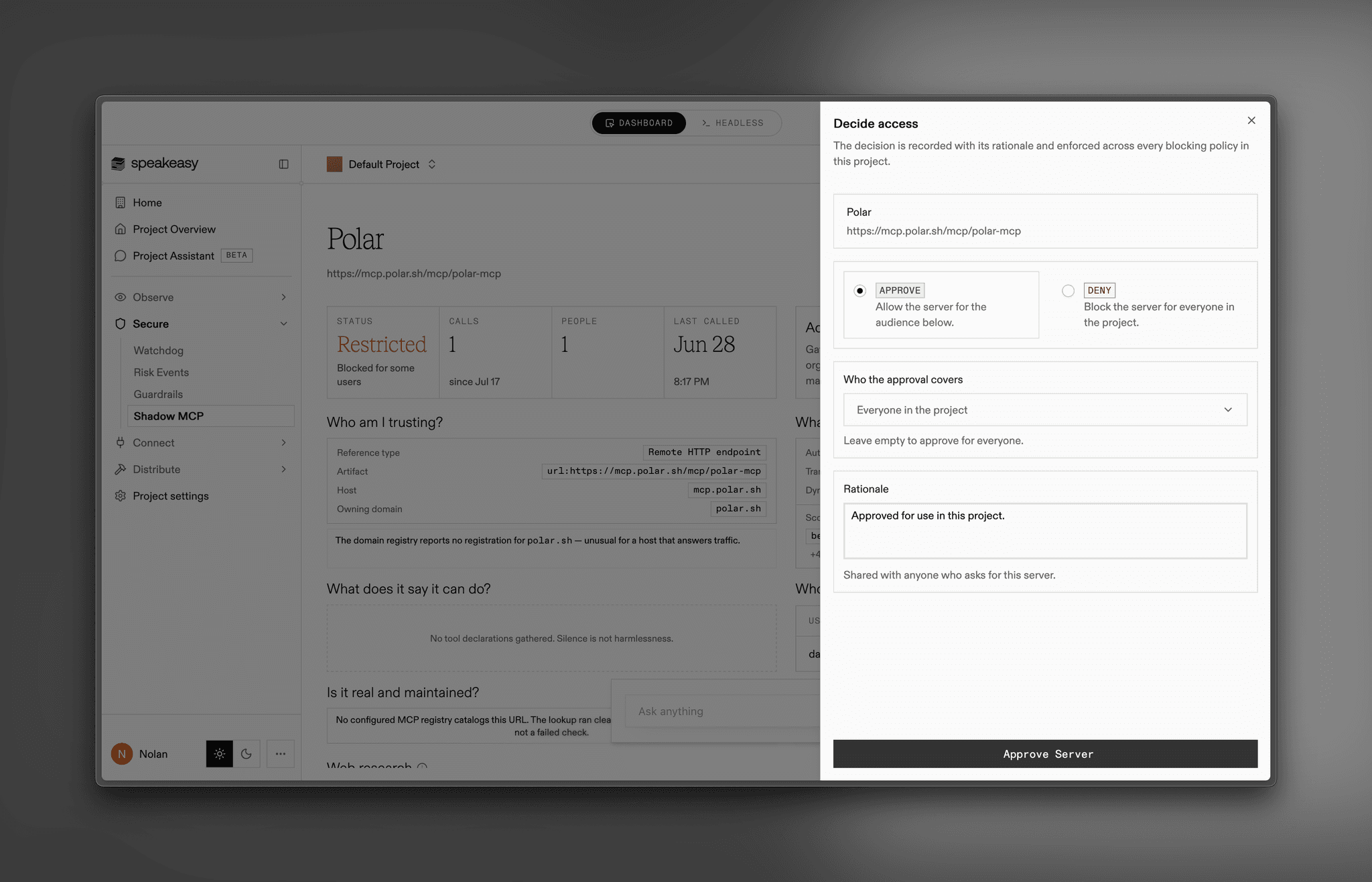
The "Decide access" drawer records the decision, who it covers, and the reviewer's rationale. Scope approval to the requester, a team, or a project according to who needs the server.
What evidence supports MCP server approval?
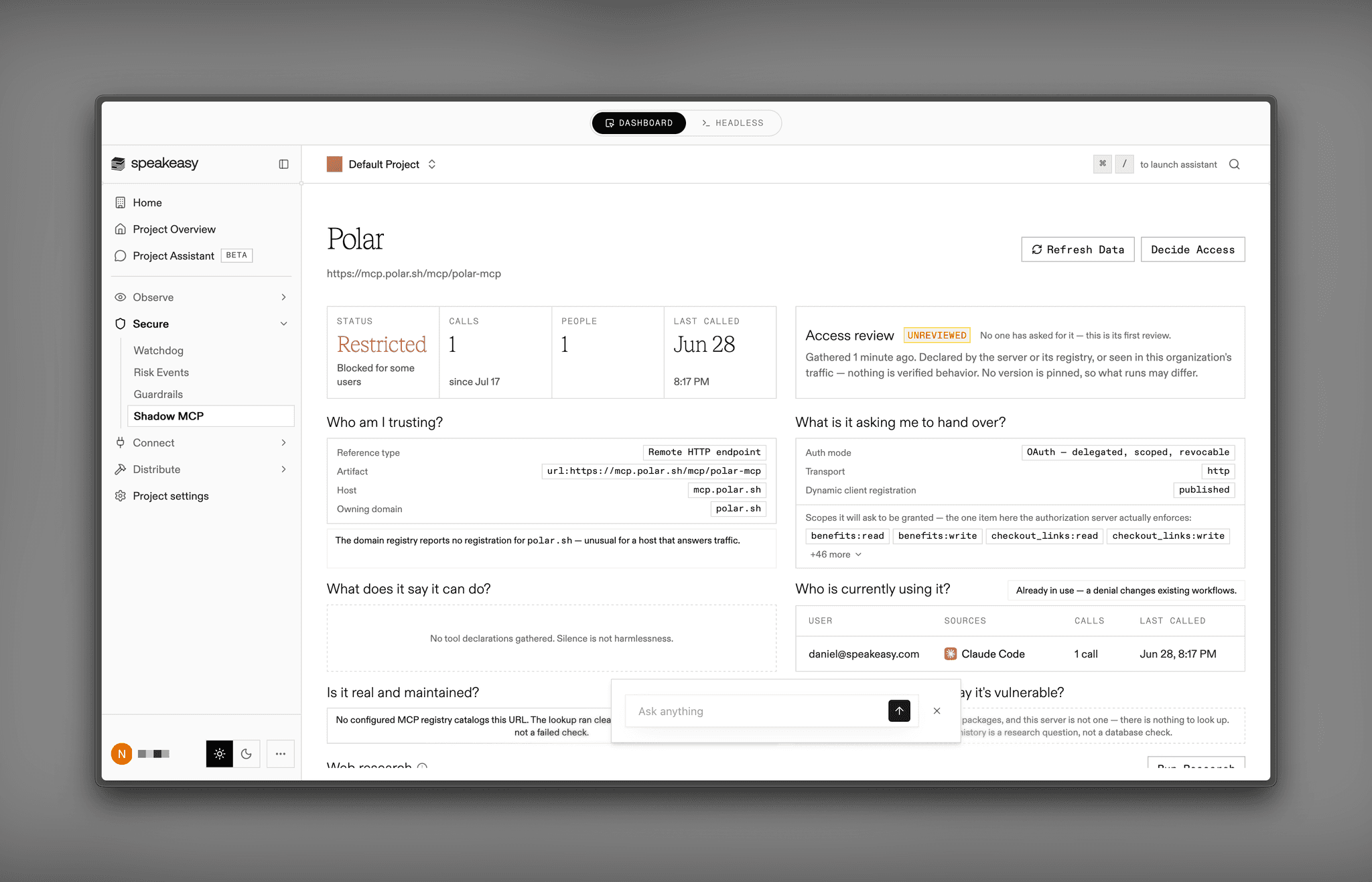
Evidence is assembled automatically, with no model in the loop, and organized around the questions you'd ask in a real review. Registry metadata describes the candidate, while the MCP inventory shows whether and how it is already in use:
- Who am I trusting? Publisher, official flag, domain match, registry age, source repository, and license.
- What is it asking us to hand over? OAuth scopes, auth mode, and the secrets and headers the server demands.
- What can it do? Declared capability for every tool, with the tools that act on a user's behalf called out.
- Is it real and maintained? GA versus beta, maintenance recency, and popularity.
- Are we already exposed? Whether the server is already in use in your org, how many people are asking for it, and any findings its traffic has already produced.
- What do we already know? Whether a vendor contract or a prior security review is on file.
When registry metadata is insufficient, you can send a research agent to investigate further. It searches independent sources, including GitHub issues, security advisories, package and maintainer history, domain age, and incident history. Its report separates what was observed, what independent sources report, and what the vendor claims, with a citation on every claim. If no independent source has written about a server, the report says so. The agent gathers and cites evidence. Reviewers make approval decisions.
When approved MCP servers need another review
A daily check gathers evidence for approved servers again and compares OAuth scopes, authentication mode, requested credentials, and published advisories with the evidence available at approval. Each distinct change flags the server for review until a new decision clears the flag.
This check can identify changes in the published evidence, but it cannot establish that a server still behaves safely. A server can change its behavior without changing its published interface. Keep grants limited to the people and projects that need access.
How to enable MCP Risk Approval
Reviews live under Secure → Shadow MCP, next to your shadow MCP inventory. Contact your Speakeasy team to enable MCP Risk Approval for your organization, or book time with our team to discuss your review process.
How do I approve an MCP server for my team?
Approve from the server's review page under Secure → Shadow MCP, where the request arrives with its evidence pack attached. You choose the scope: the individual requester, a team, or a project. The approval writes the grant on the shadow MCP blocking policy and records your rationale alongside it, so the requester can retry the tool call. Reviewers make the decision. The research agent gathers and cites evidence for them.
Does a blocked developer need a Speakeasy account to request access?
No. The block hands them a request link that opens a justification form asking why they need the server, with no dashboard login. Their request lands on the server's review page and the elected reviewers are notified.
What happens when we deny an MCP server request?
The server stays blocked and the denial is recorded on the server's review page with the reviewer's rationale, so the reasoning is available when the same server comes up again. A server can be reviewed again as new evidence arrives, and revoking an approval removes the grant from the blocking policy.
What happens if an approved MCP server changes?
A daily sweep re-gathers evidence for approved servers and compares the access-related information, including OAuth scopes, auth mode, requested credentials, and published advisories, against the snapshot your approval was based on. A change flags the server as changed since approval, once per distinct change, until a new decision clears the flag.
Last updated on