Follow us on to be up to date with the latest changes.
v0.17.0
Platform
// January 9, 2026
Chat attachment API endpoints
Gram now supports uploading and serving chat attachments through two new API endpoints.The
endpoint allows uploading attachments for use in chat conversations. The
endpoint can be accessed with an API key or session cookie. The
header is not required on the serve endpoint, making it easy for session-based clients to embed attachments in chat using standard HTML tags.For example, images can be embedded directly in chat:
Features
Chat attachment upload and serve endpoints#1173 - Added two new API endpoints for uploading and serving chat attachments, enabling rich media in chat experiences. (Author: @disintegrator )
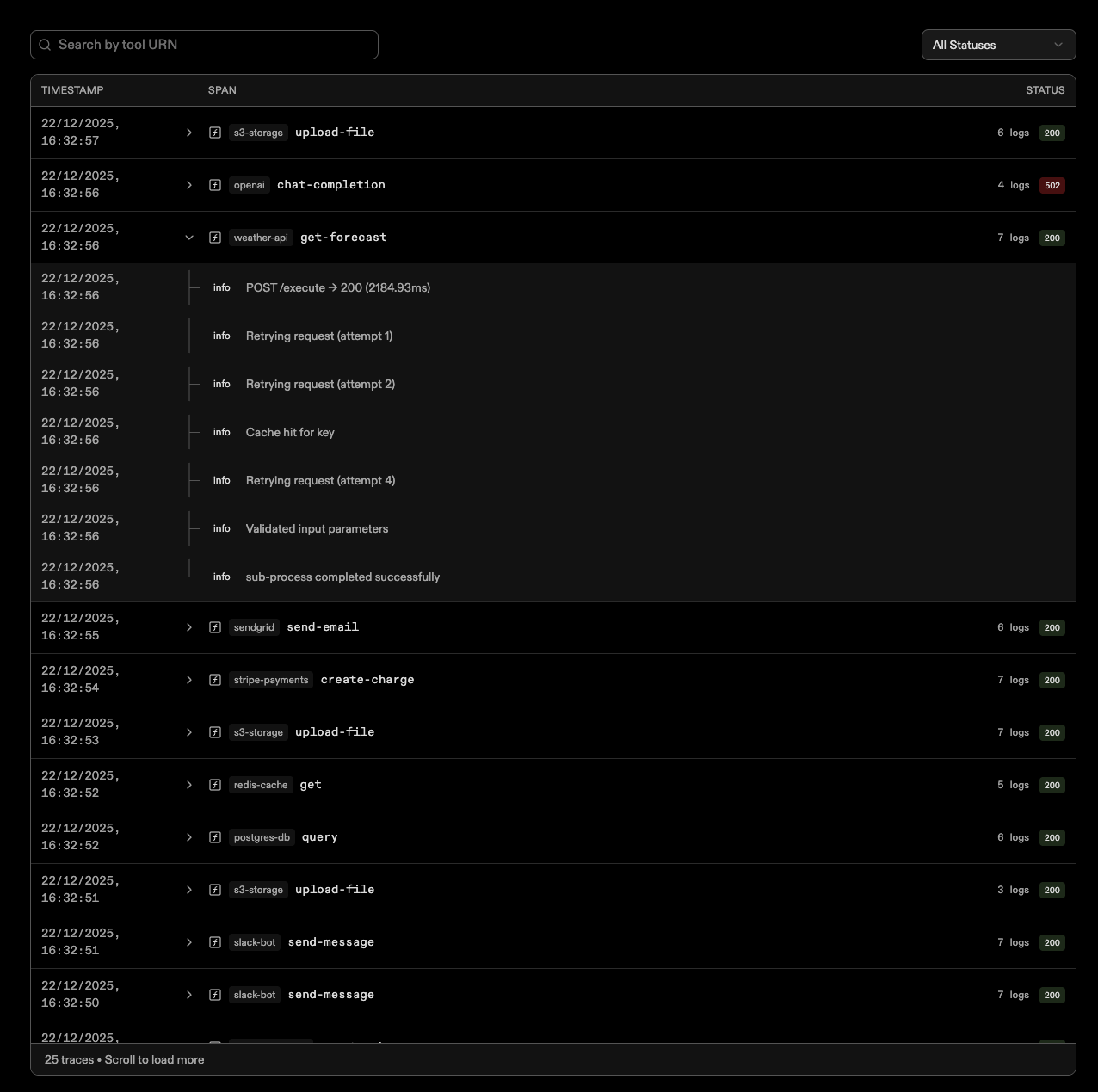
Add telemetry page displaying telemetry logs grouped by tool calls.This new telemetry page provides a powerful way to monitor and analyze your tool executions. Logs are intelligently grouped by tool calls, making it easier to trace execution flows, identify patterns, and debug issues across your Gram Functions and MCP integrations.
Features
New Telemetry Page for Improved Log Analysis#1112 - Adds a new page to display telemetry logs grouped by tool calls, enhancing our monitoring capabilities. (Author: @tgmendes )
Support for Project Deletions#1107 - Enables users to delete projects, thereby enhancing manageability and user control over their workspace. (Author: @walker-tx )
Bug fixes
Readme Enhancements for Better Navigation#1115 - Fixes broken links and improves the structure within the README for better usability. (Author: @adaam2 )
Chat Session CORS Support Fixed#1109 - Properly integrates CORS support for chat sessions, ensuring smoother cross-origin interactions. (Author: @chase-crumbaugh )
Empty State for No Search Results in Catalog#1110 - Adds an empty state component when no results are found in catalog searches, improving user experience. (Author: @walker-tx )
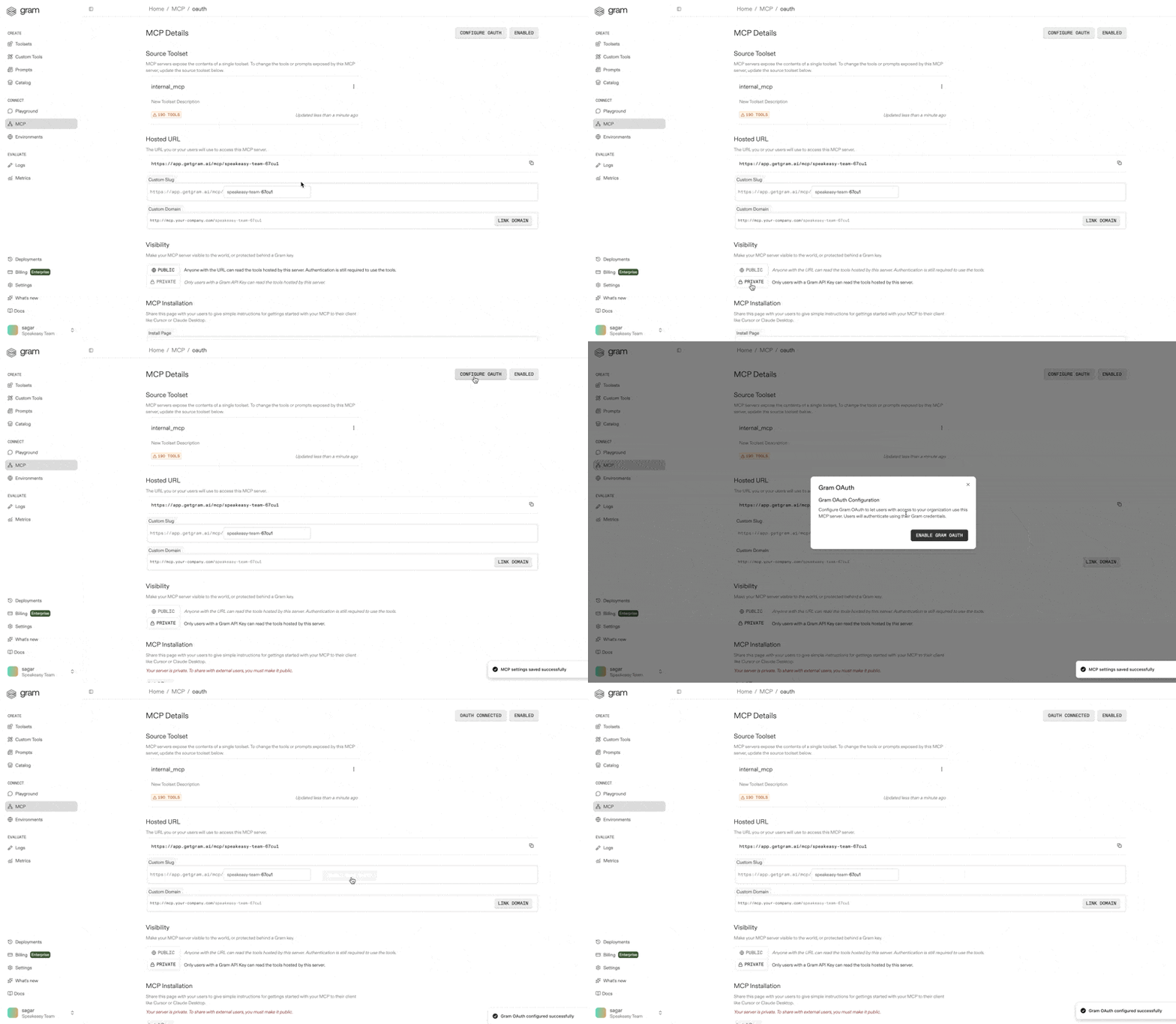
Enable private MCP servers with Gram account authentication.This change allows private MCP servers to require users to authenticate with their Gram account. When enabled, only users with access to the server's organization can utilize it.This is ideal for MCP servers that require sensitive credentials (such as API keys), as it allows organizations to:
Secure access to servers handling sensitive secrets (via Gram Environments)
Eliminate the need for individual users to configure credentials during installation
Centralize authentication and access control at the organization level
Add more robust discovery of oauth metadata#1097 - Enhances OAuth metadata discovery protocols for security and reliability. (Author: @qstearns )
Success/failure pages for gram oauth proxy#1085 - Introduces clear user feedback for OAuth authentication processes. (Author: @walker-tx )
Add telemetry logs API#1090 - Provides APIs for detailed telemetry data fetching. (Author: @tgmendes )
Add support for ephemeral chat sessions#1086 - Ephemeral chat sessions for transient user interaction. (Author: @chase-crumbaugh )
External ux for external toolsets#1080 - Offers a basic view for managing external MCP toolsets. (Author: @qstearns )
List and call tools from external MCPs#1057 - Implementation for handling tools from external MCP servers. (Author: @qstearns )
Gram as an OAuth proxy provider for mcp servers#1020 - Utilizes Gram as an OAuth provider for private MCP integration. (Author: @walker-tx )
Catalog page#1041 - Introduction of a catalog page to showcase tools and features in a consolidated manner. (Author: @chase-crumbaugh )
Add external MCPs to deployments#1055 - Facilitates adding external MCP servers during deployment processes. (Author: @qstearns )
Browse external MCP catalog#1054 - Allows users to browse through external MCPs catalog directly from the dashboard. (Author: @qstearns )
Bug fixes
Switch buttons to variant primary in Billing#1094 - Fixes brand button issues in the Billing section by switching to a primary variant. (Author: @qstearns )
Ensure all private servers show private server install instructions#1083 - Corrects the display of private server installation instructions for consistency. (Author: @walker-tx )
Fix CSP issue with Monaco editor#1075 - Resolves a content security policy issue affecting the Monaco editor's functionality. (Author: @walker-tx )
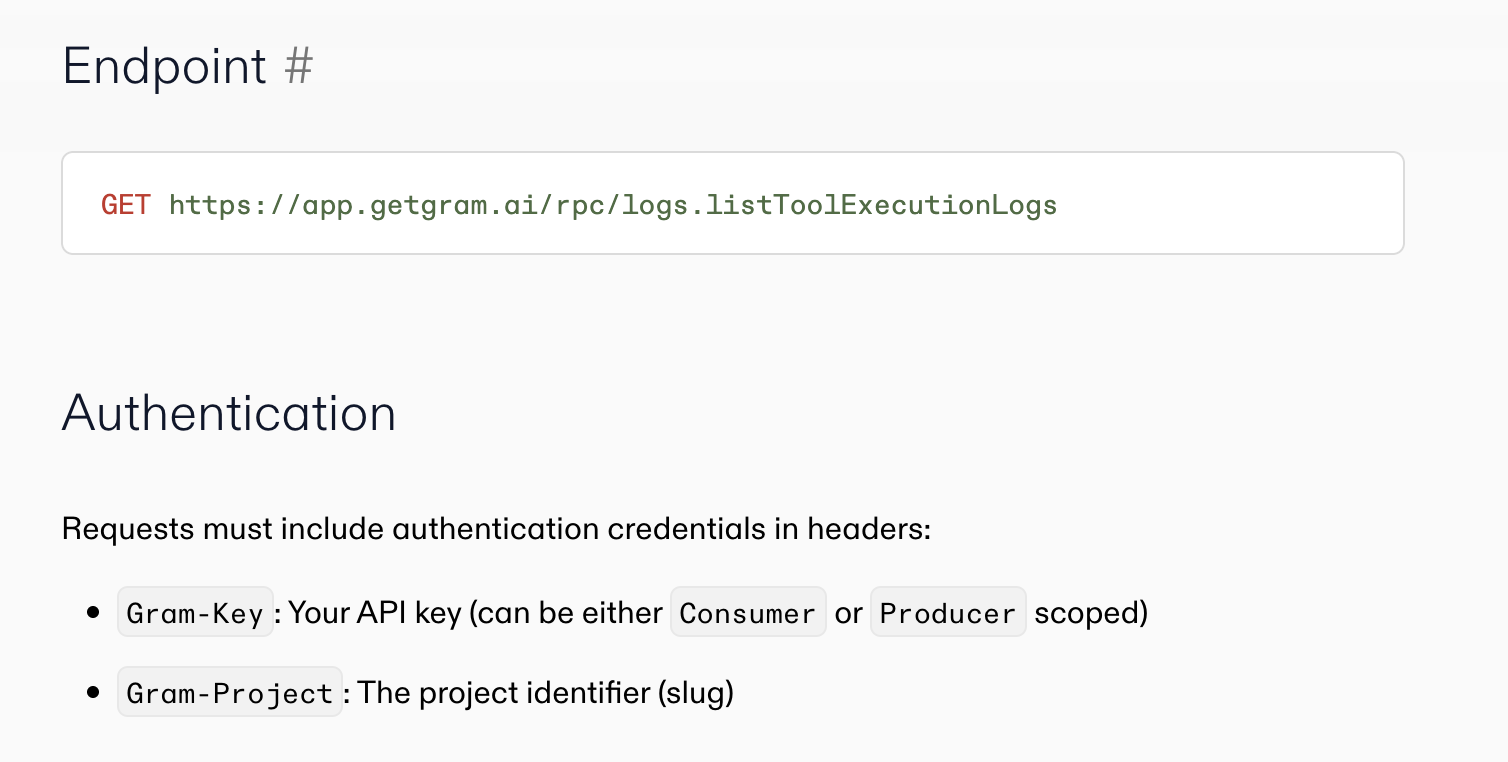
Add ListToolExecutionLogs API endpoint for querying structured tool logs with cursor-based pagination and filtering support.This new endpoint enables you to programmatically query and analyze tool execution logs from your Gram Functions. With cursor-based pagination and flexible filtering options, you can efficiently retrieve and process execution history for debugging, monitoring, and analytics purposes.Learn more about using logsCheck out the logs documentation to get started with the new API endpoint.
Features
Add local MCP registry infrastructure#1053 - Introduces infrastructure for local MCP registry to enhance external MCP code development. (Author: @qstearns )
Small Agent API changes for response view#988 - Updates to AgentAPI improve paginated log view capabilities for better response handling. (Author: @ryan-timothy-albert )
Add API endpoint to list/retrieve tool execution logs#1040 - New API endpoint introduced for fetching tool execution logs, enhancing monitoring capabilities. (Author: @tgmendes )
Ensure function OAuth respected in install page#1034 - Ensures OAuth protocols are adhered to during installations, strengthening security and user trust. (Author: @ryan-timothy-albert )
Replace Shiki with Monaco Editor for viewing large inline specs#1030 - Shifts to Monaco Editor for better handling and performance when viewing large spec files. (Author: @simplesagar )
Pin to MCP remote 0.1.25 in references that still include MCP remote#1042 - Pins older version of mcp-remote to avoid compatibility issues with legacy node versions. (Author: @ryan-timothy-albert )
Bug fixes
Don't brick page when dialogs close#1061 - Fixes freezing issues caused by dialog and popover interactions on pages. (Author: @chase-crumbaugh )
Playground doesn't update available tools when adding/removing tools#1037 - Corrects toolset reflection in the user interface of the playground tool. (Author: @simplesagar )
Playground tool parameters not rendering on initial load#1031 - Fixes an issue with the immediate display of tool parameters upon user interaction. (Author: @simplesagar )
Ensure system env compilation case sensitive#1033 - Corrects environment variable compilation to be case sensitive, preventing potential bugs. (Author: @ryan-timothy-albert )
Pass content type when uploading to Tigris#1044 - Ensures correct content type setting during uploads to Tigris for better data handling. (Author: @disintegrator )
Previously, Gram Functions could only be around 700KiB zipped, which was adequate for building many tools but was severely limiting for many others. One example is ChatGPT Apps, which can be full-fledged React applications with images, CSS and JS assets embedded alongside an MCP server, all running in a Gram Function. Many such apps may not fit into this constrained size. Large Gram Functions addresses this limitation by allowing larger zip files to be deployed with the help of Tigris, an S3-compatible object store that integrates nicely with Fly.io where Gram Functions are deployed and run.Get started with Gram FunctionsRun these commands in the terminal:
Create a new function project. See gram functions docs for more info
Build the functions
Push the functions to Gram
The build command should open a new window with the next step. If it doesn't, click here to continue.
Features
Support for Large Gram Functions#969 - Enables handling of substantially larger functions that expand the potential of the platform. (Author: @disintegrator )
Ensure Function OAuth in Install Page#1034 - Improves security by ensuring OAuth configurations are respected during installation. (Author: @ryan-timothy-albert )
Reading Toolsets Available to Chat Scoped Auth#1022 - Extends authentication options to provide more granular access controls for chat services. (Author: @ryan-timothy-albert )
PowerShell Installer Script#1026 - Automates installation of the CLI, enhancing user setup experience. (Author: @walker-tx )
Bug fixes
Playground Tool Parameters Not Rendering on Initial Load#1031 - Fixes a frustrating user interface bug in the playground. (Author: @simplesagar )
Fix Vercel CORS Check#1035 - Removes unnecessary CORS checks for smoother operation. (Author: @ryan-timothy-albert )
Fix Dashboard's WebGL Onboarding Bugs#1028 - Ensures that users without graphics acceleration have a graceful experience. (Author: @farazcsk )
SSE Streaming Response Truncation and Client Side Issues Fix#998 - Addresses issues in multi-turn tool call conversations. (Author: @simplesagar )
Performance improvements
Replace Shiki with Monaco Editor for Viewing Large Inline Specs#1030 - Enhances performance for viewing large specifications. (Author: @simplesagar )
Upgraded to AI SDK 5 with new chat transport and message handling. Playground now features built-in log viewer and tool editing side by side in addition to better inline tool rendering for chat.
Features
Restore AI SDK 5 Upgrade#992 - Restores previous updates to the AI SDK, enhancing performance and stability. (Author: @speakeasybot )
Update Chat Credit Billing#983 - Enhancements to the billing terms for chat credits, with customizable limits for organizations. (Author: @ryan-timothy-albert )
Static OAuth Callback in OAuth Proxy#980 - Simplifies OAuth by removing the need for individual server redirects. (Author: @ryan-timothy-albert )
Allow Uploading OpenAPI Specs via Remote URL#977 - Users can now upload OpenAPI specifications via URLs. (Author: @bradcypert )
Fallback Temporal Workflow for Openrouter Model Usage#978 - Implements a fallback Temporal workflow to handle delays in the Openrouter model. (Author: @ryan-timothy-albert )
Replace Windsurf Install Snippets with VSCode#971 - Updates installation guides for easier setup via VSCode. (Author: @walker-tx )
Bug fixes
Inconsistency in Environment Passthrough Authentication#997 - Fixes authentication inconsistencies in private server environments. (Author: @ryan-timothy-albert )
Nullable Chat ID Model Billing#995 - Addresses an issue with nullable ChatID in billing models. (Author: @ryan-timothy-albert )
Two updates to the MCP install page clients: Update Codex CLI installation instructions to use http instead of stdio with mcp-remote and remove Windsurf installation instructions and add VSCode install link.
Features
Update Chat Credit Billing#983 - Refined billing, increasing chat credits for pro and enterprise accounts. (Author: @ryan-timothy-albert )
Clone Pizzaz Example into Examples Folder#981 - Adds a new example to demonstrate newest features. (Author: @walker-tx )
Static OAuth Callback in OAuth Proxy#980 - Simplifies OAuth configurations across multiple servers. (Author: @ryan-timothy-albert )
Allow Uploading OpenAPI Specs via Remote URL#977 - Enhances integration capabilities of API specs. (Author: @bradcypert )
Fallback Temporal Workflow Openrouter Model Usage#978 - Implements backup strategies for Openrouter. (Author: @ryan-timothy-albert )
Replace Windsurf Install Snippets with Visual Studio Code#971 - Streamlines the installation process through VSCode. (Author: @walker-tx )
Introduces a new page for each source added to a project. The source page provides details on the source, which toolsets use it, and the ability to attach an environment to a source.
MCP servers can now include custom instructions that are displayed on the install page and provided to LLMs. This feature helps guide users and AI assistants on how to effectively use the server's tools and capabilities, improving discoverability and usage patterns.
Features
Server Instructions to Frontend#944 - Frontend now supports server instructions, enhancing configurability and user guidance. (Author: @tgmendes )
OAuth Passthrough for Function Tools#929 - Introduces OAuth credential passthrough for enhanced function tool integration. (Author: @ryan-timothy-albert )
Admin View for Creating OAuth Proxies#936 - Streamlined creation of OAuth proxies directly from admin panels, improving setup times and user experience. (Author: @ryan-timothy-albert )
Planetscale Example#928 - Practical example to showcase PlanetScale usage for real-world applications. (Author: @walker-tx )
Clickhouse Example#937 - Practical example to showcase ClickHouse usage for real-world applications. (Author: @walker-tx )
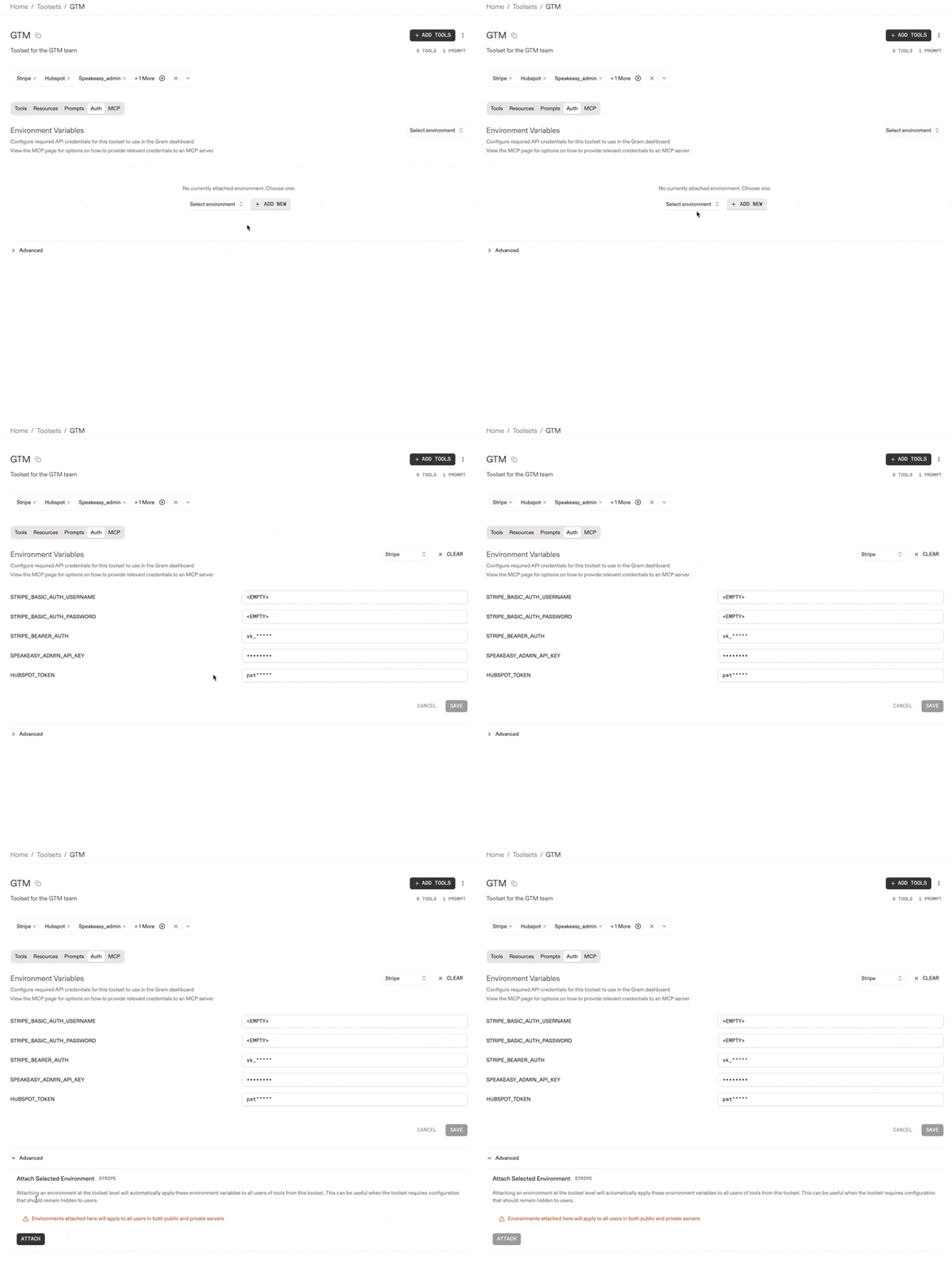
Attach Environments to Toolsets#885 - Attach environments directly to toolsets for more dynamic configuration management. (Author: @qstearns )
Bug fixes
Panic Recovery for HTTP Handlers#933 - Adds panic recovery in HTTP handlers ensuring stability and reliability. (Author: @disintegrator )
Incorrect Model Pricing Mapping Fixed#930 - Rectifies the model pricing mapping to ensure accurate cost calculations. (Author: @ryan-timothy-albert )
This feature extends environment variable attachment capabilities to toolsets, allowing for more refined configuration management and operational flexibility.
Features
Planetscale Example Integration#928 - New exemplary configurations demonstrate the practical implementation of PlanetScale DBs in varied development settings, solidifying commitment to versatile database solutions. (Author: @walker-tx )
Product Metric Attribute Estimating Tool Call Success#919 - With a focus on predictive analytics, this tool informs success rates of API calls, aiding in proactive error handling and system diagnostics. (Author: @ryan-timothy-albert )
Chat-based Usage and Openrouter Key Update#918 - This update revolutionizes user engagement by leveraging chat-interface interactions, enhancing user experience through intuitive operation. (Author: @ryan-timothy-albert )
Update Chat Model List to be More Modern#922 - More modern and efficient chat models have been introduced, ensuring users have access to cutting-edge AI-powered chat functionalities. (Author: @ryan-timothy-albert )
Bug fixes
Update Metadata Type in Polar Client#925 - Fixes a critical type mismatch in the event metadata handling that improves data integrity and operational stability. (Author: @disintegrator )
Capturing Openrouter Usage Data Streaming#921 - A vital fix that corrects the streaming data capture for Openrouter usage, ensuring accurate and reliable usage analytics. (Author: @ryan-timothy-albert )
Dynamic Toolsets v2 - Combining progressive discovery and semantic search
Introducing Dynamic Toolsets v2. Our new approach combines the strengths of both methods into a unified system that exposes three core tools:
,
, and
. The key insight is that tool descriptions provide structure and discoverability, while semantic search provides efficiency and natural language discovery. Together, they create a system that scales naturally without sacrificing usability.
Features
Gram Functions composition - Gram instances are now composable. This allows some similarity to Hono's grouping pattern, making it possible to split and organize Gram Functions code bases more than before.Before:
Now, with composability:
Integrate dynamic toolsets v2 with progressive and semantic search in one feature
Introduce announcement modal for new Gram Functions release
Add Resend example demonstrating email reminders via the Resend API
Support non-blocking deployment creation for non-intrusive deployment initiation
Update Gram description tagline and rearrange sidebar UI elements
Index embedding tags to enhance search and retrieval operations
Add tags to embeddings table for dynamic toolsets phase two
Fixes
Wrap long environment variable names in Playground auth tab to prevent overflow
Fix Moonshine button issues and adjust various UI elements
Ensure dark mode compatibility for Shiki themes
Increase function reap batch size for improved resource recovery
Enhance deployment tracking and local Gram CLI setup processes
Update esbuild configuration with CommonJS require shim for better compatibility
Correct textual content in create-function CLI for improved clarity
Deployment processes have been reengineered to become non-blocking, providing significant agility in handling deployments and improving overall system responsiveness.
Features
Add non-blocking deployment creation for more flexible deployment handling
Update Gram description and enhance login tagline with improved UI navigational elements
Add tags to embeddings table for evolving dynamic toolsets
Index embedding tags to optimize tag-based searches
Fixes
Enhance deployment tracking and local CLI setup configurations
Add CommonJS require shim to esbuild output for better dependency compatibility
Improve Gram install processes for enhanced installation experience
Update create-function CLI copy for clarity and accuracy
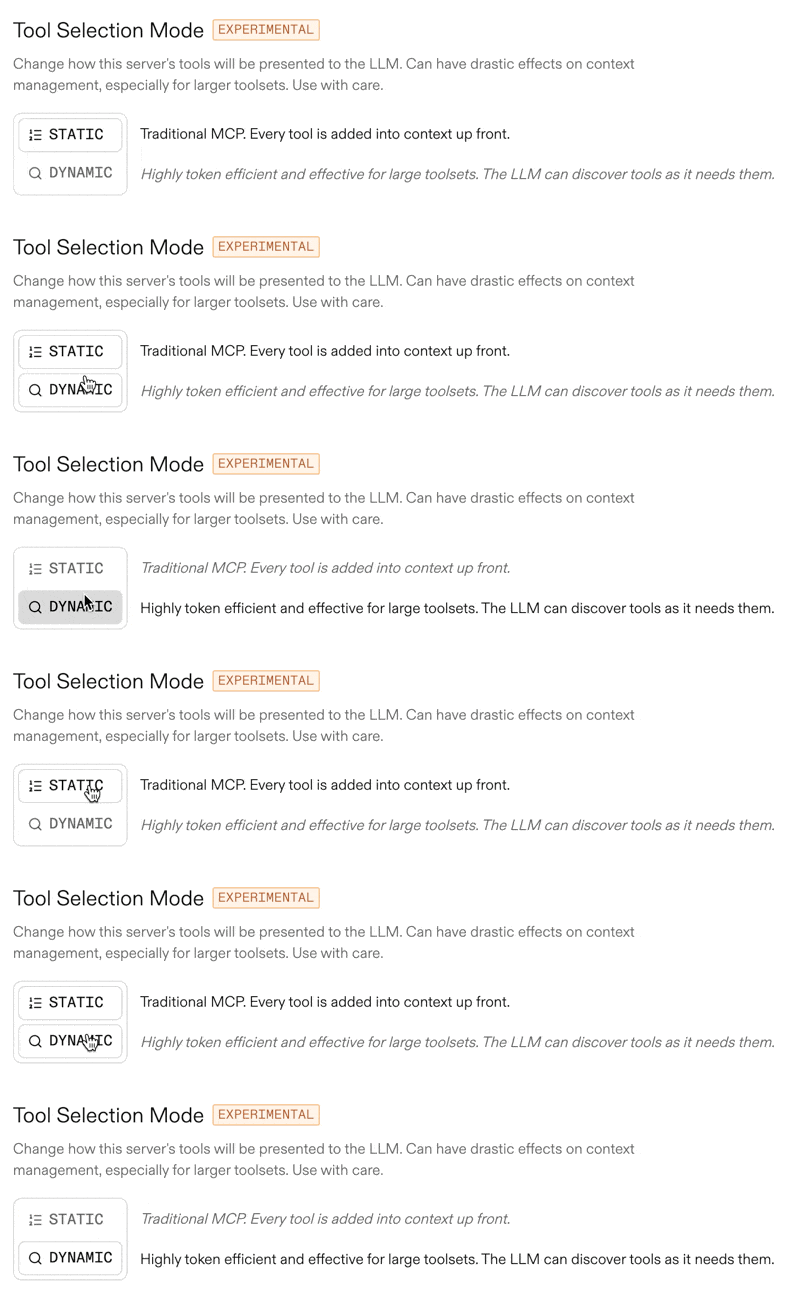
Experimental dynamic tool selection now uses semantic searches to organize tools automatically, making it easier to access and interact with relevant tools.
Features
Add select/deselect all option for tool management to enhance productivity
Implement semantic dynamic toolsets with experimental tool selection capabilities
Add
flag to
command for better installation location management
Add Pylon task creation Gram Function example demonstrating full API integration
Fixes
Fix incorrect workflow execution in ExecuteProjectFunctionsReaperWorkflow
Address inverted logging condition in OpenAPI parser
Introduce workflow to clean up unused Fly.io machines from past deployments
Deploying MCP servers to Gram is now simpler with updated templates and SDK support. This enhancement makes building and deploying MCP servers more intuitive for developers.
Features
Use streamable HTTP in Cursor MCP installations for enhanced efficiency
Streamline building and deploying MCP servers with updated templates and SDK support
Add logs table UI for improved logging and tracking capabilities
Add code samples to functions onboarding for better developer guidance
Fixes
Separate build and push commands in Gram Functions SDK for enhanced flexibility and control
Fix React hooks error caused by multiple React versions in development environments
Resolve TypeScript entrypoint exceptions in Gram Functions implementations
MCP metadata maps now accept arbitrary value types, providing greater flexibility in tool and function development. This enhancement enables more dynamic configurations and versatile development workflows.
Features
Extend MCP metadata map capabilities to accept arbitrary value types
Define variables directly within MCP functions for enhanced flexibility
Expose all tool types to the playground via URN for comprehensive tool handling
Automatically install CLI and run authentication during project creation with pnpm create
Add logs table UI for viewing tool call logs with improved monitoring capabilities
Add resources and metadata properties to MCP manifests for enhanced function metadata
Support underlying MCP servers in Gram Functions with improved meta tag handling
Incorporate logos to MCPB installation interface for visual branding
Fixes
Fix nil pointer crash when extracting empty schemas in data extraction
Correct MCP server result content handling in Gram functions
Simplify declaration of environment variables in tool configurations
Function sources can now be limited based on subscription tier, providing enhanced control over resource utilization. This feature streamlines operations for users under different plans.
Features
Add logos to control panel for enhanced visual engagement and brand recognition
Introduce metadata tags for tools and resources for better resource management
Limit number of function sources based on usage tier for improved resource control
Add full support for building Gram Functions using the SDK
Track runner memory and CPU usage per function call for improved visibility
Fixes
Require Node.js v22.18.0+ for functions SDK to ensure compatibility
Add missing 'zx' dependency to TypeScript SDK package.json
Fix functions onboarding flow to enhance user experience
Preserve Content-Length header when uploading functions for correct handling
Tolerate duplicates with gram stage command for more graceful handling
Gram Functions now has full SDK support, enabling a seamless build and deployment pipeline. This enhancement greatly improves the development experience for building and deploying functions.
Features
Add full support for Gram Functions SDK with seamless build and deployment
Track CPU and memory usage per function call for better resource management
Reintroduce OAuth protected resource metadata for enhanced security
Support functions in custom tools for expanded integration capabilities
Correctly expose MCP in browser-based inspector
Update CLI login page with improved interface
Add Gram Functions to onboarding flow for better user guidance
List Gram Functions assets on deployments pages for improved visibility
Fixes
Preserve Content-Length header when uploading functions to ensure accurate transmission
Fix functions onboarding flow to resolve user experience issues
Fix tolerate duplicates with gram stage command to handle duplicate sources gracefully
Fix nil panic during shutdown to address critical stability issue
Enhance functions onboarding UX for smoother user experience
Correctly wrap slog.Logger for accurate error source capture in logs
Custom tools now support functions, offering developers powerful ways to tailor workflows. This enhancement enables more flexible and dynamic tool configurations within the Gram platform.
Features
Support functions within custom tools for enhanced workflow customization
Track customTool URNs and add UI hints for improved toolset visibility
Add basic toolset UX for resources with a user-friendly resources tab
Include gram functions flow in onboarding process
Revamp CLI login success page for improved user experience
List Gram Functions assets on deployments pages for better asset tracking
Streamline custom domain modal ordering in the user interface
Add method flag to gram push command for increased flexibility
Introduce gram stage commands for staging deployment configurations
Build resources into the MCP layer and gateway proxy for enhanced performance
Fixes
Resolve access issues for MCP servers and URL formation bugs with producer scoped key access
Correct JSON serialization for tool definition schemas by not serializing input schema
Remove requirement for deployment ID when evolving with CLI
Include .gitignore in Gram Functions project scaffolding
Update CLI installation methods for improved security
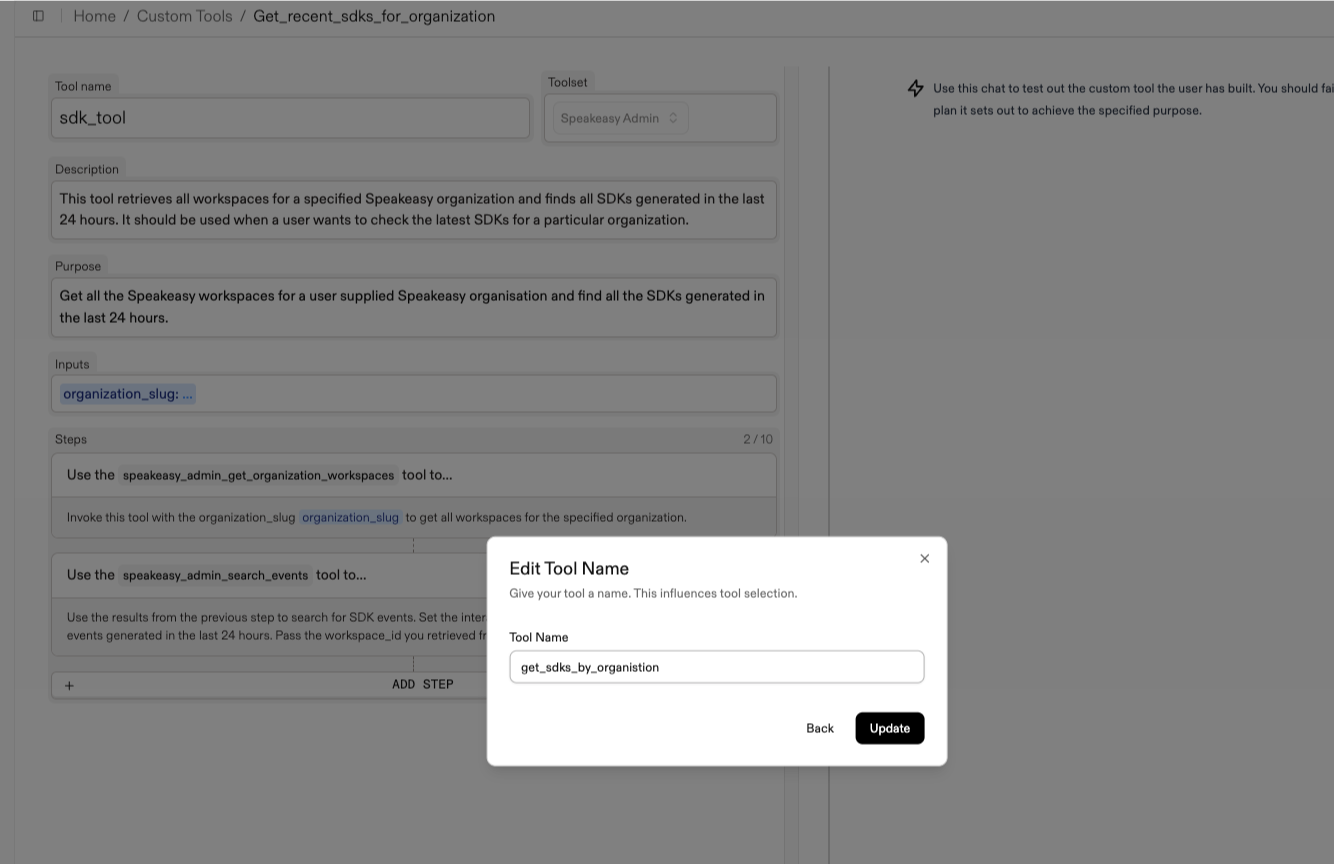
Custom tools now support tool variations. Allows the names of Custom Tools to now be edited along with all fields of Functions.
Features
Update functions and gateway to set and check the
response header from Gram Functions tool calls before proxying the response back to the client. This is an added security measure that asserts the server that ran a function had access to the auth secret and was able to decrypt the bearer token successfully.
Gram Functions now includes a simple Hono-based server in the mini-framework for local testing and development. This enhancement makes it easier to test functions locally before deploying them.
Features
Add data models and deployments for better resource management through functions
Enhanced functions runner to support new
entrypoint
Include a local development server in the Gram Functions mini-framework for testing
Support login redirects with redirect query parameter handling
Display variations in the dashboard, showing changed and original values of a tool
Create manual chunks for dependencies in the dashboard's vite configuration for improved load performance
Enhanced logging functionality for HTTP tool calls for better analytics and debugging
Fixes
Improve
fallback in dev and production setups
Deduplicate custom tool inputs from Toolify to prevent redundancy
Fix custom domain resolution to ensure custom domains are always used when available
Remove excess authorization checks on image assets
Update gateway proxy for more flexible tool call handling
Enhanced domain resolution in docs to prevent errors in custom setups
Fix domain handling for MCP URLs with custom domains