Intro to MCP
What are MCP roots?
Governing MCP across your organization?
Speakeasy’s AI control plane connects, secures, and observes every agent and MCP server from one entry point — with SSO, RBAC, runtime guardrails, and a full audit trail.
MCP roots are context-defining URIs that establish operational boundaries for MCP servers. They function as “safe zones” or “allowed directories” that an AI agent can access when interacting with your system. When an MCP client provides roots for servers, it’s essentially saying, “You’re allowed to work within these specific areas.”
While roots are sometimes described as a security feature, the MCP Specification does not dictate how servers must implement root handling. So when the client tells the server which areas it can work within, the server may ignore this rule and still be within the specification.
Any suggestion that roots provide security needs to assume that the server will respect the boundaries set by the client.
Why are MCP roots useful?
MCP roots allow the user (or an LLM) to control where a server should focus or within which boundaries a server should operate.
For example, if a user has a stock-trading MCP server, they may want their client to limit the trading server to only certain stocks or exchanges.
In this example, the client will prompt the user to select a list of stocks and exchanges, and then notify the server that the list of roots has changed. The server will then request the new roots, and should limit its actions to the selected list of stocks and exchanges.
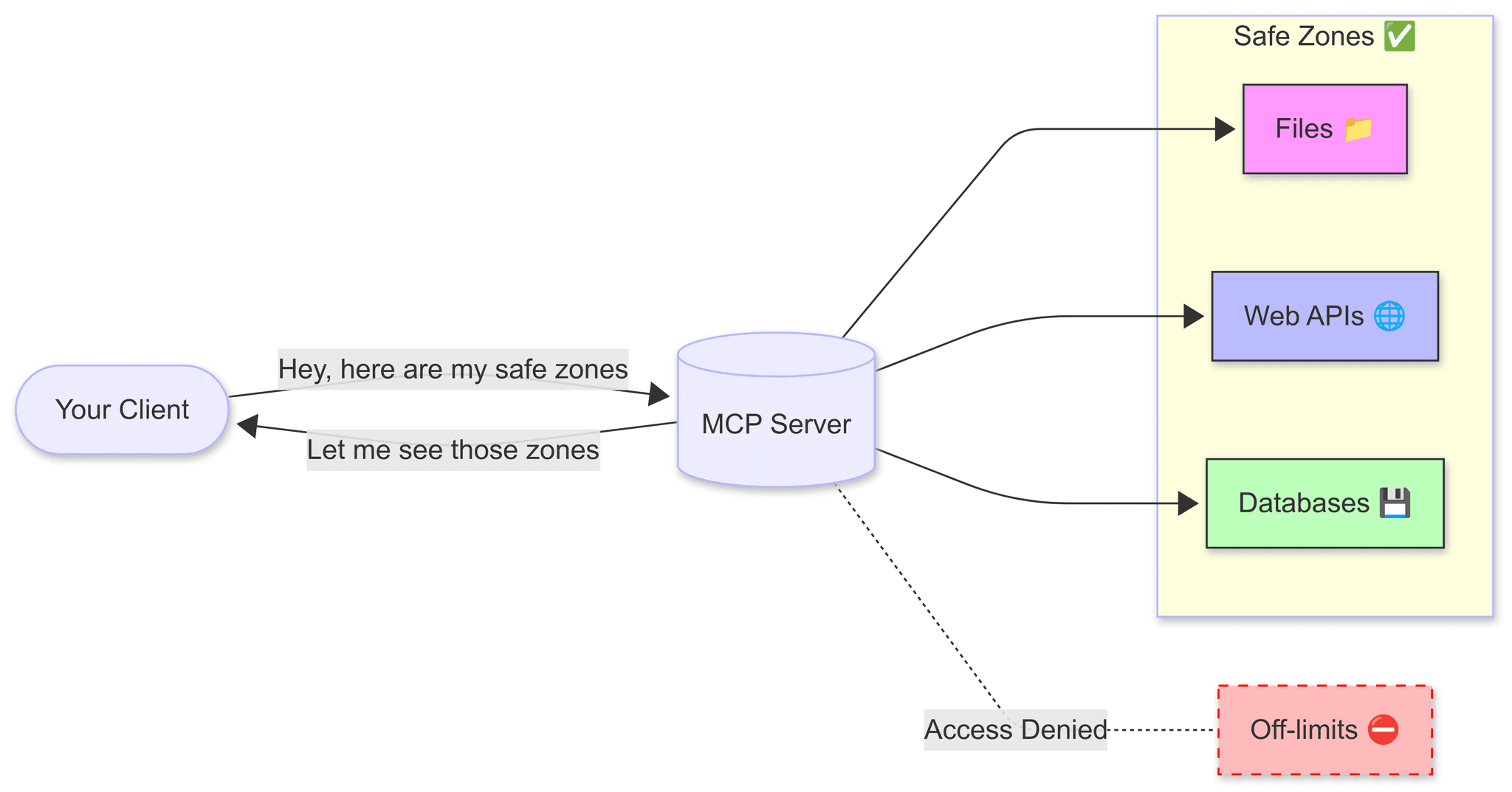
Roots help in several important ways.
- Security: If a server is known to respect root boundaries, roots act like fences that keep the server from accessing things it shouldn’t.
- Focus: Roots guide servers to look only at relevant information, like giving them a map of where to search.
- Performance: By limiting where a server can look, the server may run faster and with less searching or filtering logic.
- Trust: Users feel more comfortable knowing servers can only access specific areas they’ve approved. This still depends on the server’s implementation of roots.
MCP roots can point to different kinds of places:
- Folders on your computer:
file:///home/user/projects/myapp - Websites and APIs:
https://api.example.com/v1 - Database connections:
db://mycompany/customers - Special locations:
note://meeting-notesorconfig://app-settings
How MCP roots work
Here’s how MCP roots could work in practice:
- Client to the server: “Hello, I can use roots!” - The client tells the server it supports roots when they first connect.
- Server to the client: “What roots do you have?” - The server asks the client for available roots using
roots/list. - Client to the server: “Stay within these boundaries.” - The client returns a list of roots.
- User to the client: “I want to change the boundaries.” - The user updates the boundaries the client and server should focus on.
- Client to the server: “Roots have changed.” - If needed, the client can tell the server when roots are added or removed using
notifications/roots/list_changed. - Server to the client: “What roots do you have?” - The server requests a list of roots using
roots/list. - Client to the server: “Stay within these boundaries.” - The client responds with a list of roots.
It bears repeating that while the client owns and defines the list of allowed roots, the server should stay within those boundaries but is free to implement root handling how it wants. The MCP Specification does not enforce that servers respect those boundaries. It only standardizes how roots are communicated.
Here’s an example of a roots list response from a client:
{ "roots": [ { "uri": "file:///home/user/projects/myapp", "name": "My Application Code" }, { "uri": "https://api.example.com/v1", "name": "Example API Endpoint" } ]}The uri indicates the precise resource location, while the optional name field gives the root an identifier that can be used by an LLM.
How roots work in practice
Roots are a client capability, not a server feature. The MCP client owns and declares which roots it exposes; the server asks for them at runtime rather than defining them itself. The flow looks like this:
- During initialization, the client advertises the
rootscapability. - The client maintains the list of roots (for example, the folders a user has opened in their editor) and can update it, notifying the server with a
notifications/roots/list_changedmessage. - When the server needs the current boundaries, it sends a
roots/listrequest to the client and receives the array of{ uri, name }entries shown above. - The server scopes its file and network access to those roots, rejecting anything outside them.
The exact SDK API for requesting roots (server side) and supplying them (client side) differs between SDKs and continues to evolve, so follow the official reference for runnable code: the MCP roots specification and your SDK’s roots documentation (for example, FastMCP).
Implementation patterns
Let’s look at some examples of how we can use MCP roots within a server.
File system access
When granting access to file system directories, always verify that accessed paths are within approved roots:
def read_file(file_path):    # Convert to absolute path    abs_path = os.path.abspath(file_path)
    # Check if path is within any approved root    for root in app.roots:        if root.uri.startswith("file://"):            root_path = root.uri.replace("file://", "")            if abs_path.startswith(root_path):                # Safe to read                with open(abs_path, 'r') as f:                    return f.read()
    # Not within any approved root    raise SecurityError(f"Access denied: {file_path} is outside approved roots")
API endpoint access
Similarly, when making API calls, make sure they respect root boundaries:
async def make_api_call(endpoint, method="GET", data=None):    # Check if endpoint is within an approved root    for root in app.roots:        if root.uri.startswith("https://") and endpoint.startswith(root.uri):            # Safe to proceed            async with httpx.AsyncClient() as client:                response = await client.request(method, endpoint, json=data)                return response.json()
    # Not within any approved root    raise SecurityError(f"Access denied: {endpoint} is outside approved API roots")
Tool integration
MCP roots also work with MCP tools. If a tool is granted access to a root, it can only operate on files within that root:
@app.tool("create_file")async def create_file(path: str, content: str):    # Convert to absolute path    abs_path = os.path.abspath(path)
    # Check against allowed file system roots    for root in app.current_roots:        if root.uri.startswith("file://"):            root_path = root.uri.replace("file://", "")            if abs_path.startswith(root_path):                # Write the file                with open(abs_path, 'w') as f:                    f.write(content)                return {"success": True, "path": abs_path}
    return {        "success": False,        "error": "Permission denied: path is outside allowed roots"    }
Resource integration
Resources can also be filtered based on allowed roots:
@app.on_resources_list()async def list_resources():    all_resources = await get_all_available_resources()
    # Filter to only include resources within allowed roots    allowed_resources = []    for resource in all_resources:        for root in app.current_roots:            if resource.uri.startswith(root.uri):                allowed_resources.append(resource)                break
    return allowed_resources
Roots vs tools
MCP roots are distinct from MCP tools, which are callable server-side actions. While MCP roots define where operations can occur, MCP tools define what actions can be performed.