SDKs
Set up SDK on GitHub
The Speakeasy CLI and the Speakeasy SDK Generation GitHub Action power the SDK generation workflow. The workflow automates the process of:
- Downloading or loading the OpenAPI document from a URL or repository.
- Validating the OpenAPI document.
- Generating SDKs for multiple languages.
- Committing the generated SDKs to the repository or opening a pull request (PR).
- Publishing SDKs to package registries (when configured in
directmode).
Workflow modes and publishing
Section titled “Workflow modes and publishing”The mode input on the sdk_generation.yaml workflow controls how generated SDKs are delivered and published:
directmode: Thesdk_generation.yamlworkflow handles both generation and publishing in a single run. After generating the SDK, the workflow commits the changes directly to the branch and publishes the package to the configured registry (npm, PyPI, Maven, NuGet, etc.). No separate publish workflow is needed.prmode: Generation and publishing run as separate workflows. Thesdk_generation.yamlworkflow generates the SDK and opens a pull request. A separatesdk_publish.yamlworkflow handles publishing to package registries and runs when the PR is merged.testmode: The workflow runs through generation without modifying any GitHub state. No commits, PRs, or publishing occurs.
When configuring publishing with speakeasy configure publishing, both sdk_generation.yaml and sdk_publish.yaml are created. In direct mode, sdk_generation.yaml contains the full pipeline including the publish step, and sdk_publish.yaml is not triggered. In pr mode, sdk_publish.yaml runs after the generated PR is merged to publish the new SDK version.
Warning
Branches and pull requests created by the GitHub action are owned by it. Any future generations (whether scheduled or manually triggered) will overwrite all changes in that branch/PR. To make changes to the generated code, create a separate PR instead of modifying the action-generated PR.
Example workflow file
Section titled “Example workflow file”name: SDK Generationpermissions: checks: write contents: write pull-requests: write statuses: write
on: workflow_dispatch: inputs: force: description: Force SDK generation, even if no changes are detected. type: boolean default: false runs-on: description: Runner to use for the workflow (e.g., large-ubuntu-runner) type: string default: ubuntu-latest
jobs: generate: uses: speakeasy-api/sdk-generation-action/.github/workflows/workflow-executor.yaml@v15 with: speakeasy_version: latest force: ${{ github.event.inputs.force }} mode: pr runs-on: ${{ github.event.inputs.runs-on }} secrets: github_access_token: ${{ secrets.GITHUB_TOKEN }} speakeasy_api_key: ${{ secrets.SPEAKEASY_API_KEY }}Step-by-step guide
Section titled “Step-by-step guide”Initialize the SDK repository
Section titled “Initialize the SDK repository”Create a new GitHub repository to host the autogenerated SDKs. It is recommended to use a separate repository for each SDK, but a monorepo is also supported.
Generate the SDK workflow configuration
Section titled “Generate the SDK workflow configuration”Run the Speakeasy CLI to configure the SDK generation workflow. This command creates the necessary workflow files.
speakeasy configure githubAfter running the command, .speakeasy/workflow.yaml and .github/workflows/sdk_generation.yaml will be created. These files define the SDK generation workflow and the associated GitHub Action. If publishing is configured, .github/workflows/sdk_publish.yaml will also be created for use in pr mode (see Workflow modes and publishing above).
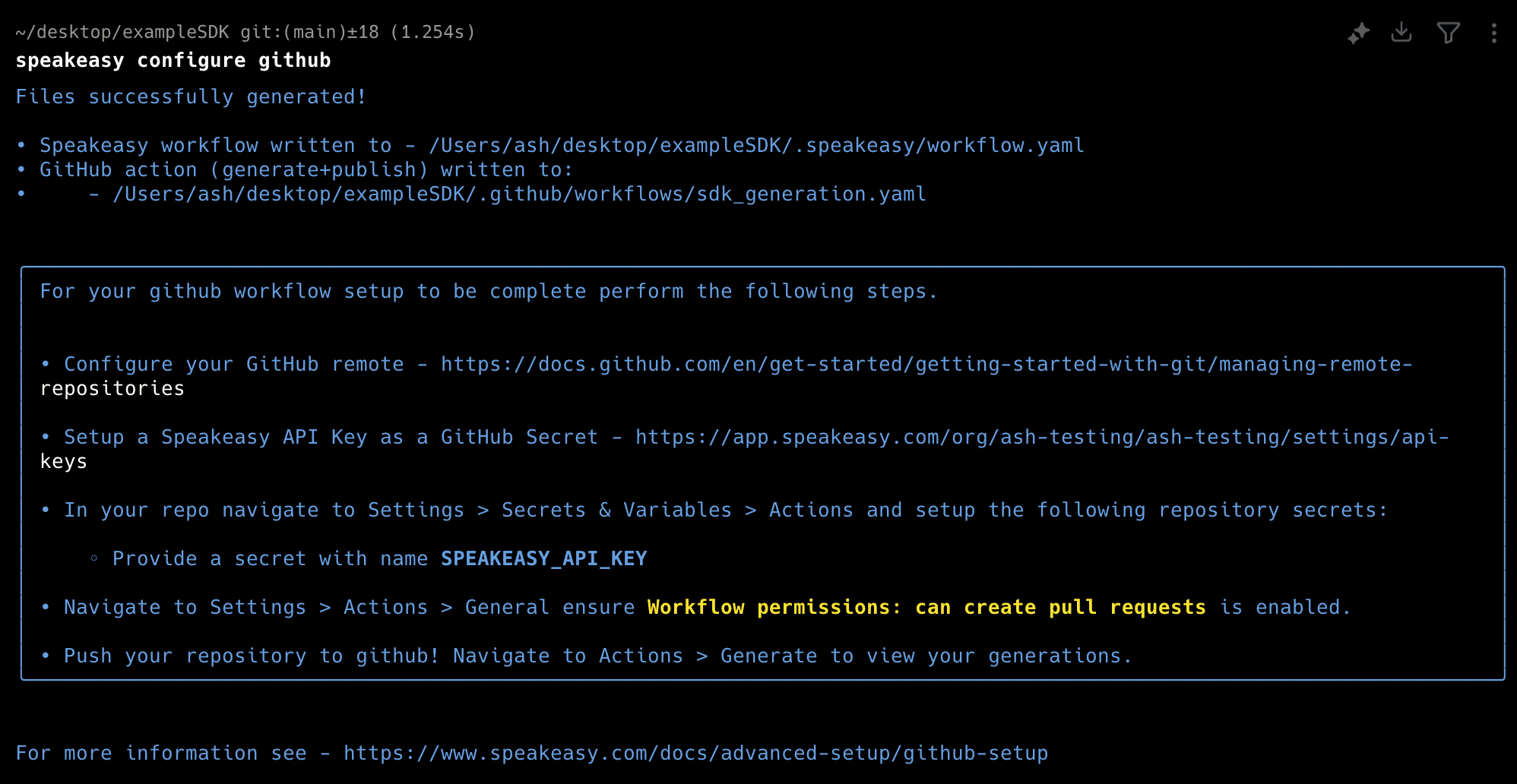
If further customization is needed, manual configuration of the workflow files is available.
Set up GitHub secrets
Section titled “Set up GitHub secrets”Configure GitHub secrets for authentication:
- Navigate to Settings > Secrets & Variables > Actions in your GitHub repository.
- Add a new secret named
SPEAKEASY_API_KEYwhich can be obtained from the Speakeasy dashboard.
Push the workflow to GitHub
Section titled “Push the workflow to GitHub”Commit and push the generated workflow files to the repository. To test the GitHub Action without modifying any GitHub branches, put the action into mode: test.
Navigate to Actions in the GitHub repository to trigger the SDK generation workflow manually or wait for it to run automatically. A green checkmark indicates successful workflow completion. If the publishing step has not been configured, it will be skipped.
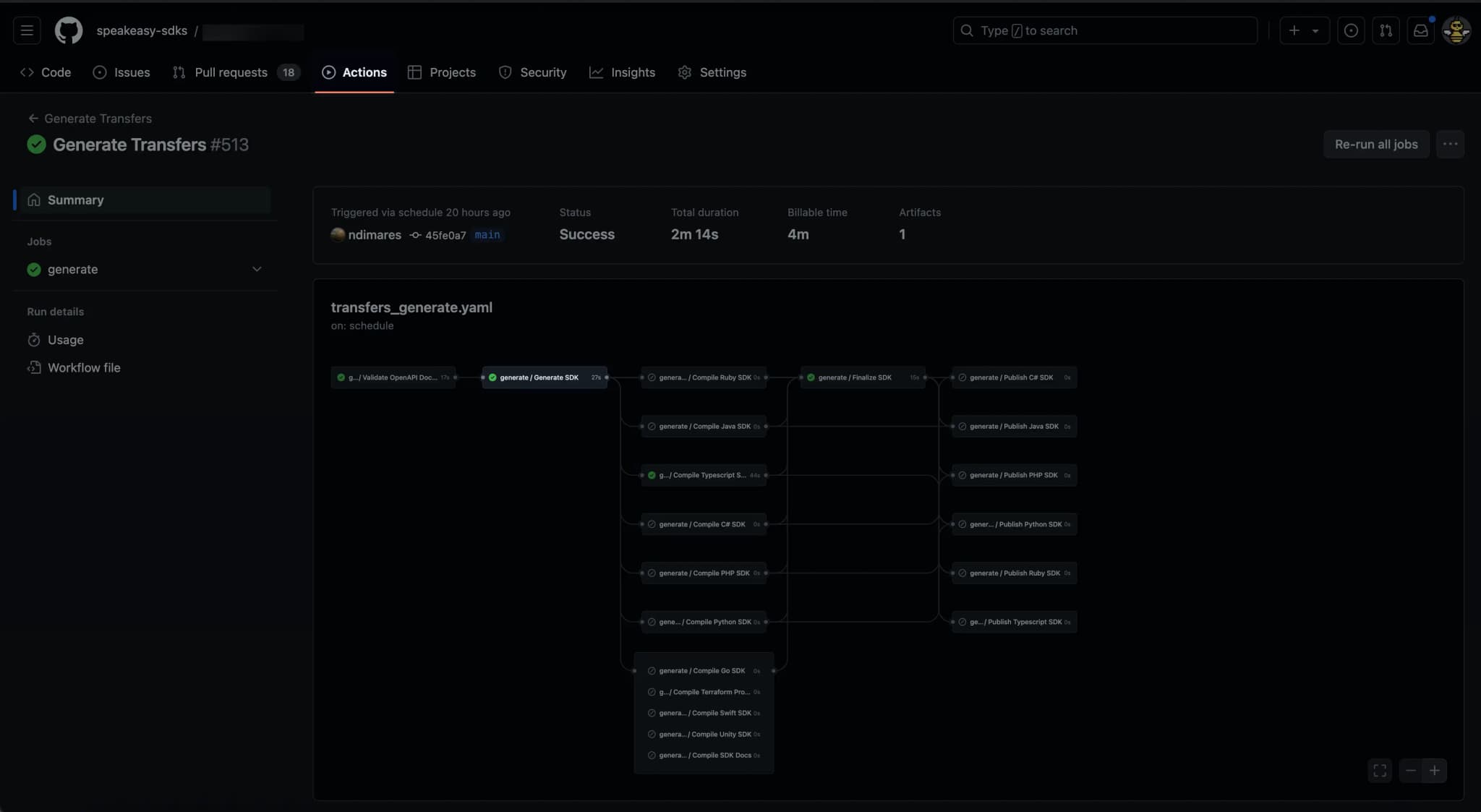
For details on package publishing, refer to the Publishing SDKs guide.
Update the GitHub Actions workflow permissions
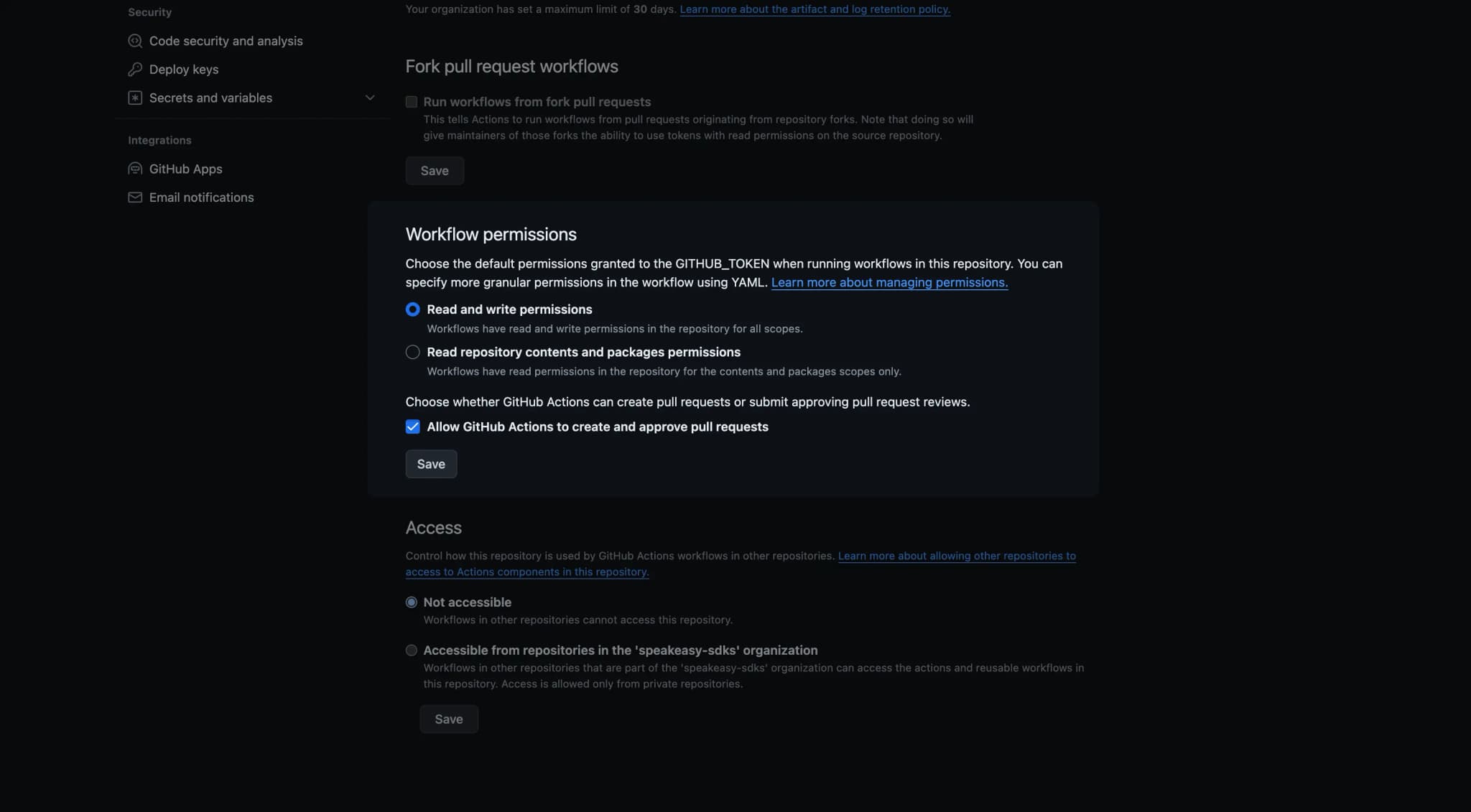
Section titled “Update the GitHub Actions workflow permissions”If the error 403 GitHub Actions is not permitted to create or approve pull requests occurs, the repository’s GitHub Actions permissions must be updated.
Navigate to Settings > Actions > Workflow permissions and adjust the permissions accordingly.
Configure remote URLs for schemas
Section titled “Configure remote URLs for schemas”Warning
Remote URLs for OpenAPI schemas must remain stable. Dynamically constructed URLs in workflow files are not supported.
If the OpenAPI schema is hosted in another repository or at a remote URL, set the source as the remote URL in .speakeasy/workflow.yaml. Use the following command to add the remote URL:

If the remote URL requires authentication, follow the prompts to provide a token or key stored as an environment variable (for example, $OPENAPI_DOC_AUTH_TOKEN).
Important: When fetching OpenAPI documents from private repositories, ensure that you prefix the token value with Bearer when setting the value. For example:
OPENAPI_DOC_AUTH_TOKEN="Bearer <TOKEN_VALUE>"Add a GitHub secret with the same name and value as the token or key (including the Bearer prefix for private repositories).
Using larger GitHub-hosted runners
Section titled “Using larger GitHub-hosted runners”For resource-intensive SDK generation builds (such as large TypeScript projects that fail during compilation due to memory constraints), you can configure larger GitHub-hosted runners with more RAM and CPU resources.
Set up larger runners
Section titled “Set up larger runners”-
Configure larger runners in your GitHub organization: Larger runners are not enabled by default and require separate billing setup.
- Follow the GitHub documentation for managing larger runners
- Choose a runner size with sufficient RAM (standard
ubuntu-latestrunners have only 7GB RAM) - Assign a custom label to your larger runner (e.g.,
large-ubuntu-runner)
-
Update your workflow: Once your larger runner is configured, update your workflow file to use the custom runner label:
name: SDK Generationpermissions:  checks: write  contents: write  pull-requests: write  statuses: write
on:  workflow_dispatch:    inputs:      force:        description: Force SDK generation, even if no changes are detected.        type: boolean        default: false      runs-on:        description: Runner to use for the workflow (e.g., large-ubuntu-runner)        type: string        default: large-ubuntu-runner # Use your custom label here
jobs:  generate:    uses: speakeasy-api/sdk-generation-action/.github/workflows/workflow-executor.yaml@v15    with:      speakeasy_version: latest      force: ${{ github.event.inputs.force }}      mode: pr      runs-on: ${{ github.event.inputs.runs-on }}    secrets:      github_access_token: ${{ secrets.GITHUB_TOKEN }}      speakeasy_api_key: ${{ secrets.SPEAKEASY_API_KEY }}
This configuration allows you to specify different runner types when manually triggering the workflow, or set a default larger runner for all builds.
Enable signed commits
Section titled “Enable signed commits”To include signed commits from the SDK Generation workflow, add signed_commits: true to the workflow file. This configuration ensures that GitHub Actions creates verified commits during workflow execution.
name: SDK Generationpermissions:  checks: write  contents: write  pull-requests: write  statuses: write
on:  workflow_dispatch:    inputs:      force:        description: Force SDK generation, even if no changes are detected.        type: boolean        default: false      runs-on:        description: Runner to use for the workflow (e.g., large-ubuntu-runner)        type: string        default: ubuntu-latest
jobs:  generate:    uses: speakeasy-api/sdk-generation-action/.github/workflows/workflow-executor.yaml@v15    with:      speakeasy_version: latest      force: ${{ github.event.inputs.force }}      mode: pr      runs-on: ${{ github.event.inputs.runs-on }}      signed_commits: true    secrets:      github_access_token: ${{ secrets.GITHUB_TOKEN }}      speakeasy_api_key: ${{ secrets.SPEAKEASY_API_KEY }}