OpenAPI Hub
Tags in OpenAPI best practices
OpenAPI Tags
Tags are a way of grouping operations for various purposes, like creating more sensible navigation in API documentation, defining API lifecycle status with tags like “Beta” that can be filtered out later, or something else entirely.
Tags Object
The document-level tags field is an optional field, which is a list of objects describing each
tag. Tags have at bare minimum a name, but can have a description, point to externalDocs, and potentially have some x-* extension properties.
tags: - name: drinks description: The drinks endpoints. - name: authentication description: The authentication endpoints.Tags can then referenced by operations, with an array allowing multiple tags to be referenced.
paths: /drinks: get: operationId: listDrinks tags: [drinks]Here is the full specification for the Tag Object.
namedescriptionexternalDocssummaryparentname of another tag that this tag is nested under. The named tag must exist in the document, and circular references must not be used. Available in OpenAPI v3.2.0+.kindnav, badge, and audience. See the tag kind registry. Available in OpenAPI v3.2.0+.x-*Human-friendly or machine-friendly
Whether a tag should be human readable (e.g. Publishing Tokens) or machine-friendly (e.g.: publishingTokens) has been a long source of discussion in the OpenAPI world, but consensus is forming around machine-friendly tags more like variable names, in whatever format is preferred: PascalCase, camelCase, snake_case.
Then the human friendly name can be passed in one of two locations.
- For OpenAPI v3.0 and v3.1 users, the commonly used vendor extension
x-displayNamewill work in most API documentation tools. - OpenAPI v3.2 introduces a new
tags.summaryfield to pass the human-friendly name.
Check to see which of these keywords are supported by documentation tools in the toolchain, and if neither perhaps go with a human-readable name until that tool supports x-displayName or the OpenAPI is upgraded to v3.2.
Grouping Tags
Tags are used for grouping operations, but sometimes its necessary to group tags, especially in larger APIs with hundreds (or even thousands) of operations.
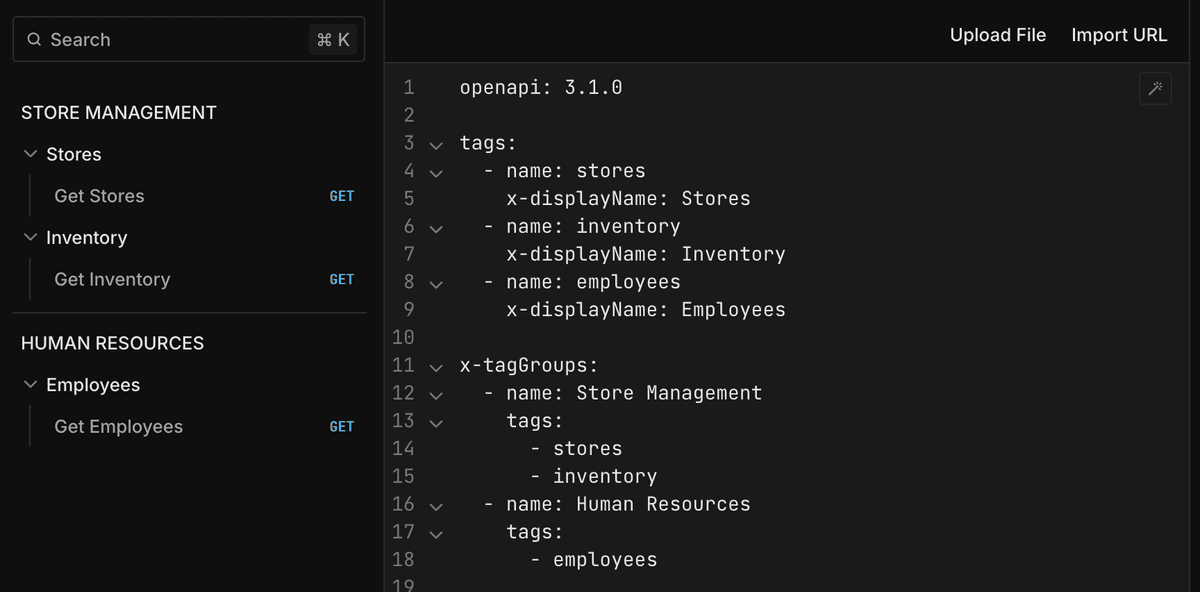
tags:  - name: stores    x-displayName: Stores  - name: inventory    x-displayName: Inventory  - name: employees    x-displayName: Employees
x-tagGroups:  - name: Store Management    tags:      - stores      - inventory  - name: Human Resources    tags:      - employees
Operations are then assigned to tags as normal. Tools which understand x-tagGroups like Scalar and Redoc will use them to create the nested navigation structures, and tools which do not understand the keyword will build the flat list of operations.
paths:  "/stores":    get:      operationId: get-stores      summary: Get Stores      tags:      - stores
  "/inventory":    get:      operationId: get-inventory      summary: Get Inventory      tags:      - inventory
  "/employees":    get:      operationId: get-employees      summary: Get Employees      tags:      - employees
In Scalar the above example would look like this.
OpenAPI v3.2 adds two new properties for handling tag grouping and nesting:
tags.parent- Thenameof a tag that this tag is nested under. The named tag must exist in the API description, and circular references between parent and child tags must not be used.tags.kind- A machine-readable string to categorize what sort of tag it is. Any string value can be used; common values arenavfor navigation,badgefor visible badges, andaudiencefor APIs used by different groups. A registry of commonly used values is available.
The kind field enables tooling to differentiate between tags used for navigation and tags used for other purposes, such as badges or audience segmentation.
tags:  - name: account-updates    summary: Account Updates    description: Account update operations    kind: nav
  - name: beta    summary: Beta    description: Operations that are in beta    kind: badge
  - name: partner    summary: Partner    description: Operations available to the partners network    parent: external    kind: audience
  - name: external    summary: External    description: Operations available to external consumers    kind: audience
Best practices
Always define tags before referencing them
It’s allowed for operations to reference undefined tags (tags not defined in the document-level tags, but it is recommended that all tags used are defined here to provide useful documentation and intent for the tags.
Alphabetize tag definitions
Some documentation tools will automatically alphabetize them, some will not, so to make sure they are alphabetized for all documentation tools put them in that order in the OpenAPI document.