Which MCP gateway architecture do I need?

Nolan Sullivan
February 4, 2026 · 24 min read
More than a handful of agents calling Model Context Protocol (MCP) servers is the point at which you choose an architecture. The MCP gateway is the proxy between agents and the servers they call; vendors sell that layer as routing infrastructure, as a governance plane, or as a hybrid that also generates or hosts the servers.
Every product on this page fits one of those three architectures:
- Infrastructure-only: Routing, protocol handling, and server lifecycle. Microsoft MCP Gateway and Docker MCP Gateway sit here.
- Governance: Identity on every call, tool-level access control, audit logging, and threat detection. TrueFoundry, Lunar.dev MCPX, and MCP Manager sit here.
- Hybrid: Governance plus a catalog of existing servers, MCP servers generated from OpenAPI documents, and hosting. Speakeasy sits here as part of the AI Control Plane.
We build Speakeasy, so we are not neutral. We link to primary sources throughout and are honest about where every tool here is strong.
We tested five MCP gateway solutions hands-on and assessed a sixth, Willow, from its public documentation:
- The Speakeasy MCP Gateway allows you to generate MCP servers or connect to existing ones, and handles routing, authentication, and logging through an intuitive dashboard.
- Composio provides 500+ managed integrations for building MCP servers without maintaining individual connections.
- Arcade is an MCP runtime with agent-optimized tools, per-user OAuth, and centralized governance across 100+ integrations.
- TrueFoundry delivers enterprise governance with RBAC, guardrails, and compliance controls.
- Willow, formerly Webrix, is a governance gateway with a connector marketplace, endpoint sensors, and a browser extension.
- Docker MCP Gateway offers complete infrastructure control through container-based orchestration.
Other products exist, like MintMCP and Runlayer, but we focused on solutions that offer hands-on testing without requiring enterprise sales calls.
Skip to the product evaluations or read on for our assessment criteria.
Assessment criteria
We assessed each product across the following categories:
- Developer experience: Setup time, configuration complexity, documentation quality, and integration capabilities (prebuilt integrations, available connectors, and custom MCP servers)
- Logging and monitoring: Observability through log output and query capabilities
- Security and compliance: Authentication mechanisms (including OAuth, API keys, and SSO) and governance controls (covering RBAC, audit trails, and access restrictions)
- Cost analysis: Total cost, combining hosting, platform fees, and token consumption
Composio: A library of integration tools
Composio provides over 500 managed integrations for building MCP servers without maintaining individual tool connections.
Developer experience
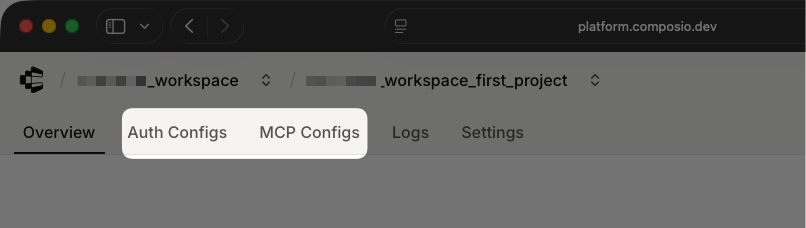
The Composio dashboard centers the Auth Configs tab for managing service credentials and the MCP Configs tab for creating MCP servers.
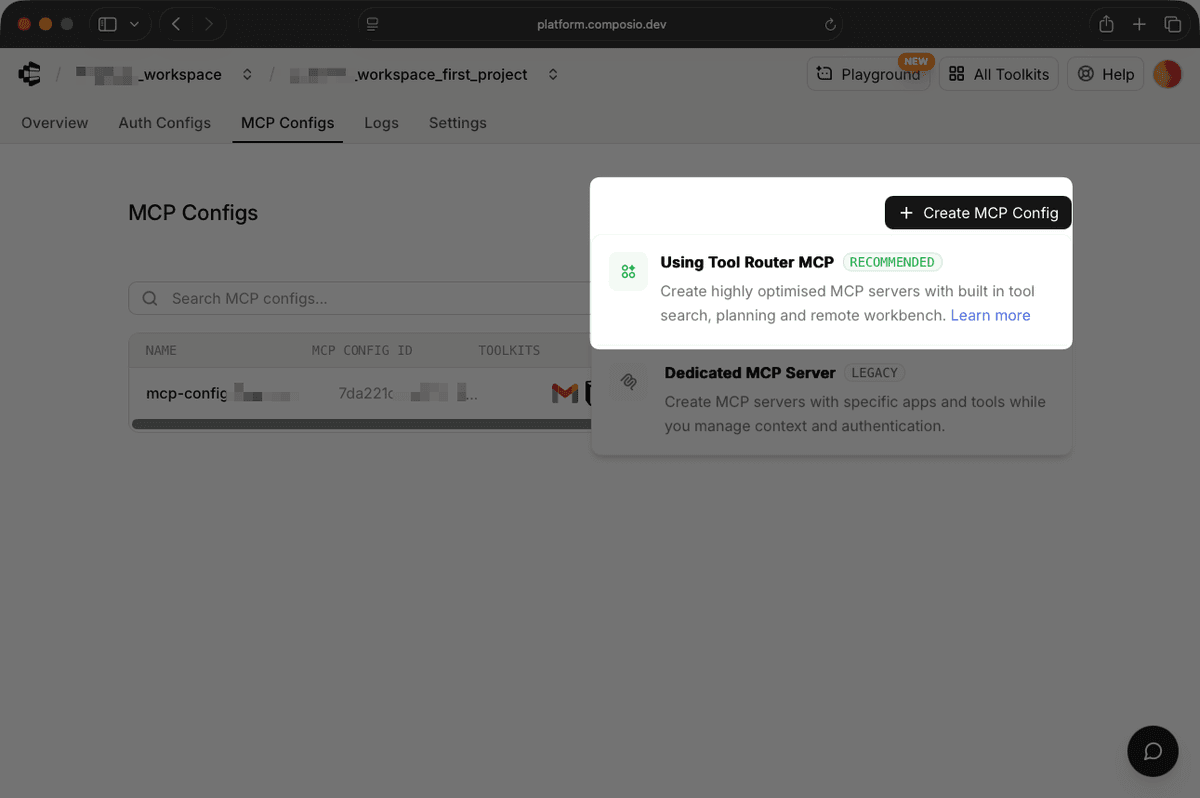
The MCP Configs page provides two methods for creating MCP tools:
- Using the legacy Dedicated MCP Server to select specific apps and manage context and authentication manually
- Using Tool Router MCP to automate request optimization, authentication, logging, and permissions
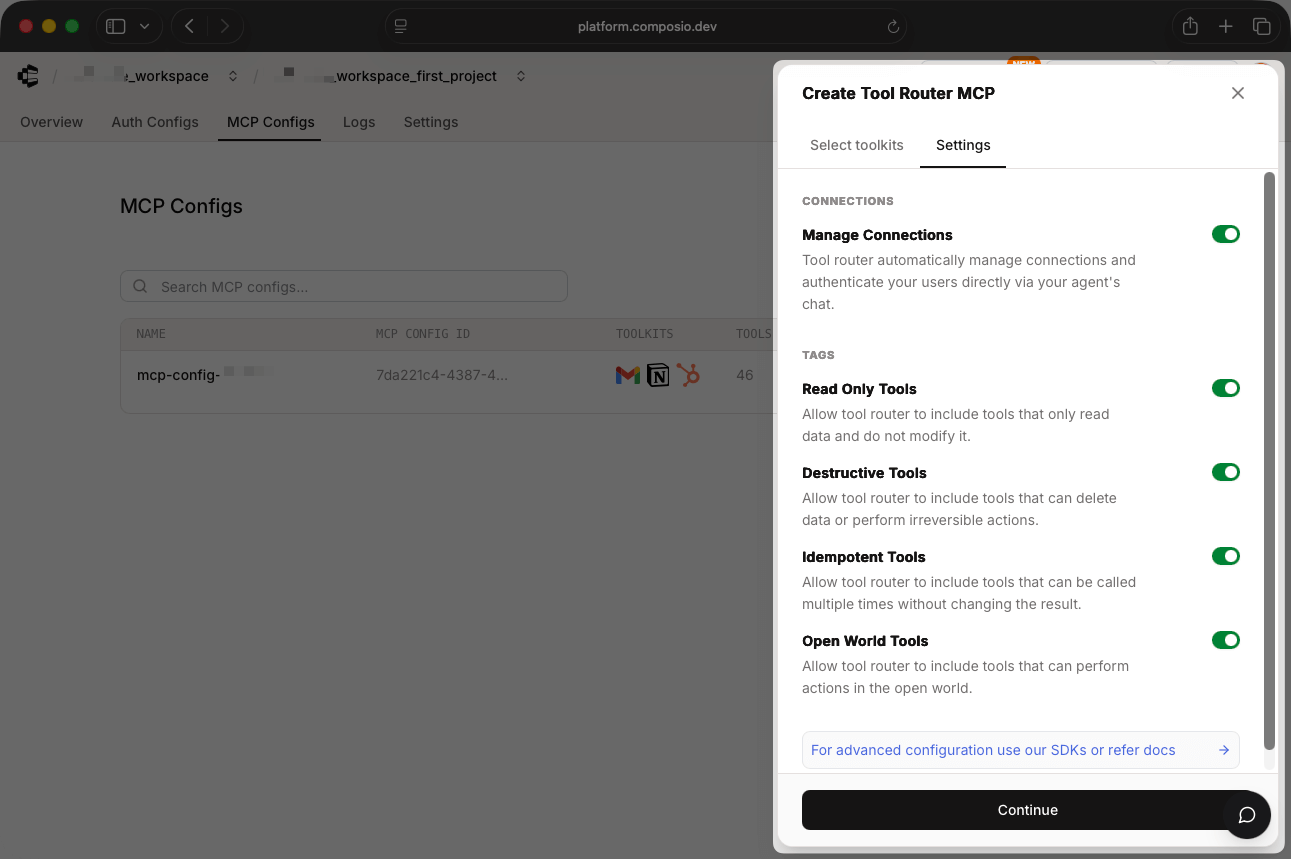
Start configuring a Tool Router MCP by selecting your toolkits. Toolkits bundle related MCP tools (such as Gmail, Slack, and GitHub) with permission controls (such as read-only, destructive, idempotent, and open-world).
To set up additional permission management at the session level, use the Composio SDK:
from composio import Composio
composio = Composio()

# Restrict session to specific toolkits
session = composio.create(
    user_id="61d0acef-a337-430b-81a8-ccf12a9dc966",
    toolkits=["github", "gmail", "slack"]
)

# Enable or disable specific tools
session = composio.create(
    user_id="dc09f56f-588e-40f7-818c-5a3934f2c69a",
    toolkits={"enable": ["github", "gmail", "slack"]}
)

session = composio.create(
    user_id="dc09f56f-588e-40f7-818c-5a3934f2c69a",
    toolkits={"disable": ["exa", "firecrawl"]}
)
With Composio's UI, you can set up an MCP server within minutes. The dashboard guides you through straightforward toolkit selection and basic permissions. The Composio SDK lets you configure session-level tool control and authentication flows.
While Composio provides a high number of managed integrations, its biggest drawback is that you can't add custom MCP servers without contacting its team. If you have a proprietary API, for example, you have to wait for Composio to build an integration for you.
Security and compliance
Composio supports two authentication schemes: OAuth 2.0 and API keys. Most toolkits use OAuth 2.0, while services like Supabase and Notion rely on API keys.
Composio is optimized for chat workflows, although specific authentication flows differ by integration context. For example, chat-based agents provide connection links directly in conversation for the user to authenticate:
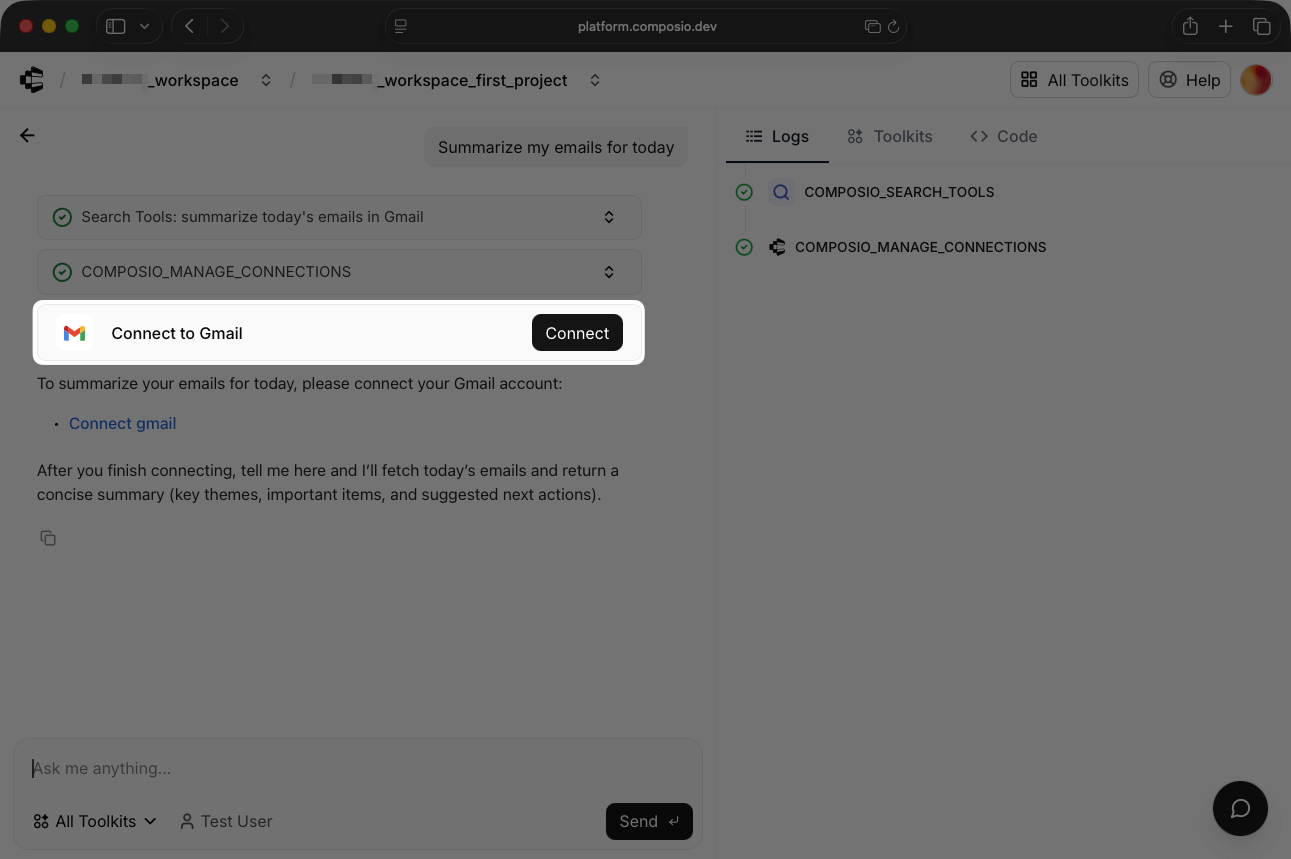
Whereas applications using the Composio SDK generate redirect URLs for user authorization:
connection_request = session.authorize("github")
print(connection_request.redirect_url)
# https://connect.composio.dev/link/ln_abc123
The in-conversation authentication links work well when agents interact directly with users. However, the flow feels less natural for non-chat applications.
Composio handles permissions through toolkit selection and session-level controls. While these methods work for simple access management, Composio lacks the dedicated governance interfaces for RBAC rules and the granular access restrictions that TrueFoundry provides. You can't define role-based policies or tool-level permissions.
Logging and monitoring
The Composio dashboard Logs tab displays detailed request and response data for each tool call.
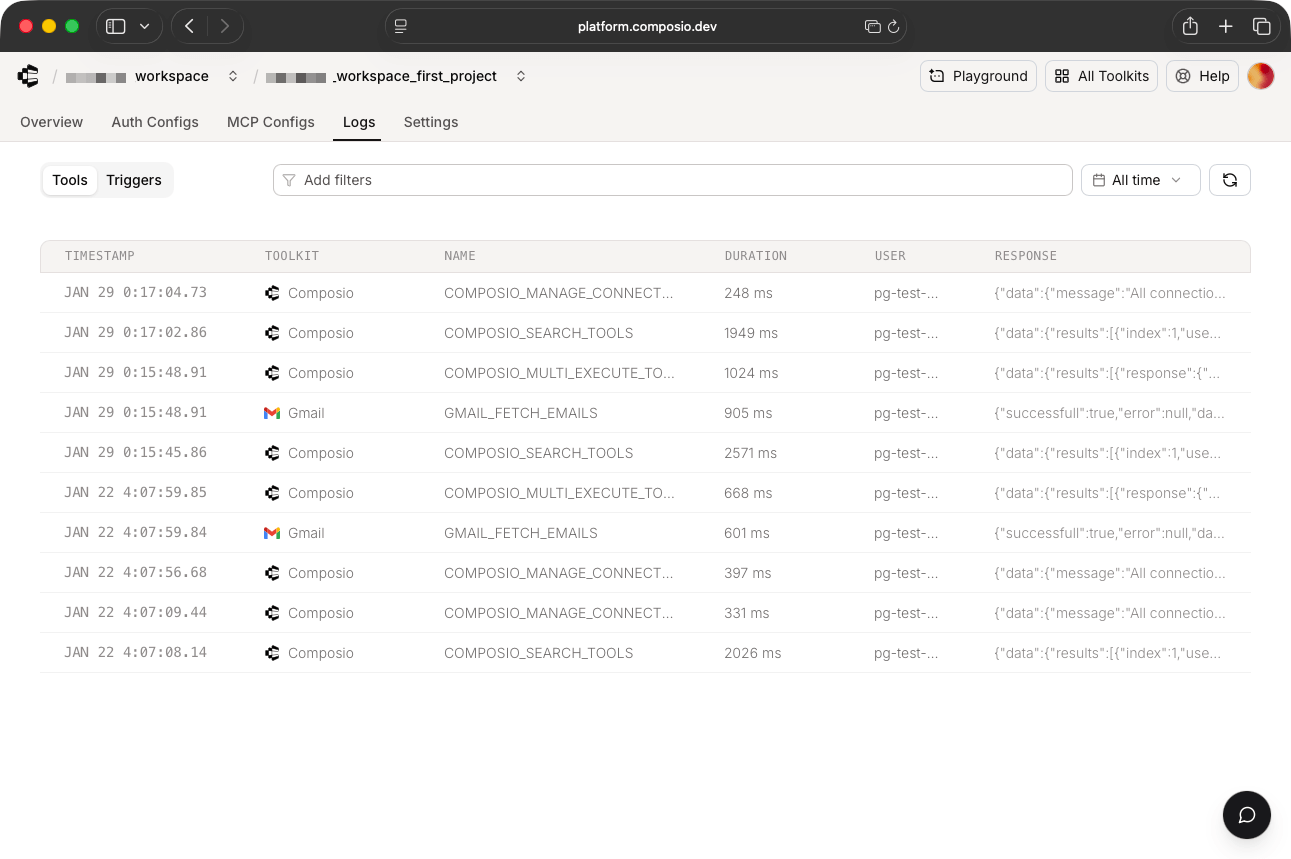
Each log includes the complete request parameters and response bodies. While this makes debugging straightforward, it also exposes sensitive information, such as email contents and message previews.
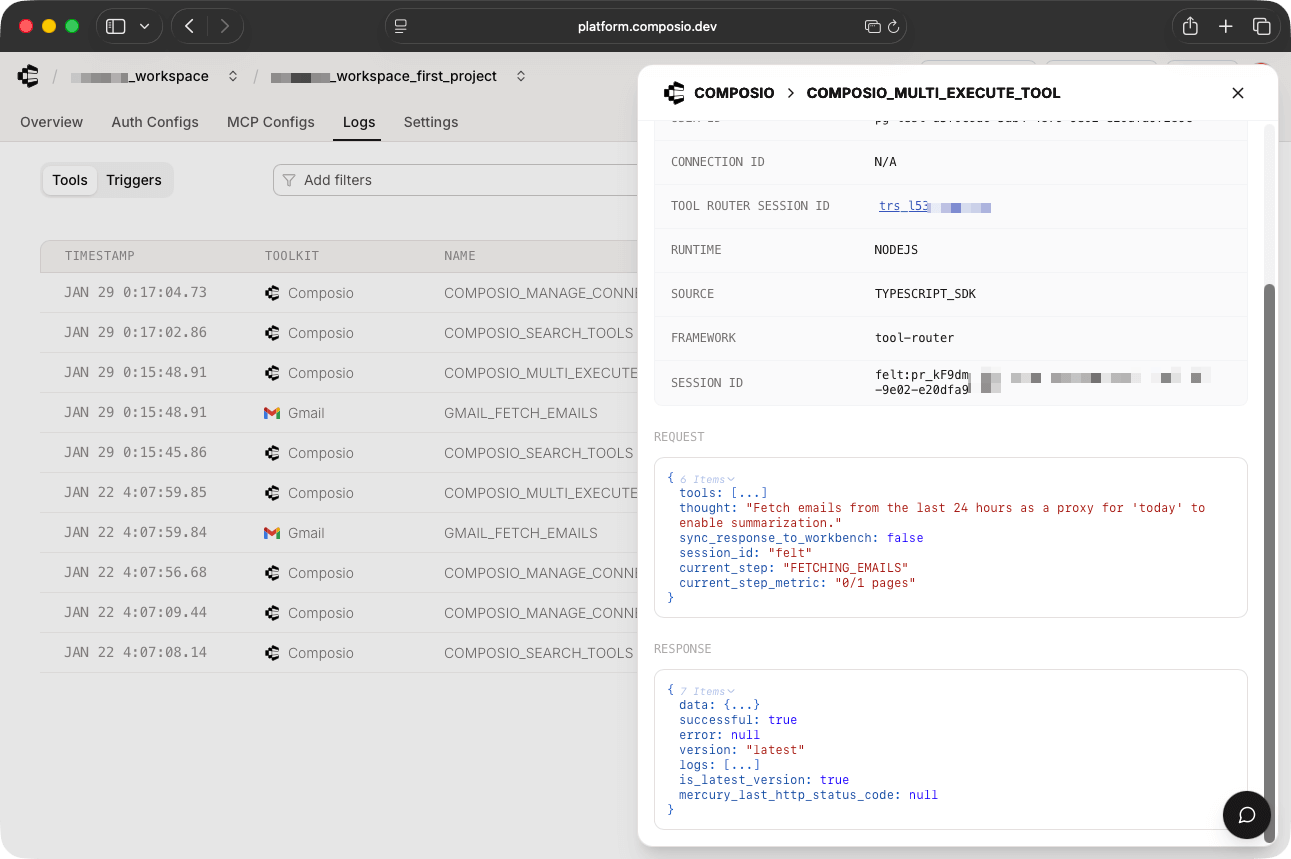
If you handle protected health data or operate under GDPR, these logs expose you to compliance violations. Contact Composio about its logging strategy before deploying to production.
Cost analysis
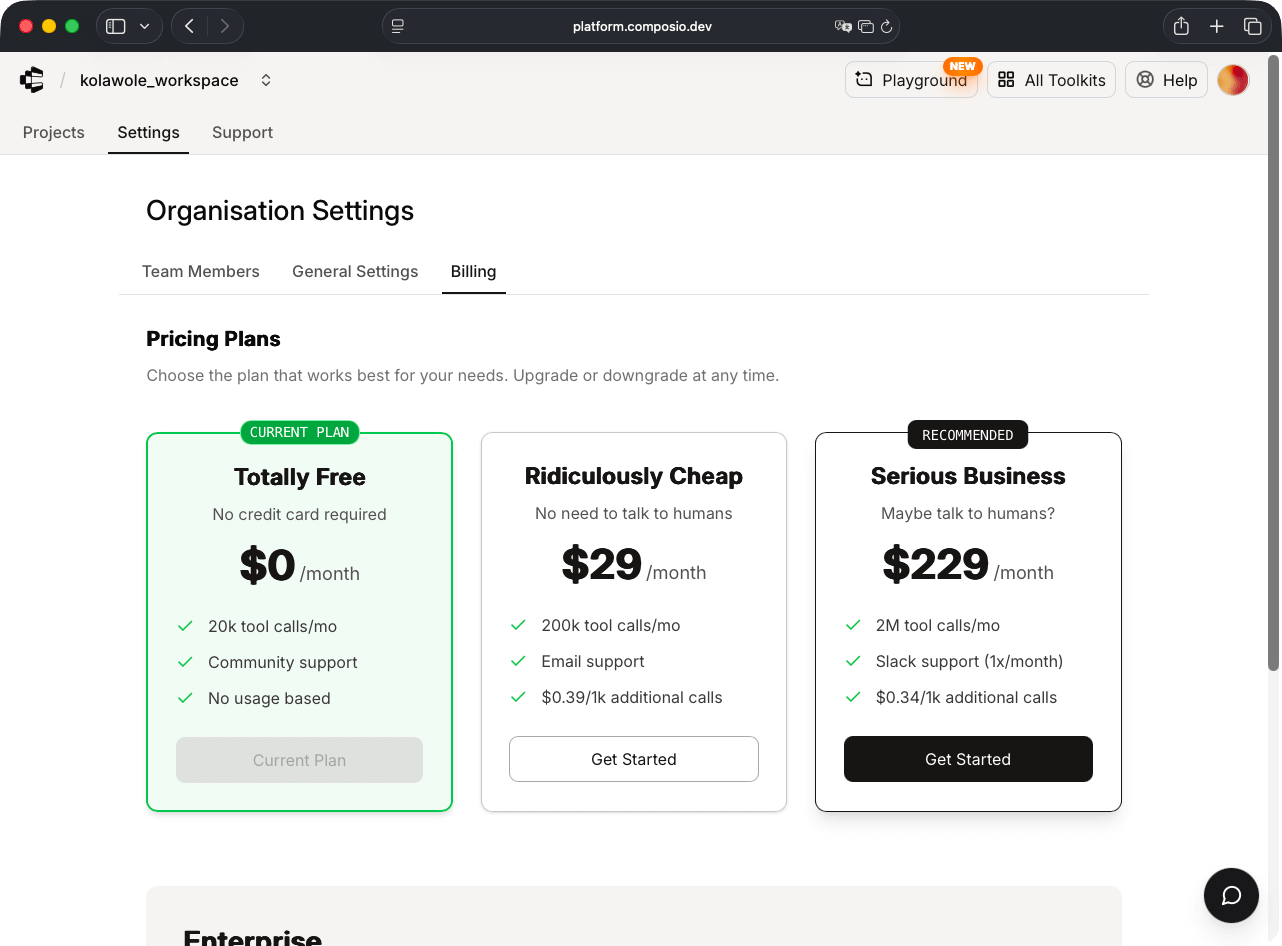
Composio pricing scales across three tiers:
- The Free plan includes 20,000 tool calls per month and community support.
- The Standard plan includes email support and 200,000 tool calls at $29 per month. You can purchase additional tool calls at $0.39 per 1,000 calls.
- The Business plan includes Slack support, 2,000,000 tool calls at $228 per month, and a slightly discounted rate of $0.34 per 1,000 additional calls.
Arcade: An MCP runtime for authenticated agents
Arcade positions itself as an MCP runtime that connects AI agents to external tools and data sources through authenticated, per-user OAuth flows. It bundles tools into MCP Gateways, single URLs that expose curated toolsets to any MCP-compatible client.
Developer experience
Arcade centers its workflow around MCP Gateways. Instead of configuring individual MCP servers, you create a Gateway in the Arcade dashboard, select the tools you need, and get a single URL to add to your MCP client.
The setup process is straightforward:
- Create a Gateway in the dashboard
- Select tools from the catalog (GitHub, Linear, Slack, Salesforce, Google Workspace, and others)
- Copy the Gateway URL into your MCP client (Cursor, VS Code, Claude Desktop, or any MCP-compatible client)
- Users authenticate just-in-time when they first access a tool
Arcade's MCP Gateways are multi-user by default. Send a teammate the Gateway URL and they authenticate with their own credentials for each service, sharing the same toolset without sharing tokens.
Arcade offers 100+ integrations with over 8,000 agent-optimized tools. Unlike basic API wrappers, Arcade describes its tools as purpose-built for agents, with consistent schemas and predictable error handling designed to match actual agent workflows rather than raw API structures.
For custom tools, Arcade provides a Python and JavaScript SDK with a FastAPI-like interface for creating tools and exposing them through MCP. With Arcade Deploy, you can host custom tools with a single command, and no server management is required.
Arcade's documentation recommends keeping total tools below 80 per Gateway to avoid context window issues, which is a reasonable constraint given how LLMs handle large tool sets.
Security and compliance
The platform uses first-party OAuth flows directly with each provider, meaning your agents authenticate with the same trusted methods your security team already approves. Token refresh and lifecycle management happen automatically.
Arcade offers two authentication modes for MCP Gateways:
- Arcade Auth: An OAuth flow requiring browser authentication with short-lived tokens
- Arcade Headers: Pass an API key via the
Authorizationheader and a user ID via theArcade-User-IDheader, better suited to clients without browser support
Security controls include per-user credential isolation (each user operates with their own OAuth tokens), tool-level permission scoping (agents can't access actions beyond their scope), and just-in-time authorization (tokens are requested only when needed and expire after use).
Arcade's RBAC works at the tool level, so platform teams can control which tools appear in which Gateways with granular permissions. This prevents agents from operating with overly broad access.
Logging and monitoring
Arcade provides audit logging that captures user identity, data scope accessed, and action outcomes. The platform goes beyond basic tool invocation logs to include user attribution (which user's agent performed the action, not just "an agent did something"), the specific records and fields accessed, and whether the action succeeded or failed.
The dashboard provides visibility into what tools are being used, by whom, and for which actions. While not as feature-rich as TrueFoundry's monitoring dashboards with built-in guardrails, Arcade's logging is more comprehensive than what Docker or Composio offer out of the box.
Cost analysis
Arcade pricing scales across three tiers:
- The Hobby plan is free and includes 100 user challenges, 1,000 standard tool executions, 50 pro tool executions, one Arcade-hosted worker, and five self-hosted workers.
- The Growth plan costs $25 per month plus usage: 600 user challenges (then $0.05 each), 2,000 standard executions (then $0.01 each), and 100 pro executions (then $0.50 each). Arcade-hosted workers cost $0.05 per server-hour.
- Custom Enterprise plans include volume pricing, a dedicated account representative, and custom SLAs.
TrueFoundry: Enterprise-grade governance
TrueFoundry delivers advanced governance controls for teams operating in regulated industries that require compliance and audit capabilities.
Developer experience
TrueFoundry provides two methods for adding MCP servers.
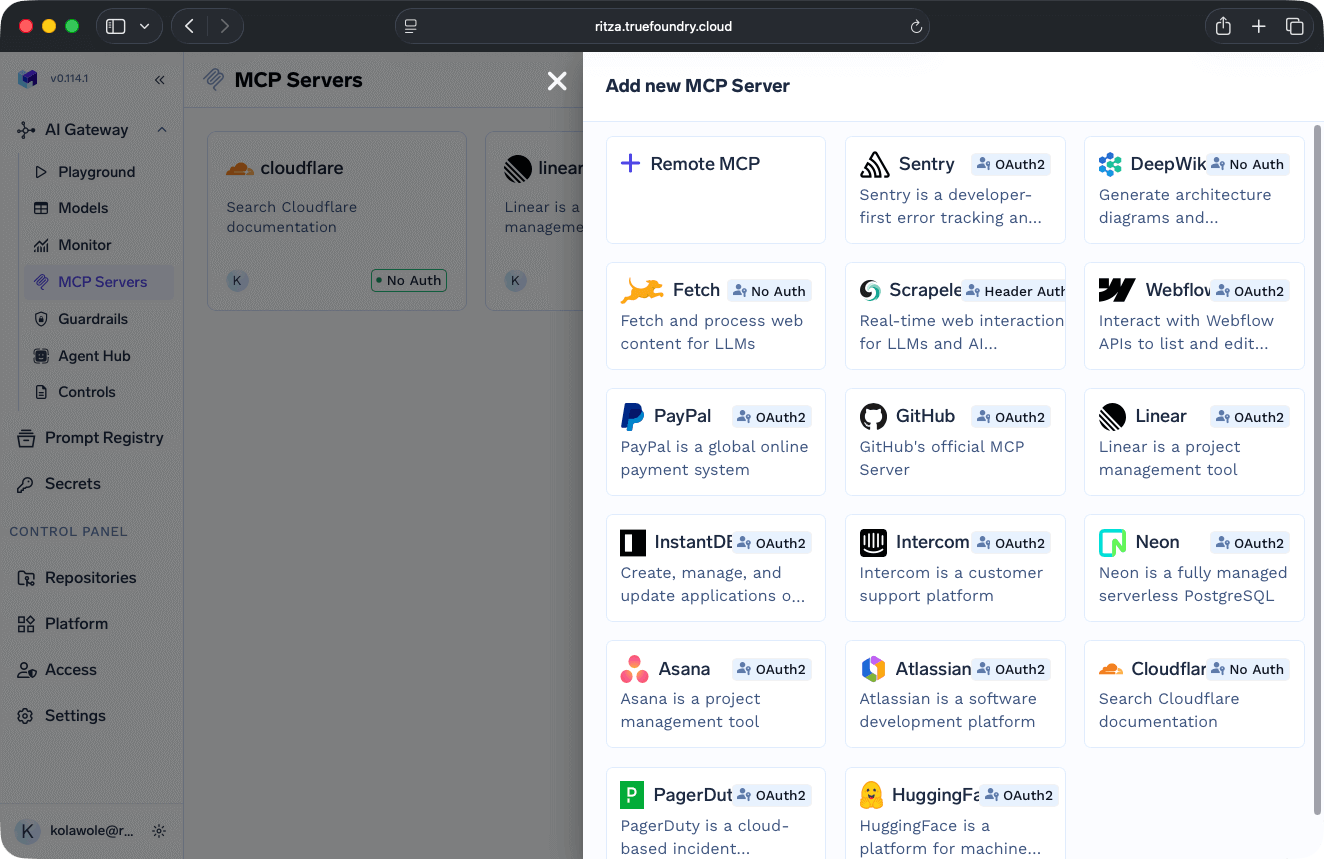
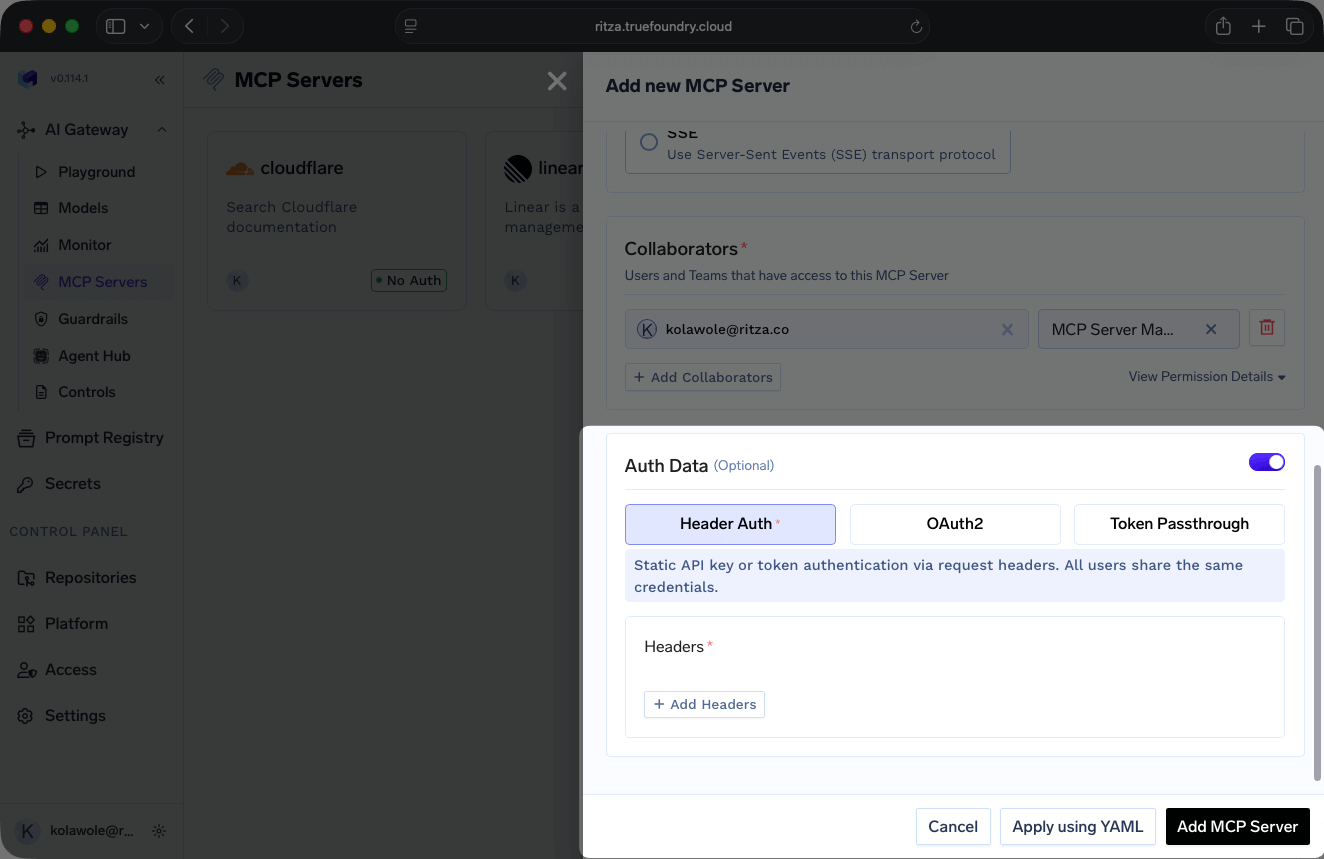
TrueFoundry requires you to have an MCP server ready with auth credentials before you start. You can't prototype quickly. This makes sense for enterprises with established infrastructure, but slows down teams validating product ideas.
Security and compliance
Authentication configuration varies by server type. TrueFoundry's catalog servers include built-in OAuth flows, but remote servers require you to manually manage credentials through the authentication interface.
TrueFoundry provides extensive governance features beyond basic authentication, including:
- Rate limiting
- Routing rules
- Request and response guardrails
- Data access controls (such as for detecting personally identifiable information (PII))
- Budget limiting
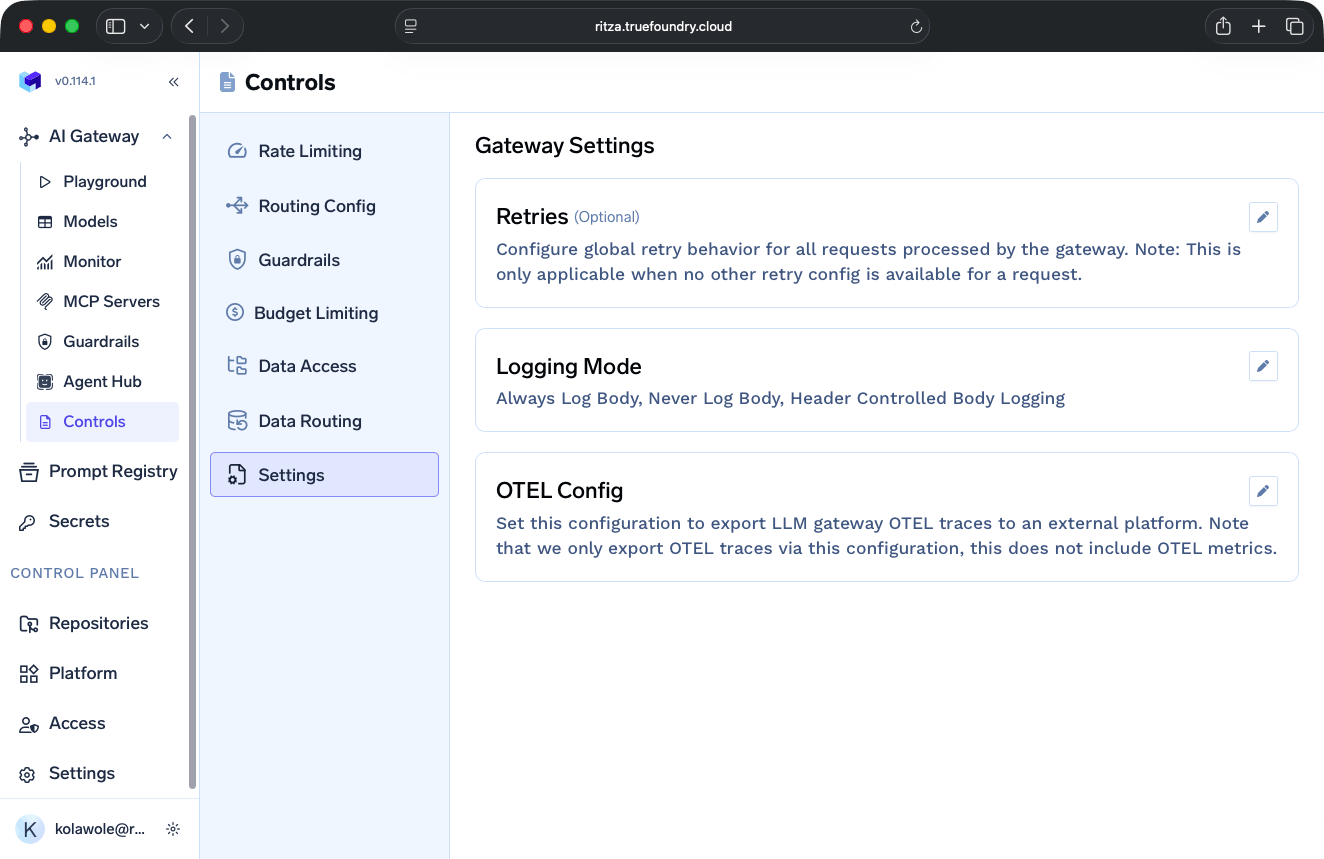
The Guardrails configuration supports multiple providers for content filtering and compliance:
- AWS Bedrock
- OpenAI moderation
- Azure PII Detection
- Azure Content Safety
- Enkrypt AI
- Palo Alto Prisma AIRS
- PromptFoo
- Fiddler
- Pangea
- Patronus
- Custom guardrails (if you have them)
The platform's comprehensive governance controls make it ideal for teams in regulated industries requiring strict SOC 2 or HIPAA compliance. However, such governance complexity is overkill for public-facing products or small teams, where using Speakeasy or Composio makes more sense.
Logging and monitoring
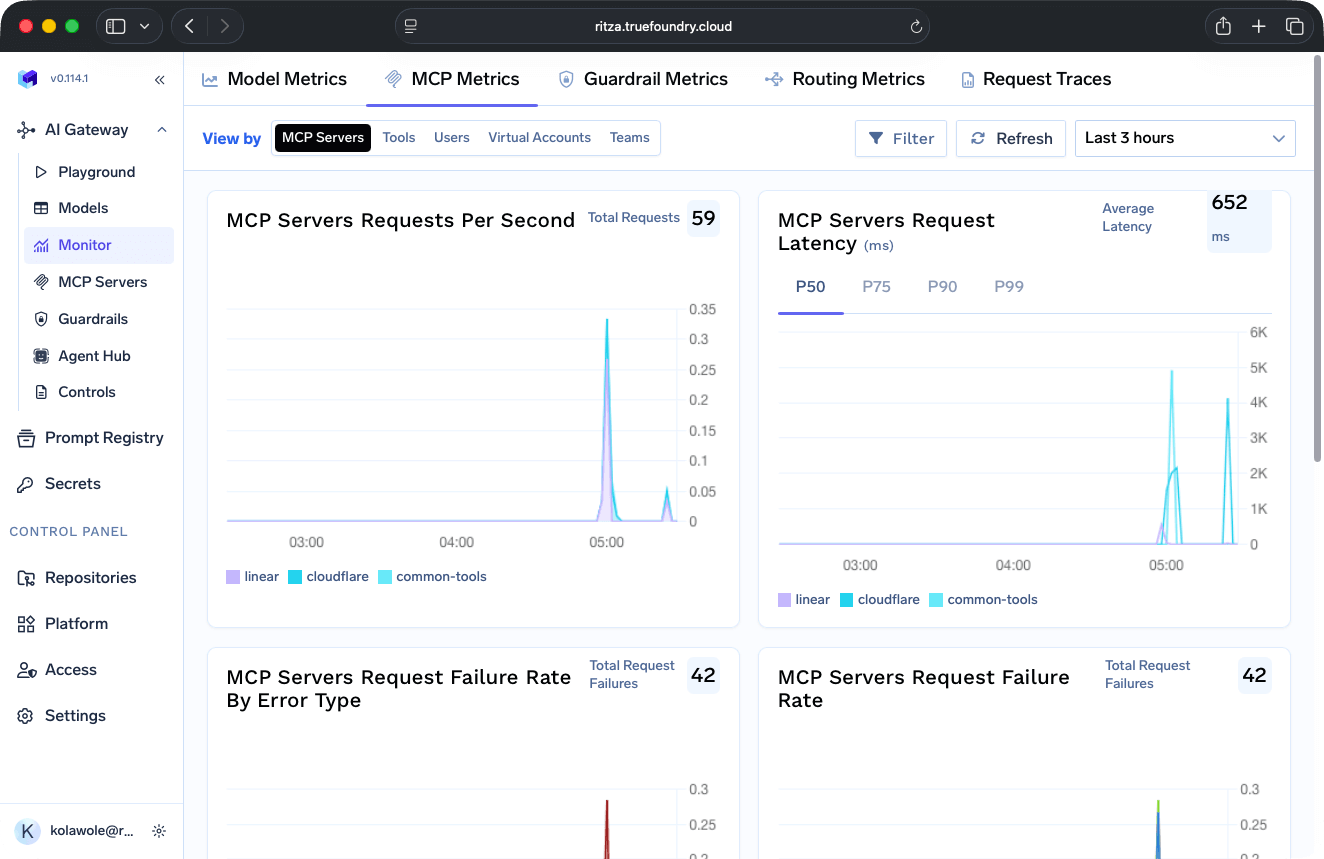
The TrueFoundry Monitor dashboard visualizes your routing, MCP, and guardrail metrics, including requests per second, request failure rates, budget consumption, and performance breakdowns.
You can also view your Request Traces to access a detailed execution history:
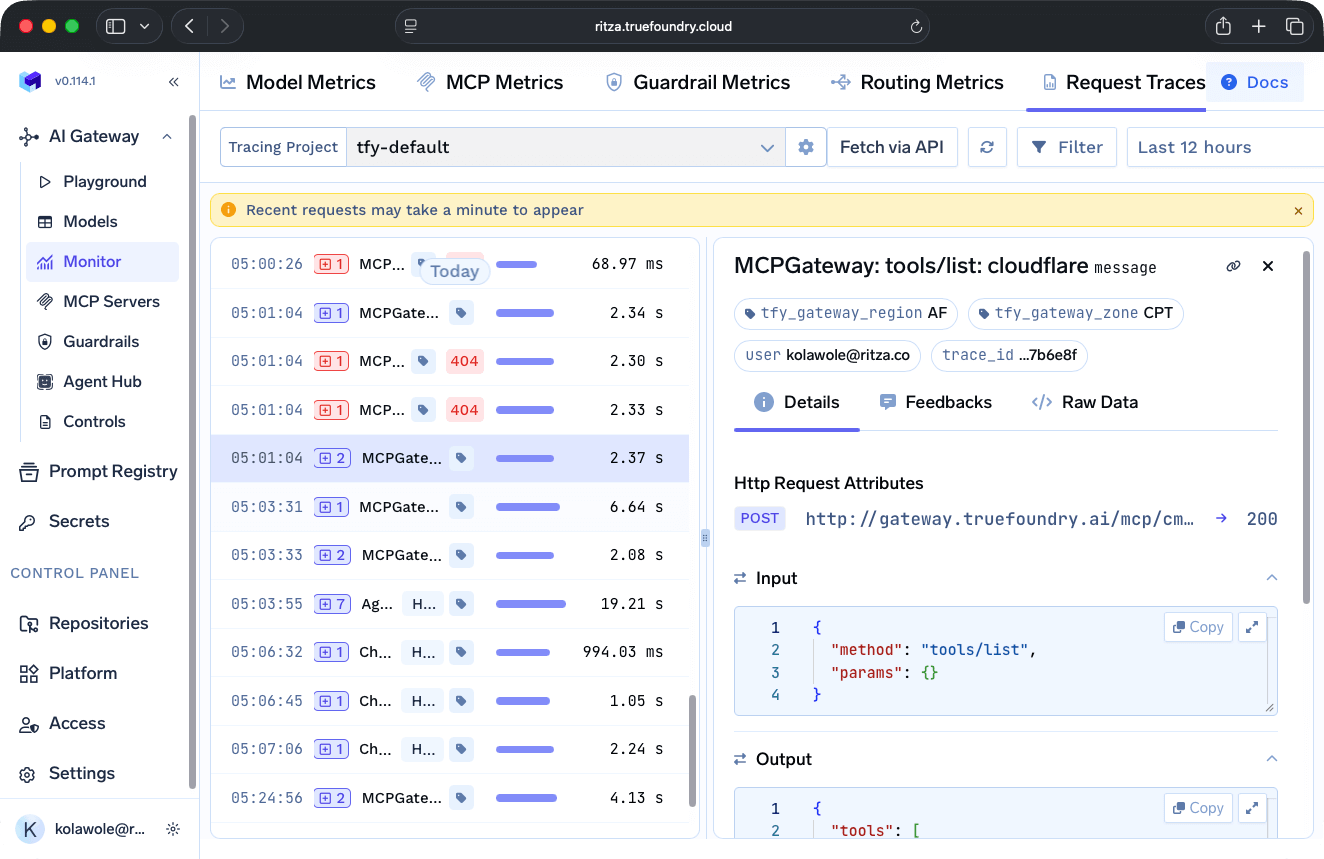
When you inspect an individual request trace, you see the complete input and output data. Like Composio, TrueFoundry's logs contain PII; but unlike Composio, TrueFoundry protects you from compliance violations by letting you use guardrails to filter sensitive data before it reaches AI agents. You can also disable body logging entirely.
Cost analysis
TrueFoundry offers flexible payment plans:
- The free Developer plan provides 50,000 requests per month, for up to three users.
- The Pro plan provides 1,000,000 requests for up to 10 users, at $499 per month.
- The Pro Plus plan provides 1,000,000 requests, more MCP tool calls, and advanced controls for up to 25 users, at $2999 per month.
- Custom Enterprise plans provide over 10,000,000 requests per month, as well as HIPAA and GDPR compliance, for unlimited users.
Self-hosted deployments cost $600-$1,000 per month in infrastructure. TrueFoundry is SOC 2 certified across all payment tiers.
Willow: A governance gateway with an enablement layer
Willow, which rebranded from Webrix in 2026, is a governance gateway surrounded by an enablement layer. We assessed Willow from its public documentation rather than hands-on testing, so this section is shorter than the others. For a line-by-line comparison with Speakeasy, see Speakeasy vs Willow.
The gateway is the core of the product. Clients are configured with a Willow MCP URL instead of a direct tool URL, and every call routed through it passes four checks: identity, group-based access to the target server, runtime guards on request content, and response guards that mask PII on the way back. Around the gateway sit a marketplace with a claimed 1,000+ pre-built connectors plus API-to-MCP conversion, endpoint sensors that surface unapproved tools and shadow MCP servers, and Willow for Chrome as a browser policy layer.
On identity, the Willow gateway mints and validates its own tokens. SSO providers such as Okta and Entra ID sit upstream of it, SCIM provisioning removes access at offboarding, and access on each call follows Willow group assignments matched to a Willow user record rather than a directory principal evaluated at call time.
Willow deploys as SaaS, self-hosted on AWS, GCP, or Azure, or on-prem and air-gapped, per its governance and compliance page. Pricing starts with a free tier for up to five users and five integrations, a Startup plan at $15 per seat, and custom enterprise plans that gate SCIM and guardrails. Willow reports SOC 2 Type II certification.
Speakeasy: The hybrid gateway in the AI Control Plane
The Speakeasy MCP Gateway generates MCP servers from REST APIs and handles gateway infrastructure automatically, allowing teams to focus on building products rather than managing routing and authentication.
Developer experience
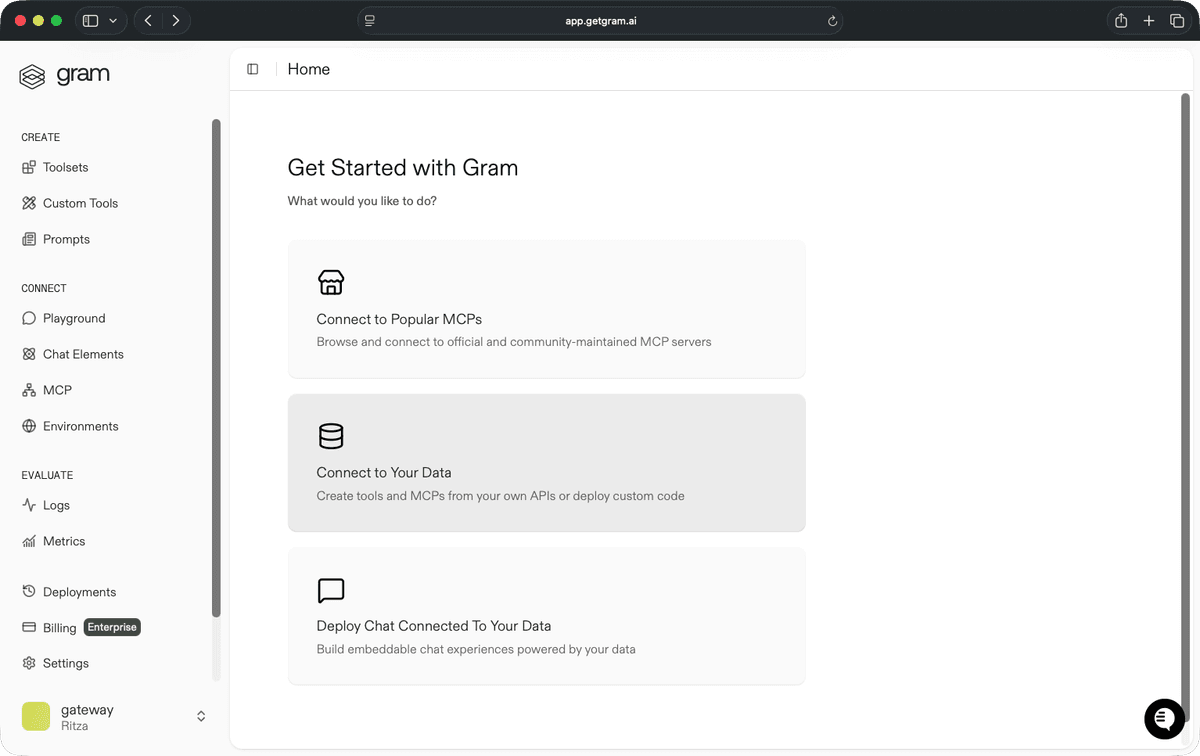
Speakeasy provides three primary services.
- Connecting to pre-existing MCP servers: The Speakeasy catalog includes both official and community-maintained MCP servers.
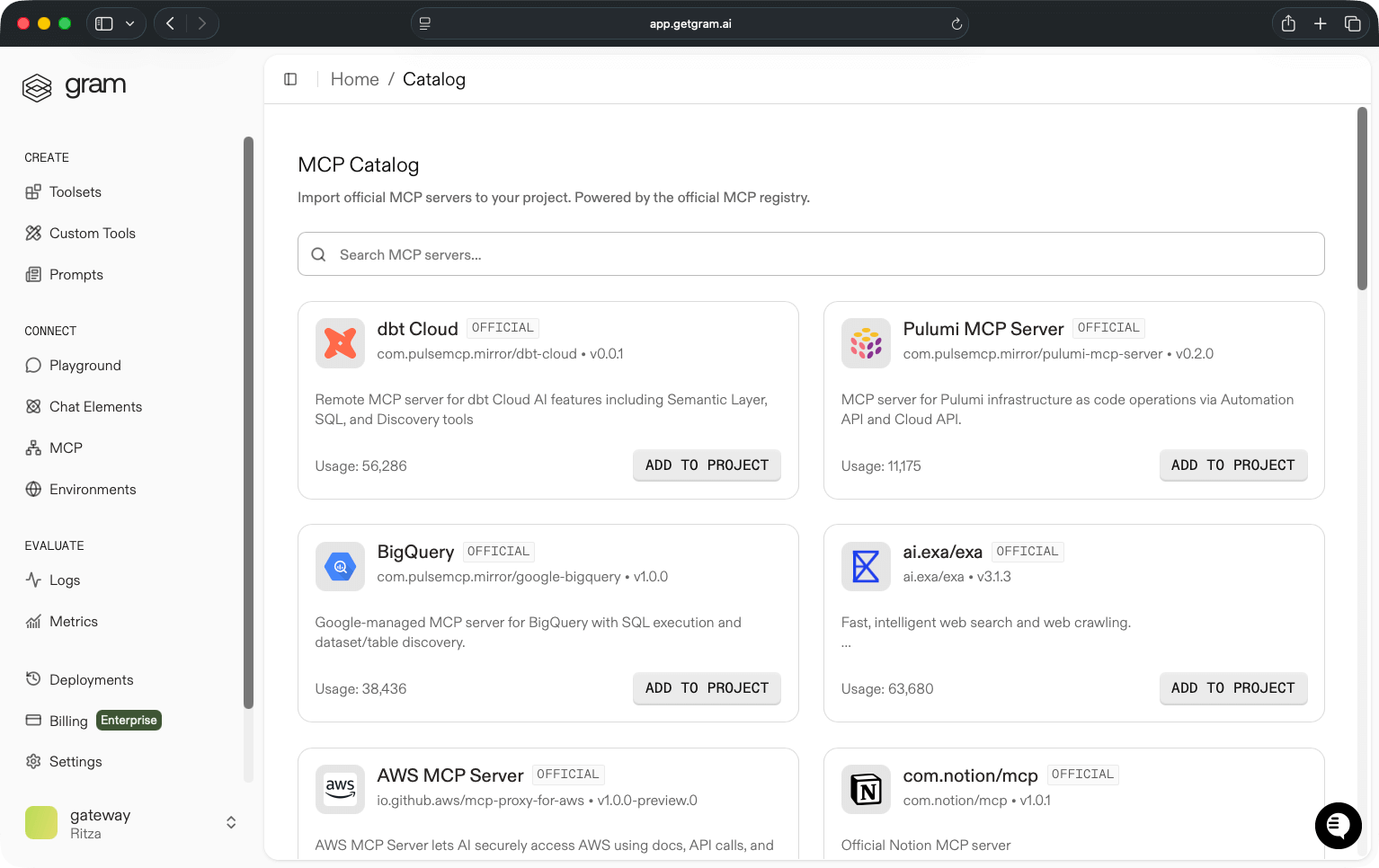
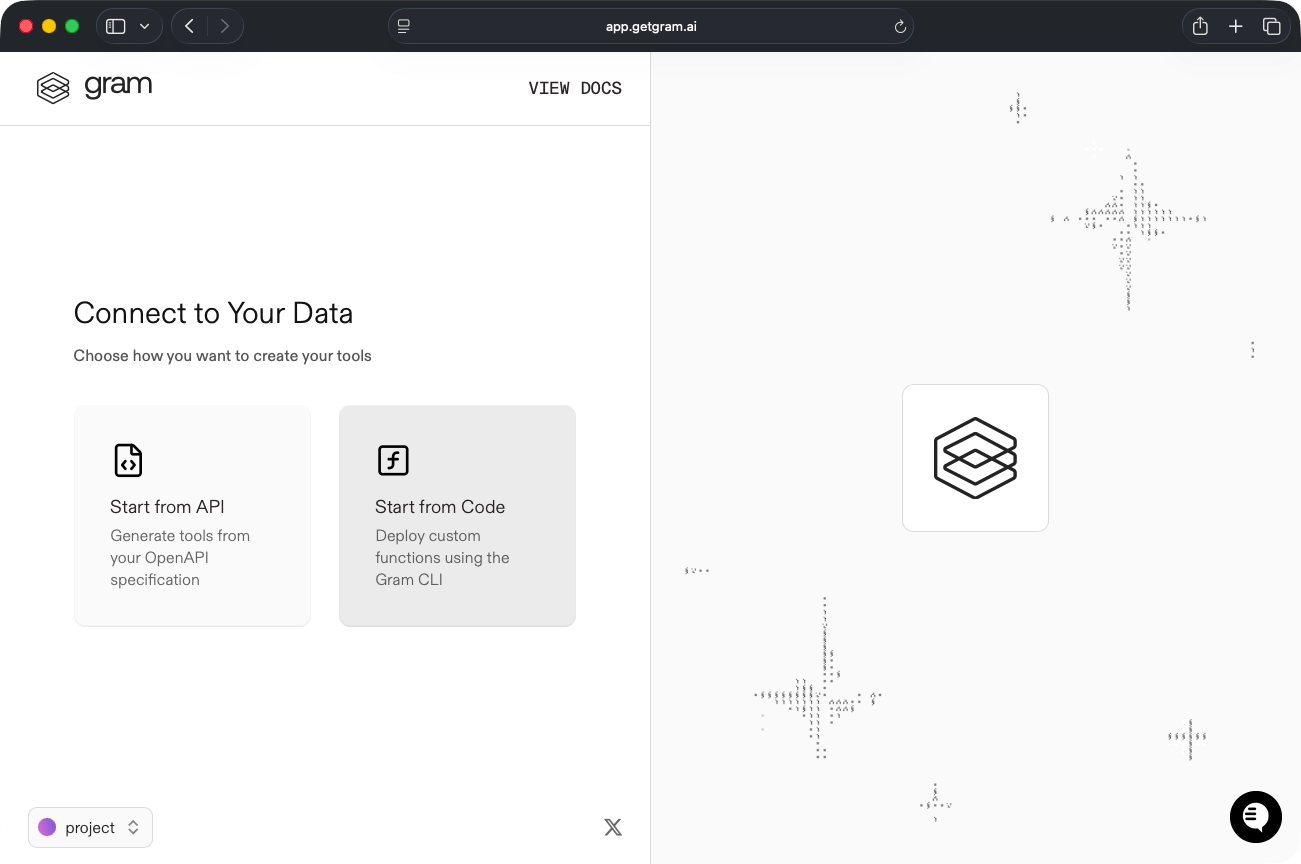
- Creating custom MCP servers: Upload your OpenAPI specifications or write custom functions in TypeScript.
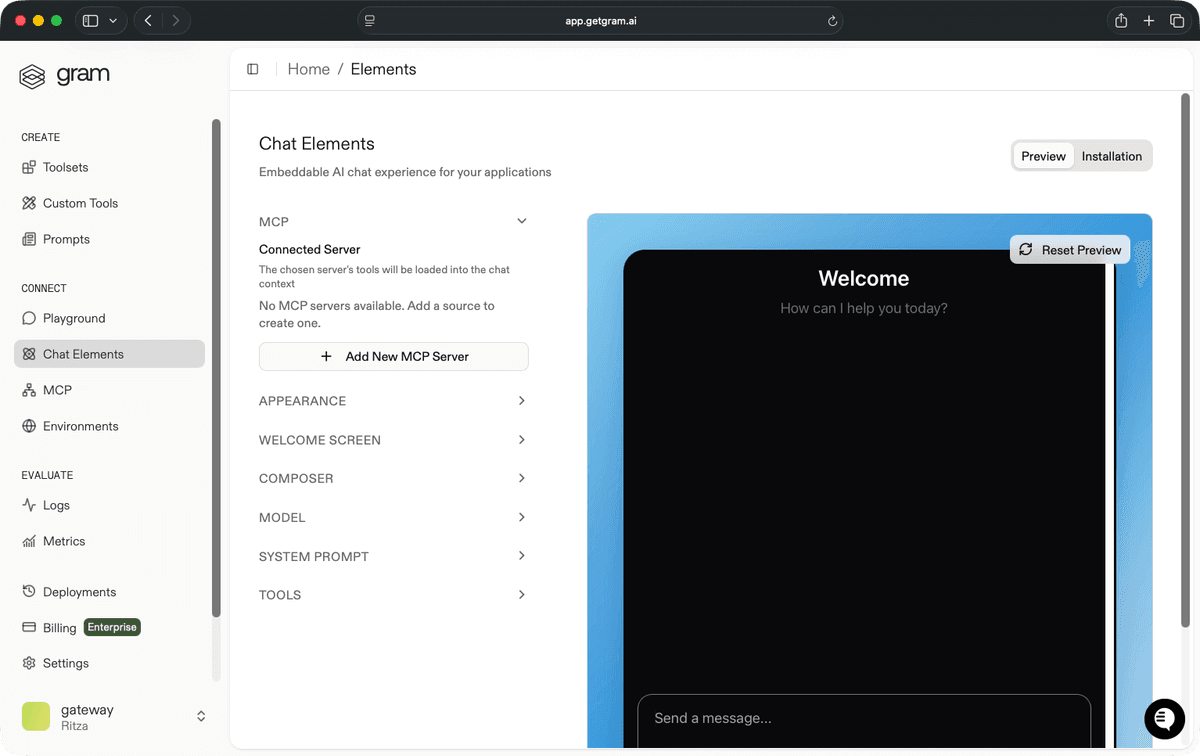
- Building direct chat experiences with MCP capabilities: The platform also deploys chat experiences that you can embed in applications.
After connecting to two or more MCP servers, you can organize tools from various sources into curated toolsets for specific use cases. For example, you can combine CRM and ticketing tools into a customer support toolset or combine Salesforce and email tools into a sales toolset. Each toolset becomes a hosted MCP server with its own endpoint.
With its intuitive tool curation UX and ability to convert an OpenAPI document to an MCP server within minutes, Speakeasy is the easiest MCP gateway to set up.
Security and compliance
Speakeasy routes requests to toolsets, manages OAuth tokens, enforces access policies, and logs tool calls through the platform's unified control layer.
Speakeasy supports four authentication approaches, depending on how your API handles credentials:
- Speakeasy OAuth (private servers): Users authenticate via browser using their Speakeasy account credentials. The platform manages the entire OAuth flow with organization-based access control. No external OAuth implementation needed.
- User-facing OAuth (public servers): Full dynamic OAuth flows using Dynamic Client Registration (DCR). This is the standard required by the MCP spec for public-facing servers, though DCR adoption remains limited across the industry.
- Pre-obtained access tokens: Users provide tokens they've already generated through your existing system. This requires no OAuth flow implementation, just token validation. Best for APIs with token generation already in place.
- Client credentials flow: Users supply a
client_idandclient_secretfor server-to-server authentication. Speakeasy automatically handles the token exchange and caches tokens based on expiration, supporting bothclient_secret_postandclient_secret_basicmethods.
To enable OAuth on a Speakeasy MCP server, your OpenAPI spec includes OAuth as a security scheme:
security:
  - oauth2Example: [pets:read]
components:
  securitySchemes:
    oauth2Example:
      type: oauth2
      flows:
        authorizationCode:
          authorizationUrl: /oauth/authorize
          tokenUrl: /oauth/token
          scopes:
            pets:read: Read pet information
How Speakeasy exposes authentication also depends on the Visibility settings of each MCP server.
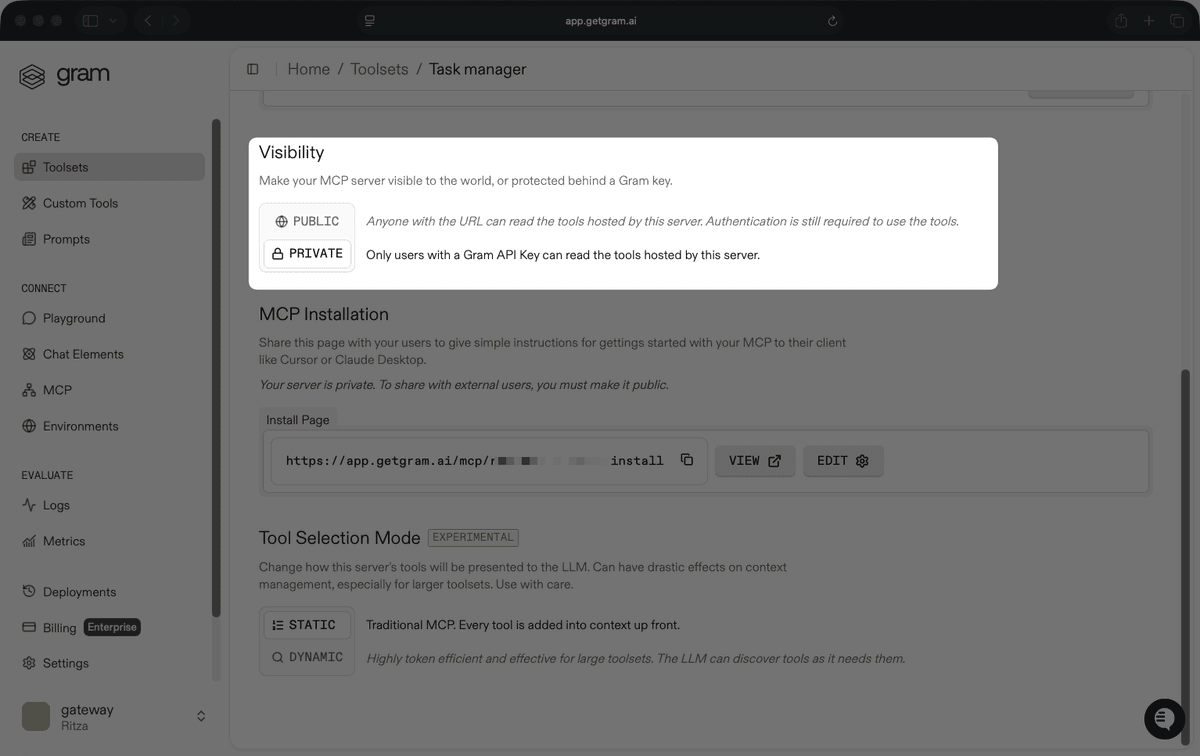
When you set a server to Private, only users with a Speakeasy API key can access its tools. Clients connect to the hosted server URL and pass the API key and target environment as headers sourced from environment variables, so credentials never sit in the client config itself. This mode is best suited to servers built for enterprises or internal teams.
When you set a server to Public, any user with the URL can access its tools, but they still authenticate per-user through the configured OAuth flow before making tool calls. The client config is the server URL alone, with no additional headers.
Managed OAuth configuration is available on enterprise plans.
Logging and monitoring
The logging interface displays incoming requests in real time:
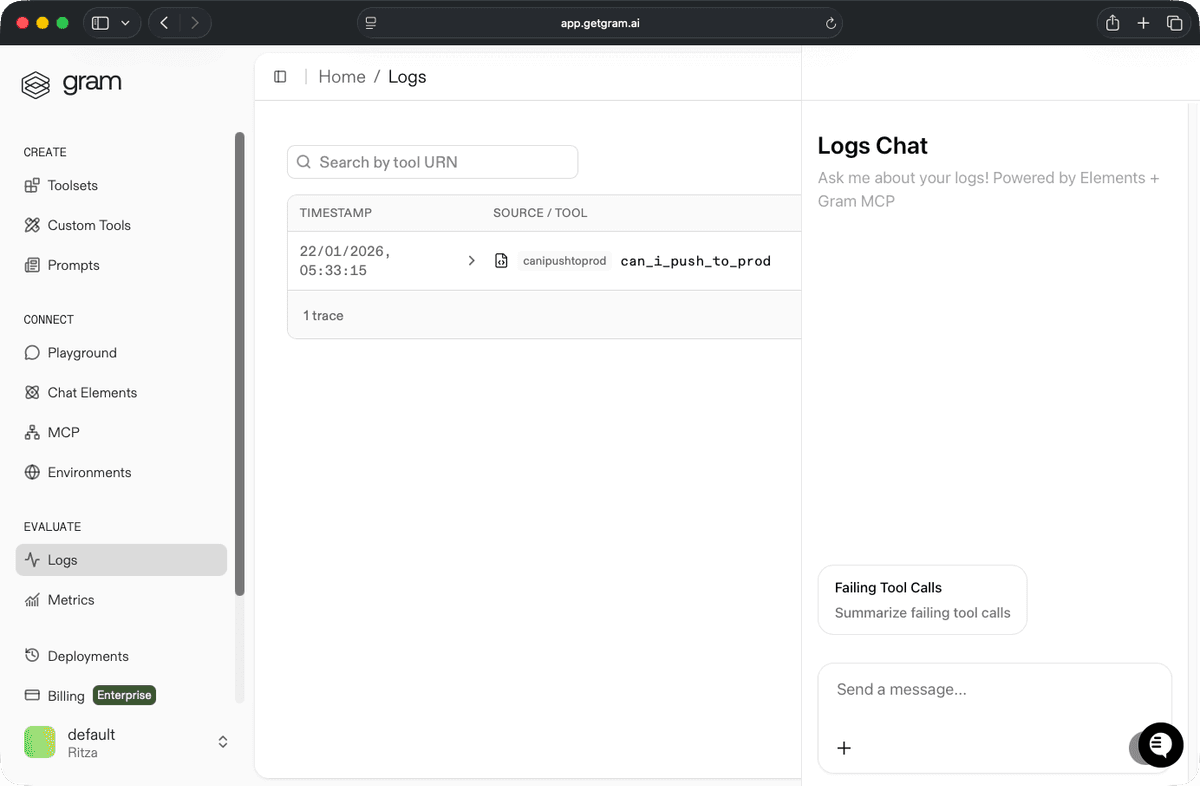
Individual log entries show tool call details and responses:
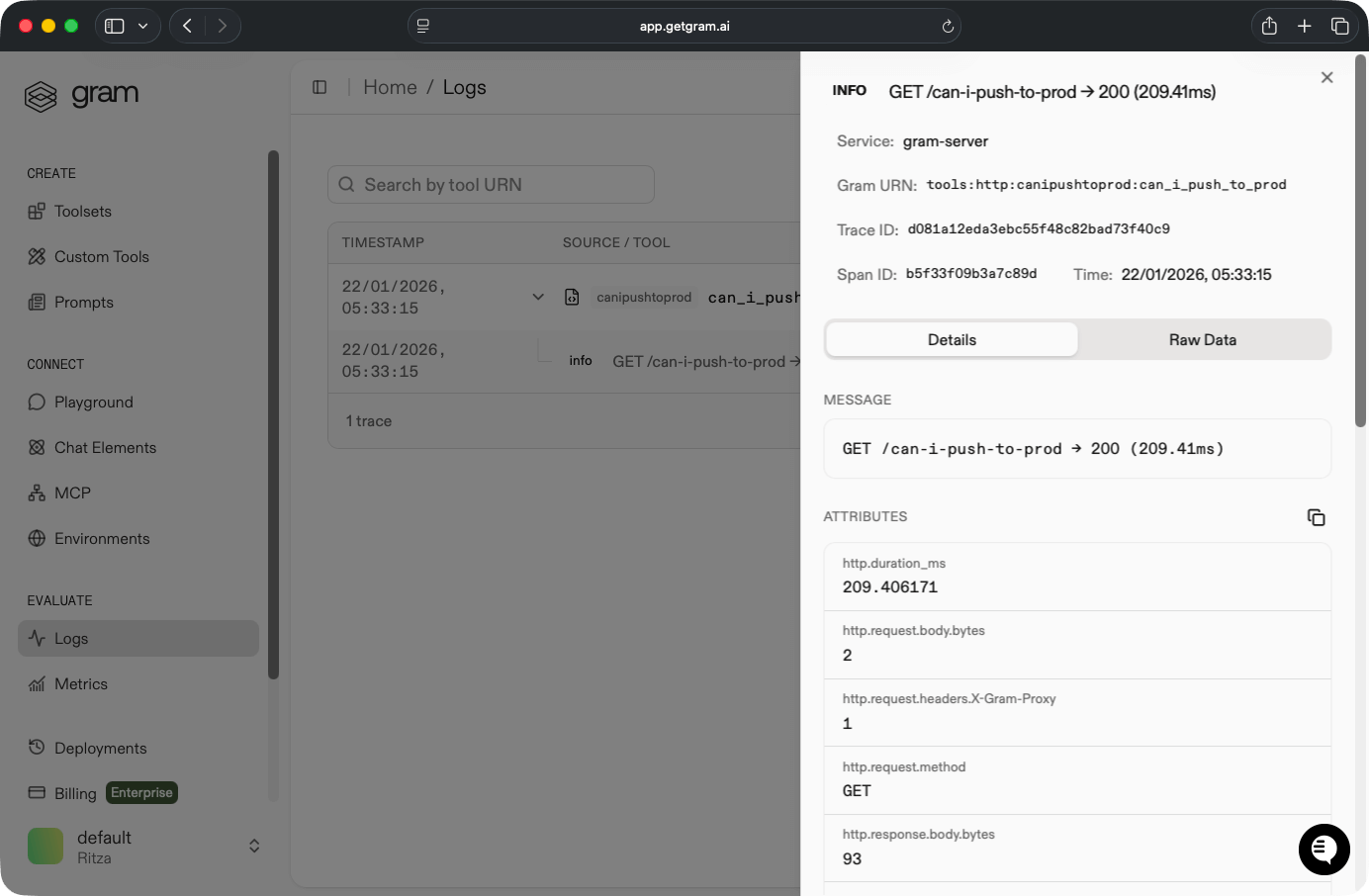
Unlike Composio or TrueFoundry, Speakeasy logs capture request metadata without exposing request or response bodies. This protects you from compliance violations by default, so you don't need to configure body logging controls or contact vendors about PHI exposure.
Cost analysis
Speakeasy offers tailored enterprise pricing based on deployment size and usage, with SSO, audit logs, and a self-hosted dataplane available. You can book a demo or talk to the team for a quote.
Docker MCP Gateway: Self-hosted container orchestration
Docker MCP Gateway provides complete infrastructure control through container-based MCP server orchestration. It's best suited to teams already operating Docker-native infrastructure.
Developer experience
Docker MCP Gateway uses file-based configuration. You need to configure three components:
-
Store your credentials as environment variables in
.env:# GitHub Operations GITHUB_PERSONAL_ACCESS_TOKEN=ghp_your_token_here # Notion Workspace NOTION_API_KEY=secret_your_notion_token_here -
Set up the infrastructure using service definitions in
docker-compose.yml:services: mcp-gateway: image: docker/mcp-gateway:latest ports: - "8080:8080" command: - --transport=sse - --port=8080 - --catalog=/mcp/catalogs/docker-mcp.yaml volumes: - /var/run/docker.sock:/var/run/docker.sock - ./config:/mcp/catalogs -
Catalog available servers in
config/docker-mcp.yaml:version: 2 name: development-productivity servers: github: title: "GitHub Service" type: stdio image: node:18-alpine command: - npx - -y - "@modelcontextprotocol/server-github"
Developers familiar with Docker can set up the MCP gateway in 20-40 minutes. If you're unfamiliar with container orchestration, you face a steep learning curve involving YAML syntax, Docker networking, and environment variable management. You may prefer solutions with UI-based setups that take minutes instead of hours.
Docker MCP Gateway supports any MCP server available as an npm package or Docker image. Adding custom servers requires updating both Docker Compose and the server catalog.
Docker's documentation covers setup and architecture but overlooks session management, catalog schema validation, production deployment patterns, and the need for a systematic debugging guide.
Security and compliance
Because Docker MCP Gateway has no authentication layer, you're responsible for building and maintaining security infrastructure through network isolation and per-server authentication:
- Run MCP servers in a private Docker bridge network.
- Manage server credentials for external services (such as GitHub tokens, Notion keys, Slack tokens) through environment variables.
- Add external authentication to production deployments using reverse proxies (like Nginx and Traefik) or API gateways (like Kong and AWS API Gateway).
Logging and monitoring
Logging uses Docker's native infrastructure:
# View all logs
docker-compose logs -f

# View specific server
docker-compose logs -f github-server

# Filter by timestamp
docker-compose logs --since=2026-01-22T06:00:00
Gateway logs show configuration loading and request routing. Individual MCP server logs vary by npm package implementation.
Docker logs lack structured logging, request tracing, metrics collection, and audit trails. When an agent breaks in production, you can't trace which tool call failed or why. Production deployments require integrating external observability tools (such as Sentry, ELK Stack, Prometheus and Grafana, or cloud monitoring services), which adds infrastructure complexity and cost.
Cost analysis
Docker MCP Gateway is open source with no platform fees. You can avoid the recurring costs that come with other solutions and invest in Docker infrastructure instead. However, you pay with DevOps time: YAML configuration, ongoing maintenance, and debugging when things break.
If you want to use Docker MCP Gateway, decide whether your team has the Docker expertise to manage its complexity or whether platform fees (starting at $29 per month for Composio) are worth the cost to buy back more productive time.
Which MCP gateway should you choose?
The best MCP gateway depends on whether you're building new MCP servers or managing existing ones.
Composio's many integrations make it a good choice for managing existing servers, especially within chat workflows. But without the ability to add custom servers, it isn't suited to anyone wanting to build.
Arcade takes a strong stance on authentication, making per-user OAuth and agent authorization its core selling point. Its multi-user Gateways and agent-optimized tools work well for teams that need authenticated, multi-user access across many services. However, usage-based pricing can be unpredictable at scale, and the 80-tool-per-Gateway limit may require splitting toolsets across multiple Gateways for complex setups.
TrueFoundry has a comparatively smaller catalog of prebuilt servers, but includes a remote configuration option that makes it suitable for both building and managing servers. The platform provides extensive governance and compliance controls, making it ideal for enterprises in regulated industries, but painful for everyone else.
Willow pairs its governance gateway with self-serve enablement: a large connector marketplace, endpoint sensors, and a browser policy layer, with self-hosted and air-gapped deployment available. Its identity model is Willow-native, with gateway-minted tokens matched to Willow user records, which is worth weighing if you need every tool call authorized against a directory principal.
Speakeasy stands out as the easiest MCP gateway to use. In addition to supplying a catalog of pre-existing servers, it generates custom MCP servers from OpenAPI specs in minutes and lets you write custom functions in TypeScript for building servers with code. Similar to Composio, Speakeasy lets you build chat experiences powered by MCP tools.
Also suited to both building and managing servers, Docker MCP Gateway provides complete infrastructure control at no cost. But with verbose YAML files, configuration quickly becomes complex. If you're not already running everything in Docker, the setup pain is seldom worth it.
Capabilities comparison
Pricing and recommendations
Do I need an MCP gateway?
What is the difference between an infrastructure MCP gateway and a governance MCP gateway?
How is an MCP gateway different from an API gateway?
What is a hybrid MCP gateway?
Should I build an MCP gateway or buy one?
How should SSO work across MCP servers?
Let a control plane handle governance and gateway features, so you can focus on building. Learn more about the Speakeasy MCP Gateway or book a demo.
Last updated on