Technical Reference / Device Agent
Device Agent
A lightweight endpoint agent that enforces the organization's required plugins and MCP configuration on developer machines and in cloud coding sandboxes, and reports coverage back to the platform.
The device agent is a lightweight endpoint agent for developer machines and cloud coding sandboxes. It installs, maintains, and reports on the organization’s mandated AI agent configuration: which plugins and MCP servers Claude Code, Codex, Cursor, OpenCode, GitHub Copilot, and OpenClaw should have, kept in place even as tools update or users switch accounts. On laptops it runs as a small background daemon with a menu bar app on macOS and a tray app on Windows and Linux, and deploys through MDM or a self-serve installer. In a cloud sandbox it runs inside the session itself, installed by the environment’s setup script. See Claude Code on the web and Cursor Cloud.
Admins configure the agent from the Device Agent page under Organization settings > Secure > Device Agent in the dashboard.
The device agent is in beta and enabled per organization. Capabilities described here reflect the current release; contact Speakeasy for access and rollout support.
Access requirements
Section titled “Access requirements”Viewing the Device Agent page requires the org:read scope, so both Admins and Members can see it. Administrative actions, including creating the API keys used for enrollment, require the org:admin scope, which only the Admin role holds by default. The Configuration and Scan Targets tabs are visible to organization admins only. Any organization member can enroll their own device.
What it aims to achieve
Section titled “What it aims to achieve”The platform enforces policy at MCP tool-call time, but that enforcement only applies if the AI agent on the laptop or in a supported cloud environment actually routes through a sanctioned MCP server. The device agent is the device-side guarantee that it does. It closes the most common bypass path: configuration drift on developer laptops, including the case where a user switches their AI agent to a personal account and silently loses the organization’s plugins, telemetry, and guardrails. Cloud sessions have the same gap until their environment is configured.
The intended outcome reads like a policy statement: install these MCP servers and plugins into every engineer’s AI agents, keep them installed even when an engineer switches accounts, and show which devices are covered. Admins configure policy in the dashboard and watch per-device coverage; developers see a menu bar or tray icon reflecting status and otherwise keep working.
Plugin assignments decide what the agent delivers to a given device, so assignment changes in plugins flow through to enrolled machines. Which plugins reach a device is controlled by each plugin’s Assignments section; see Plugins.
The agent also carries signals back the other way. When a policy blocks a call against an unapproved MCP server, the agent raises a desktop notification on that machine and offers to file the access request, so the request reaches an admin without the developer hunting for a link in the AI tool’s output. See shadow MCP for how those requests are reviewed.
Capabilities
Section titled “Capabilities”- Plugin and MCP configuration sync - An organization-wide policy of marketplaces and plugins is rendered into each agent’s native configuration across Claude Code, Codex, Cursor, OpenCode, GitHub Copilot, and OpenClaw. The agent tracks what it installed and never touches entries the user added themselves.
- Continuous reconciliation - The daemon re-fetches policy and re-applies it every 60 seconds, so mandated configuration survives tool updates, settings resets, and account switches instead of drifting until the next manual audit.
- Telemetry wiring - The agent configures Claude Code’s OpenTelemetry export to point at the platform’s telemetry ingest, seeding the session logs and token metrics behind Observe. Neither OpenCode nor OpenClaw has an OpenTelemetry exporter, so there is nothing to wire up there: their observability plugins report sessions, tool calls, tokens, and cost on their own. See distributing plugins to OpenCode and distributing plugins to OpenClaw.
- Managed identity for hooks - Hook plugins resolve the developer’s email and organization from the agent locally, with no network call and no access to the organization credential, so telemetry is attributed to the right person.
- Offline resilience - The agent detects control-plane downtime, backs off, and drains the hooks’ buffered telemetry once connectivity recovers, so short outages don’t lose events.
- Managed auto-update - Updates ship through release channels with checksum verification and a per-version kill switch; macOS binaries are Developer ID-signed and notarized.
How it connects
Section titled “How it connects”The agent has a small, well-defined network surface. Policy polling doubles as the device heartbeat, and everything else flows through existing platform channels:
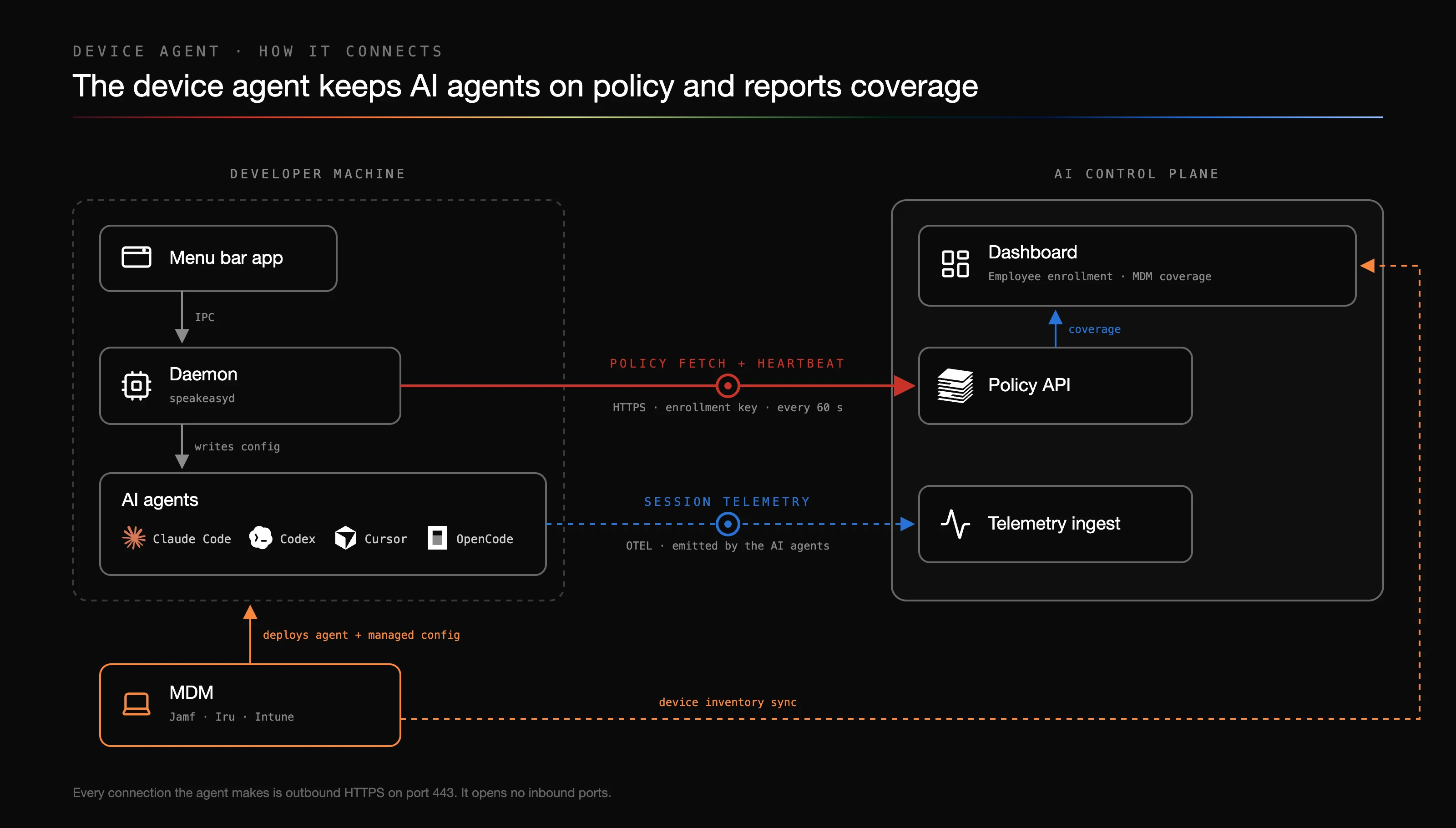
- Policy fetch and heartbeat. Every minute the daemon fetches the organization’s plugin policy over HTTPS, authenticated with its enrollment key. Each poll also records the device check-in that powers coverage reporting.
- Session telemetry. The AI agents themselves emit telemetry to the platform’s OTEL ingest; the agent’s job is wiring that configuration up and keeping it in place.
- MDM. The MDM deploys the agent and its managed configuration to devices, and separately syncs device inventory into the platform so coverage can be measured fleet-wide. See MDM installations.
- Cloud sandboxes. Same policy fetch over
ai.speakeasy.com. A hosted sandbox has no MDM; identity is theorg_tokenin/etc/speakeasy/managed.json, written by the environment’s setup script. See Claude Code on the web and Cursor Cloud.
Network allowlist
Section titled “Network allowlist”Every connection the agent makes is outbound HTTPS on port 443. It opens no inbound ports; the enrollment sign-in callback binds to loopback (127.0.0.1) only. On a locked-down network, allow these destinations:
| Destination | Purpose |
|---|---|
ai.speakeasy.com, the Speakeasy control plane | Plugin-policy fetch, device check-in and heartbeat, enrollment, and the OpenTelemetry ingest that Claude Code’s telemetry is pointed at. |
storage.googleapis.com | Signed release manifests and agent update binaries (see Automatic updates). |
The plugin marketplace hosts, which are the control-plane host by default plus any external Git host the policy references (for example, github.com) | Cloning and updating the plugin and marketplace repositories the policy assigns. |
The marketplace hosts depend on the plugins the policy assigns, so review the assigned policy to enumerate them for a given environment. The agent refuses plaintext HTTP and non-public marketplace URLs.
Claude Code on the web Trusted network access does not include ai.speakeasy.com. Set the shared environment to Custom, check Also include default list of common package managers (keeps storage.googleapis.com and the usual registries reachable), and add ai.speakeasy.com on its own line. Setup is covered in Claude Code on the web.
Automatic updates
Section titled “Automatic updates”The agent keeps itself current so a fleet doesn’t quietly drift onto old builds, while leaving teams that prefer to drive versions through MDM in full control. Behavior is set by the auto_update field in the agent’s managed configuration, either managed.json or a macOS configuration profile (see MDM installations).
Update modes
Section titled “Update modes”| Mode | Behavior |
|---|---|
disabled | Default. The agent never checks for updates; IT ships new versions on its own cadence via MDM. Required in Anthropic-hosted cloud environments, where the VM lives minutes and the setup script pins a version. |
notify | The agent checks and reports that an update is available but does not install it. |
automatic | The agent checks, downloads, verifies, and installs without user interaction. Recommended. |
How updates are delivered
Section titled “How updates are delivered”- The agent checks at startup and every 24 hours, and on demand via the agent CLI’s
update --check. - Each binary is verified by SHA-256 against a signed release manifest before it is installed. macOS binaries are Developer ID-signed and notarized.
- The new binary is swapped into place atomically. If an updated daemon fails to start, the agent automatically reverts to the previous version, so a failed update never leaves a device worse off than before.
- Self-update applies on macOS, Windows, and Linux. On Windows the daemon verifies the newer signed MSI and launches it through a detached Windows Installer process; fleets that prefer MDM-owned version moves set
notifyinstead. See Microsoft Intune. - The agent CLI’s
update --applyruns the same download-verify-swap on demand, for scripted or headless use.
The agent CLI is not on PATH, because the AI control plane CLI and the Speakeasy SDK generator also install a binary named speakeasy. Call it by full path:
- macOS:
"$HOME/Library/Application Support/Speakeasy/bin/speakeasy" update --check - Windows (PowerShell):
& "C:\Program Files\Speakeasy\speakeasy.exe" update --check - Linux:
~/.local/state/speakeasy/bin/speakeasy update --check
Enrollment
Section titled “Enrollment”Setup lives in the Instrument agent platforms step of the setup wizard (see getting started) and on the Setup tab of the Device Agent page, with walkthroughs for macOS, Windows, and Linux, plus a Remote sessions walkthrough for Claude Code on the web. Enrollment tokens come from an API key with the Agent scope, created on the API keys page.
Three enrollment paths cover evaluation, fleet rollout, and cloud sandboxes:
- Self-service - The developer opens the menu bar app and clicks Enroll, which opens the dashboard in a browser. After sign-in, the agent redeems a short-lived, single-use code (PKCE-bound, so the code is useless without the device that requested it) for a long-lived per-user key scoped to agent use only. Any organization member can enroll their own device.
- MDM zero-touch - IT deploys a managed configuration file or macOS configuration profile carrying the organization’s agent key and settings alongside the installer package. Devices come up enrolled with no user interaction.
- Cloud sandbox - The environment’s setup script writes
/etc/speakeasy/managed.jsonwith a shared identity and an organization token, so there is no interactive enroll step in the session. For Claude Code on the web the dashboard’s Remote sessions walkthrough generates that script; for Cursor Cloud it is configured in the repository or Cursor environment. See Claude Code on the web and Cursor Cloud.
Once a device is enrolled, the menu bar app also links to the organization gateway, the single MCP URL that gives a person every MCP server they can reach. It appears when the organization has a gateway.
The Device Agent page
Section titled “The Device Agent page”The Device Agent page under Organization settings > Secure has up to four tabs:
- Setup holds the install walkthroughs for macOS, Windows, Linux, and Remote sessions, and is visible to anyone with
org:read. - Configuration (preview) holds fleet-wide settings for organization admins. For each platform, choose an enforcement layer of Off, User (write to the user’s home directory), or Managed (use the elevated managed writer). The tab also sets the Update channel agents follow (
stableby default), an Auto-update policy of Inherit (use each device’s local or MDM setting) or an explicit policy, and the Sync interval between policy pulls. - Scan Targets manages the library of AI tools the agent probes for on each device, split into Built-in targets the platform ships and Custom targets added with Add target for tools the platform does not ship. Findings feed Shadow AI. This tab is admin-only.
- MDM Integrations connects device inventory sources, so the platform knows which devices exist and which run the agent, and compliance evidence destinations. It is enabled per organization; contact Speakeasy to turn it on. See MDM installations.
Device status in the dashboard
Section titled “Device status in the dashboard”Each policy poll updates the device’s standing, surfaced in two places:
- Identities filters people by Device agent coverage, with values such as Agent active, Agent stale, Agent on another device, No agent, and Missing from MDM. Each identity’s Accounts & devices tab lists the managed devices assigned to that person in its Managed devices panel.
- With an MDM inventory source connected on the MDM Integrations tab, the dashboard joins the MDM’s device list against agent heartbeats to show fleet-wide coverage: which managed devices have an active agent, which are stale, and which have none.
Claude Code on the web
Section titled “Claude Code on the web”Claude Code on the web runs each session in an Anthropic-hosted VM, not on the developer’s laptop. The device agent runs inside that VM, pulls organization policy from the control plane, and writes Claude configuration, following the same policy-sync loop as any other machine. Do not paste observability hook JSON into Claude settings; the agent writes those hooks itself.
In the dashboard this flow is called Remote sessions: pick the Remote sessions tile, next to macOS, Windows, and Linux, on the Device Agent page or in the setup wizard. It opens a three-step walkthrough that the sections below mirror.
This walkthrough covers Anthropic-hosted environments only, not Anthropic self-hosted environments.
Configure the shared environment
Section titled “Configure the shared environment”Create a shared environment (Team or Enterprise) from Cloud environments in Claude admin settings. Personal environments do not reach the rest of the organization.
Trusted network access does not include the Speakeasy control plane. Set Network access to Custom, check Also include default list of common package managers (keeps the agent release bucket and the usual registries reachable), and add ai.speakeasy.com on its own line. Without that host the agent cannot fetch policy or send hook events. The full destination list is in the network allowlist.
Install and configure the agent
Section titled “Install and configure the agent”A headless shared VM cannot enroll through a browser sign-in, so remote sessions use managed enrollment: in the walkthrough, enter a shared session identity email and generate an org_token. Every session in the environment receives that identity’s policy and attribution, so use a dedicated organization member or service account (for example claude-code-web@example.com), not a personal address. The dashboard embeds the email, the token, and a pinned, checksum-verified agent version into a single bash Setup script. Copy it from the dashboard rather than writing it by hand.
Paste the script into the environment’s Setup script field. It runs once as root before Anthropic snapshots the environment’s filesystem, and does exactly three things:
- Installs the daemon. Downloads the pinned linux_amd64
speakeasydbinary from the release bucket, verifies its SHA-256 checksum, and installs it to/usr/local/bin/speakeasyd. - Writes managed enrollment. Creates
/etc/speakeasy/managed.jsonwith the identity email, theorg_token,auto_update: "disabled", andhide_ui: true, readable by root only. Everything in the VM runs as root, so no root helper or per-user enrollment is involved. - Registers a SessionStart hook. Writes
/root/.claude/settings.jsonwith an async SessionStart hook (matchingstartup|resume) that starts the daemon underflock, so a startup/resume double-fire can never start it twice.
Anthropic snapshots files, not processes, so nothing the setup script starts survives into a session. The SessionStart hook revives the daemon at every session start and resume; from there the agent’s normal policy sync installs plugins, writes tool configuration, and keeps enforcement reconciled. There is no cloud-specific sync logic.
The script pins the agent version and disables auto-update because the VM lives minutes: auto-update is wasted work, and a bad build is fixed by regenerating and re-pasting the script, which rebuilds the cached filesystem Anthropic snapshots.
Anyone who can use the environment can read the setup script and /etc/speakeasy/managed.json, including the org_token. Re-generating the token in the dashboard splices a new token into the script and leaves the old token working. To retire the old token, save the updated script in the shared environment, then revoke the old token under Settings → API Keys. Sessions still using a revoked token stop syncing policy.
Make it the organization default
Section titled “Make it the organization default”Anthropic has no switch that locks members to one environment.
- Web, Desktop, and mobile. After creating the shared environment at Cloud environments, set it as the organization default at claude.ai/admin-settings/claude-code. That preselects it when a member has not chosen another environment.
- CLI (
claude --cloud). Merge the following into Managed Settings, replacingenv_…with the shared environment’s ID, copied from Claude after the environment exists. The managed value overrides a user’s/remote-envdefault.
{ "remote": { "defaultEnvironmentId": "env_…" }}The first session in a fresh VM may briefly show pending: Claude must clone the organization’s observability plugin marketplace before the agent can enforce its managed hooks. Server-managed enabledPlugins triggers that clone, and the agent reconciles again once the bundle appears.
Cursor Cloud
Section titled “Cursor Cloud”Cursor Cloud loads project hooks from the repository before it starts an agent. Use a checked-in hook manifest plus a one-shot device agent reconcile at session start. The hook manifest captures Cursor agent activity and can apply the supported prompt and tool-call policy checks. speakeasyd sync --once --cursor-cloud installs the observability runtime for that session, then exits; it does not run a persistent daemon in the sandbox.
The Cursor integration is complementary. It imports organization-level usage and spend from the Cursor Admin API. It does not replace the hooks where agent-session capture or hook policy checks are needed.
Prerequisites
Section titled “Prerequisites”-
Provision a dedicated Speakeasy identity for Cloud Agents, for example
cursor-cloud@example.com. Do not use an individual’s identity: all Cloud sessions in the environment report under this identity. -
Create an organization token for that identity. This is the
org_tokenthe device agent uses. -
In Cursor, open Cloud Agents, select the environment for the repository, and add these runtime values:
Name Value Type SPEAKEASY_EMAILThe dedicated Cloud Agent identity Environment variable SPEAKEASY_ORG_TOKENThe organization token Secret
Do not place the token in a Build command or Build secret. Cursor caches the result of its install step in an Environment Build, so the token must be exposed only when an agent session starts. A person who can run an agent in the environment can read runtime secrets, so use a dedicated identity and rotate its token if that access changes.
Add the hook manifest
Section titled “Add the hook manifest”Commit .cursor/hooks.json to the repository. Cursor Cloud supports repository hooks, not user-level hooks, so this file is required whether the environment is configured in code or in the Cursor dashboard.
{ "version": 1, "hooks": { "beforeSubmitPrompt": [{ "command": "bash '/opt/speakeasy/speakeasy-observability-cursor/hooks/bootstrap.sh' --config='/opt/speakeasy/speakeasy-observability-cursor/speakeasy.json' agenthooks run --provider=cursor --timeout=60s # speakeasy-device-agent-managed", "failClosed": true }], "stop": [{"command": "bash '/opt/speakeasy/speakeasy-observability-cursor/hooks/bootstrap.sh' --config='/opt/speakeasy/speakeasy-observability-cursor/speakeasy.json' agenthooks run --provider=cursor --timeout=60s # speakeasy-device-agent-managed"}], "afterAgentResponse": [{"command": "bash '/opt/speakeasy/speakeasy-observability-cursor/hooks/bootstrap.sh' --config='/opt/speakeasy/speakeasy-observability-cursor/speakeasy.json' agenthooks run --provider=cursor --timeout=60s # speakeasy-device-agent-managed"}], "afterAgentThought": [{"command": "bash '/opt/speakeasy/speakeasy-observability-cursor/hooks/bootstrap.sh' --config='/opt/speakeasy/speakeasy-observability-cursor/speakeasy.json' agenthooks run --provider=cursor --timeout=60s # speakeasy-device-agent-managed"}], "preToolUse": [{ "command": "bash '/opt/speakeasy/speakeasy-observability-cursor/hooks/bootstrap.sh' --config='/opt/speakeasy/speakeasy-observability-cursor/speakeasy.json' agenthooks run --provider=cursor --timeout=60s # speakeasy-device-agent-managed", "failClosed": true }], "postToolUse": [{"command": "bash '/opt/speakeasy/speakeasy-observability-cursor/hooks/bootstrap.sh' --config='/opt/speakeasy/speakeasy-observability-cursor/speakeasy.json' agenthooks run --provider=cursor --timeout=60s # speakeasy-device-agent-managed"}], "postToolUseFailure": [{"command": "bash '/opt/speakeasy/speakeasy-observability-cursor/hooks/bootstrap.sh' --config='/opt/speakeasy/speakeasy-observability-cursor/speakeasy.json' agenthooks run --provider=cursor --timeout=60s # speakeasy-device-agent-managed"}] }}Protect .cursor/hooks.json and the setup scripts with the repository’s normal branch protections. Cursor protects environment secrets, but repository contributors can change a hook command in a pull request.
Configure the environment
Section titled “Configure the environment”Cursor runs an install command when it creates an Environment Build and a start command every time it starts an agent. The install command must not use the identity or token. The start command writes session-scoped enrollment, runs the one-shot reconcile, and exposes the session runtime at the stable path the hook manifest uses.
Repository with a .cursor/environment.json file
Section titled “Repository with a .cursor/environment.json file”Keep the file’s existing settings and point its commands at two scripts:
{ "$schema": "https://cursor.com/schemas/environment.json", "install": "bash .cursor/install.sh", "start": "bash .cursor/start.sh"}Put the install script in .cursor/install.sh:
#!/usr/bin/env bashset -euo pipefail
VERSION="<released version>"SHA256="<matching checksum>"sudo apt-get updatesudo apt-get install -y --no-install-recommends jqcurl -fsSL -o /tmp/speakeasyd \  "https://storage.googleapis.com/speakeasy-device-agent-releases-prod/v${VERSION}/speakeasyd_${VERSION}_linux_amd64"echo "${SHA256}  /tmp/speakeasyd" | sha256sum -c -sudo install -m 0755 /tmp/speakeasyd /usr/local/bin/speakeasyd
Get the version and checksum together from the device agent release manifest. Pinning the release is intentional: Cloud Agent environments are short-lived, so the next Environment Build is the update mechanism.
Put the start script in .cursor/start.sh:
#!/usr/bin/env bashset -euo pipefail: "${SPEAKEASY_EMAIL:?configure SPEAKEASY_EMAIL}": "${SPEAKEASY_ORG_TOKEN:?configure SPEAKEASY_ORG_TOKEN}"
tmp="$(mktemp)"trap 'rm -f "$tmp"' EXITumask 077jq -cn --arg email "$SPEAKEASY_EMAIL" --arg org_token "$SPEAKEASY_ORG_TOKEN" \  '{v: 1, email: $email, org_token: $org_token, environment: "ephemeral", auto_update: "disabled"}' > "$tmp"sudo install -D -o root -g "$(id -gn)" -m 0640 "$tmp" /etc/speakeasy/managed.json
/usr/local/bin/speakeasyd sync --once --cursor-cloud
runtime=""for candidate in "$HOME"/.cursor/plugins/local/*-observability-cursor; do  [ -d "$candidate" ] || continue  if [ -z "$runtime" ] || [ "$candidate" -nt "$runtime" ]; then runtime="$candidate"; fidone[ -n "$runtime" ] || { echo "Cursor observability runtime was not materialized" >&2; exit 1; }sudo mkdir -p /opt/speakeasysudo ln -sfn "$runtime" /opt/speakeasy/speakeasy-observability-cursor
Repository without a .cursor/environment.json file
Section titled “Repository without a .cursor/environment.json file”In Cursor, open Cloud Agents, select the repository environment, and place the contents of the install script in its Install command and the contents of the start script in its Start command. Keep .cursor/hooks.json in the repository. Cursor cannot load project hooks from dashboard-only configuration.
Build, test, and verify
Section titled “Build, test, and verify”- Trigger an Environment Build after committing the hook manifest and setup configuration, and wait for it to succeed.
- Start a new Cloud Agent from that Build. An existing agent does not reload hooks from a newer Build.
- Inspect the start-command output. A successful setup includes
cursor armed cloud hooks active: /workspace/.cursor/hooks.json. - Give the agent a normal task that includes a prompt and a tool call. The earliest read-only repository exploration is outside project-hook coverage, so it is not a useful validation event.
- In Speakeasy, open the target project and choose Observability > Agent Sessions. Search for the dedicated Cloud Agent identity and confirm the new Cursor session appears.
Cursor Cloud supports the prompt, agent-response, agent-thought, stop, and pre/post tool-use hooks shown above. It does not run sessionStart, sessionEnd, or MCP-specific repository hooks for managed Cloud Agents.
Disable or revert the setup
Section titled “Disable or revert the setup”Remove the Speakeasy entries from .cursor/hooks.json, remove the start command or script, and create a new Environment Build. Delete the two Cursor environment values after no other environment uses them. Do not revoke the organization token before moving or removing every environment that relies on it, or those sessions stop syncing immediately.
Enforcement for Cursor on a developer’s own machine is separate and unchanged: the device agent installs the organization’s plugins and MCP servers into local Cursor as normal. See MDM installations.
Fleet deployment through MDM
Section titled “Fleet deployment through MDM”For fleets, deploy the agent through an MDM such as Iru (formerly Kandji), Jamf, or Intune. Binaries install alongside a managed.json file, so identity and enrollment are set centrally with no per-user setup. The MDM installations guides cover each provider.
Used by
Section titled “Used by”- Plugins and the Anthropic, OpenCode, and OpenClaw plugin pages
- Shadow MCP, access review, and Shadow AI
- Session portability, which ships with the menu bar app
- API keys with the Agent scope