Security and Policy / Guardrails
Guardrails
Create and manage the risk policies that scan agent sessions for secrets, sensitive information, and prompt-defined risks.
Guardrails are risk policies: rules that scan agent session interactions for secrets, sensitive information, and prompt-defined risks, then flag or block what they match. Every finding a policy records feeds Watchdog for triage. Create and manage policies on the Guardrails page, under Security and Policy > Guardrails in the dashboard.
Access requirements
Section titled “Access requirements”Viewing this page and creating, editing, or deleting policies require the org:admin scope.
Each policy binds four things, configured as steps in the policy editor:
- Detection: what counts as a finding
- Scope: which content is examined
- Action: what happens on a match
- Audience: the users the policy applies to
The wider a policy scans, the more real risk it catches and the more false positives it produces. Set each of the four bindings deliberately rather than defaulting to maximum coverage.
This page covers:
Create a policy
Step through the policy editor from type to Create policy
Detectors
The detector categories a built-in policy turns on
Prompt-based policies
Plain-language guardrails judged by an LLM
Detection scope
Which session content a policy evaluates
Action, severity, and audience
What happens on a match, and for whom
Managing existing policies
Enable, disable, edit, or delete a policy from the table
Quarantines
Sessions frozen by a quarantine policy, and how to release them
Bypass requests
How blocked members request an exception, and where it is decided
How many policies to create
Where to split policies, and where to combine them
Create a policy
Section titled “Create a policy”-
On the Policies tab, select New Policy. The policy type chooser opens.

-
Select the policy type. The editor opens on that type’s first step.
- Built-in detector: scans with the detector catalog and custom detection rules. Choose it when the risk is a recognizable pattern: secrets, PII, financial data, risky tool calls.
- Prompt-based: an LLM judge evaluates each in-scope message against a plain-language guardrail. Choose it when the risk is contextual rather than a pattern.

-
Complete each step, selecting Continue to advance: the detectors or the guardrail, then the detection scope, then the action, severity, and audience.
-
On the Review step, check the summary and select Create policy. The policy appears in the policy table, enabled. Leave the name blank to generate one from the detectors or the guardrail.

Built-in detector policies step through Detect > Scope > Action > Review after selecting Built-in detector. Prompt-based policies add an Evaluate step: Guardrail > Scope > Evaluate > Action > Review after selecting Prompt-based. The active step is held in the URL, so browser navigation moves between steps and a step is shareable as a link.
Detectors
Section titled “Detectors”On the Detect step of a built-in detector policy:
-
Toggle on each detector category to scan. The Built-in rules header counts the categories that are on.

-
To adjust individual rules, select Customize on an enabled category. A panel opens listing the category’s rule groups:
- Toggle a rule group on or off
- Expand a group to toggle its single rules
- Search to find a rule across groups
- Enable all and Disable all reset the whole selection

-
Select Continue.
| Category | Detects | Notes |
|---|---|---|
| Secrets | API keys, tokens, private keys, credentials | |
| Financial information | Credit cards, bank accounts, routing numbers, IBAN codes | |
| Personal identifiable information | Phone numbers, email addresses, IP and MAC addresses | |
| Government identifiers | SSNs, passport numbers, national IDs, tax IDs | Covers US, UK, EU, and APAC identifier formats |
| Healthcare information | Medical record numbers, patient data, Medicare IDs | |
| Off-policy content | Requests that violate usage policies or acceptable use guidelines | Shown as coming soon; not yet available |
| Prompt injection | Indirect injection through tool output and hidden instructions | Evaluated by an LLM judge |
| Shadow MCP | Tool calls that don’t come from a Speakeasy-issued MCP server | Requires Speakeasy hooks on the agent. See Shadow MCP |
| Destructive tools | MCP tool calls annotated as destructive | Requires Speakeasy hooks and Speakeasy-issued tool metadata |
| Destructive CLI commands | Shell, git, database, and cloud CLI patterns such as rm -rf, git push --force, DROP TABLE, and kubectl delete ns | Covers native terminal tools and MCP-routed tools whose arguments carry destructive content |
| Non-corporate accounts | Sessions authenticated with a personal AI account, or an account whose email domain is off the approved list | Approved domains are set on the policy |
| Custom rules | Organization-specific patterns, selected individually from the Custom Rules section of the step | Authored on the Detection Rules tab |
See the Detection Rules tab for the full catalog and for authoring custom rules.
Pattern and classifier-backed detectors are cheap to run broadly. LLM-judged categories cost a model call per evaluated message, so give them a narrow detection scope.
Three categories detect activity that has already happened, so they can only flag and never block: destructive tools, destructive CLI commands, and non-corporate accounts.
Most findings carry a match span marking the exact content that triggered the detector. Spans drive the highlighting in session transcripts and prefill the value when creating an exclusion.
Prompt-based policies
Section titled “Prompt-based policies”A prompt-based policy replaces the detector catalog with a plain-language guardrail. Use one when the risk is contextual rather than a pattern: an exfiltration attempt through curl, a refund issued without prior authorization, a delete against production.
On the Guardrail step:
-
Describe the behavior to flag, or select a template chip (No production deletes, External data transfer, PII exposure) and edit from there.

-
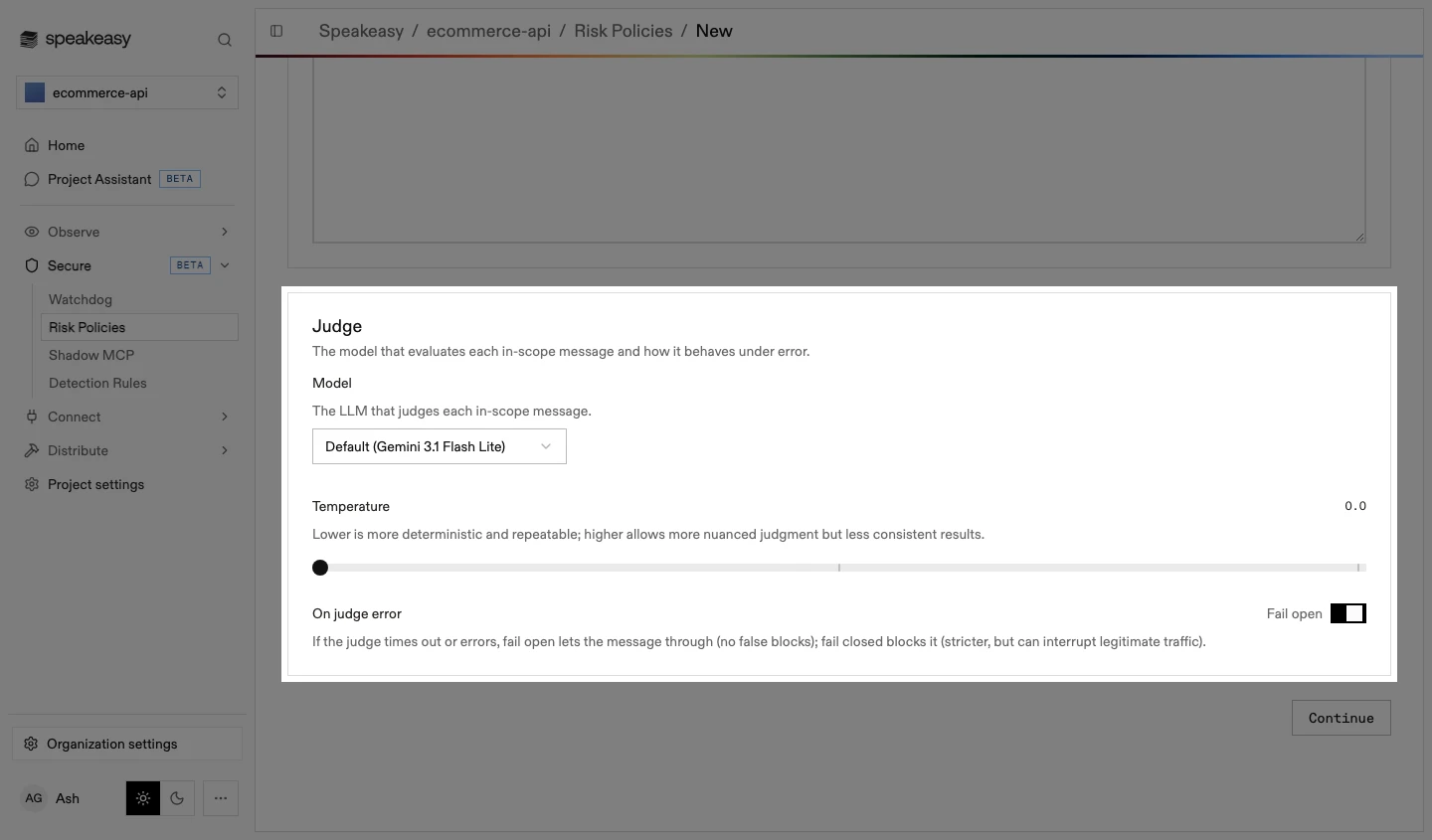
Configure the judge below the guardrail:
- Temperature: lower is more deterministic and repeatable, higher allows more nuanced judgment but less consistent results
- On judge error: fail open lets the message through when the judge times out or errors; fail closed treats the error as a match
-
Select Continue.
The judge evaluates each in-scope message against the guardrail and returns a verdict, a confidence score, and a rationale that is shown with the finding. It reads the same scan surfaces as the deterministic detectors: prompts, assistant messages, tool calls and their arguments, and tool responses.
Pair the guardrail with a detection scope rather than asking it to do all the work. Express “exfiltration through curl” as a scope that selects shell tool calls plus a guardrail that judges intent within them. A narrow scope cuts the judge’s cost and removes the traffic most likely to produce false positives.
On the Evaluate step, test the guardrail against real traffic before it goes live:
-
Pick recent agent sessions to replay, searching by session title or user. The judge runs over each session and shows the Flagged or Clean verdict it would produce.

-
Open a session to review the judgment. The transcript opens with the judge’s verdict, confidence, and rationale inline on each matched message. Under Was the judge right?, select Right or Wrong. The answers build a scorecard that persists with the policy, so a later edit is measured against the same review set.

-
To tune the guardrail, edit its text in the panel on the left of the step. The judge re-runs over the replayed sessions automatically after a short pause, so competing wordings can be compared against the same traffic.

-
Select Continue.
Evaluation uses the same detection scope as production scanning, so replay verdicts match live behavior. The scorecard appears again on the Review step, with links back to the sessions behind each verdict.
Detection scope
Section titled “Detection scope”On the Scope step, choose which session content the policy evaluates. Scope is set per detector category, so one policy can watch tool calls for destructive commands while watching prompts for secrets. Content outside the scope is never examined, which removes the scanning cost along with the noise.
-
Review each category’s recommended surfaces. Toggle User, Assistant, Tool requests, and Tool responses to change what is scanned; a custom selection replaces the recommendation.

-
For expression-level control, select Granular scope. Two CEL fields open, with one-click examples under each.

-
Write the expressions, or start from an example chip under each field:
- Detect on messages matching: a message must match this expression to be evaluated
- Exempt messages matching: messages matching this expression leave the policy entirely

-
Select Continue.
Match tool calls by MCP server, by the function invoked, by the harness-recognized tool name, or by drilling into the call’s arguments:
tool_calls.exists(t, t.server.matchExact("github"))tool_calls.exists(t, t.function.matchGlob("*delete*"))tool_calls.exists(t, t.function.matchText("bash") && t.args.get("command").matchRegex("rm -rf"))Use scope for whole classes of message that are irrelevant to the policy. When the policy is right but a specific value or rule keeps producing false positives, create an exclusion rule instead: a post-filter that suppresses matching findings retroactively and going forward while detection coverage stays intact.
Action, severity, and audience
Section titled “Action, severity, and audience”On the Action step:
-
Set Severity with the slider, from 0.1 to 10. Findings surface it as a Low, Medium, High, or Critical badge; it does not change what the policy detects, and Watchdog uses it to group and filter findings.

-
Choose how the policy responds when it fires:
- Log for review: record the finding and let the session continue. The default
- Warn and confirm: warn the user and require an acknowledgement before the action proceeds. Where confirmation isn’t possible, this falls back to blocking
- Deny the request: reject matching prompts and tool calls outright
- Quarantine session: deny the matching event and freeze the session’s prompts and tool calls until an admin releases it

-
Under Audience, choose who the policy evaluates:
- Everyone: every user in the organization
- Specific users: individual members, selected by search. Requires at least one selection
- Specific roles: every member of the selected roles, including members added to a role later. Requires at least one selection

-
Write the message shown to the user in the field below the audience: Warning message for a warning policy, Custom Message for a blocking one. Blank falls back to a default. Warning messages support the
%{match},%{entity},%{policy}, and%{rule}placeholders, substituted at warn time.
-
Select Continue.
To introduce enforcement safely:
- Create the policy with Log for review and a broad audience. Findings are recorded and nothing is interrupted.
- Review what it catches in Watchdog, and tune the scope or add exclusions until the findings look real.
- Raise the action to Warn and confirm or Deny the request, scoped to a small audience.
- Widen the audience once the enforcement behavior is confirmed.
An acknowledgement suppresses re-prompting for the same call for a grace period, so an agent that retries immediately isn’t challenged twice. Where an outright rejection is too blunt, a blocked user can request a just-in-time bypass instead.
Managing existing policies
Section titled “Managing existing policies”The Policies tab lists every policy in the project, beside the Detection Rules, Exclusion Rules, and Quarantines tabs.
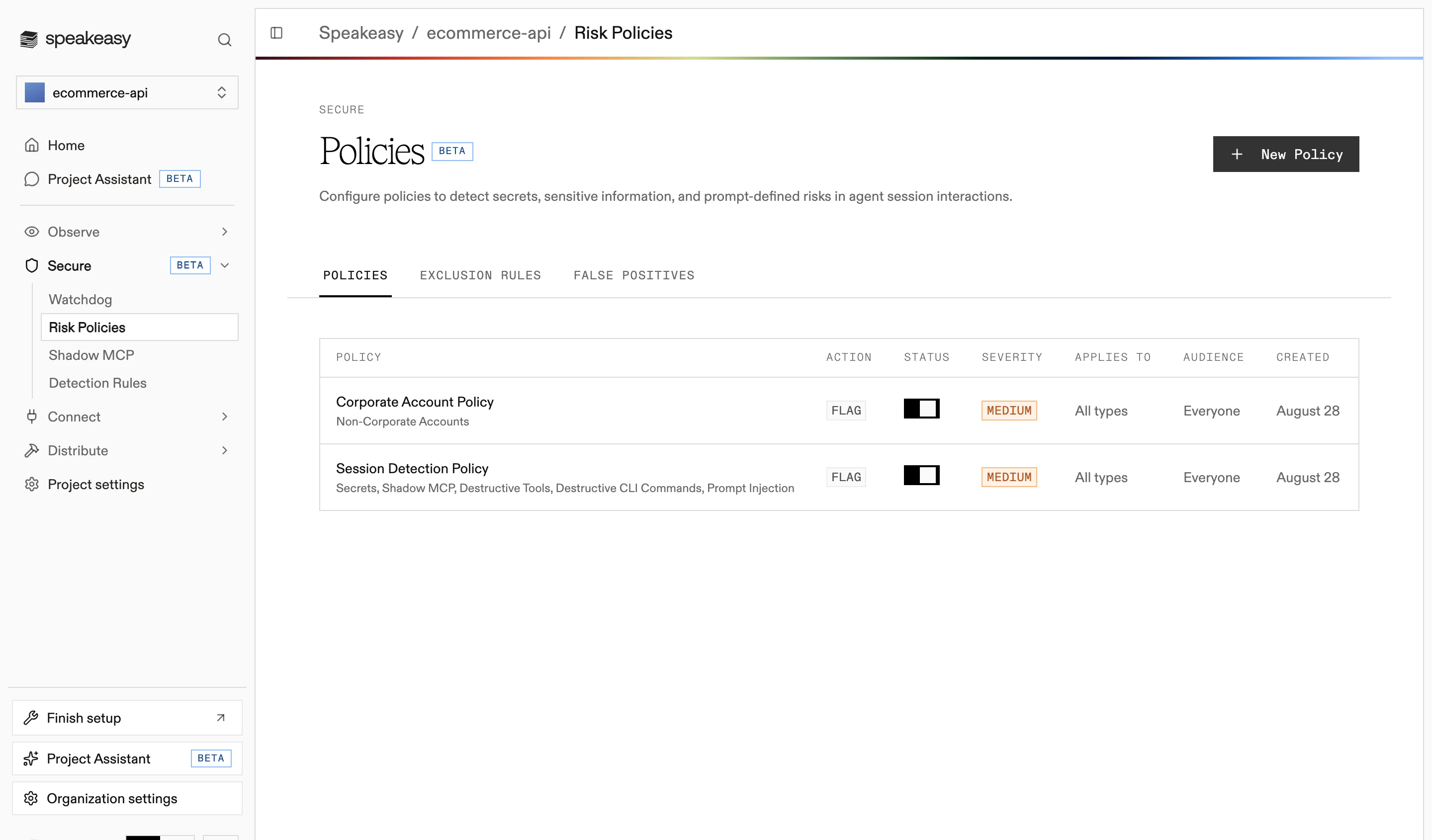
- To enable or disable a policy, use the toggle in its row.
- To edit or delete a policy, use its row actions. Deleting shows the impact and affected rule groups before confirming.
Quarantines
Section titled “Quarantines”When a quarantine policy fires, it denies the matching event and freezes the session: further prompts and tool calls in that session are blocked until an admin releases it.
The Quarantines tab lists every active session quarantine with the session, the policy that fired, the user, and when the session was quarantined.
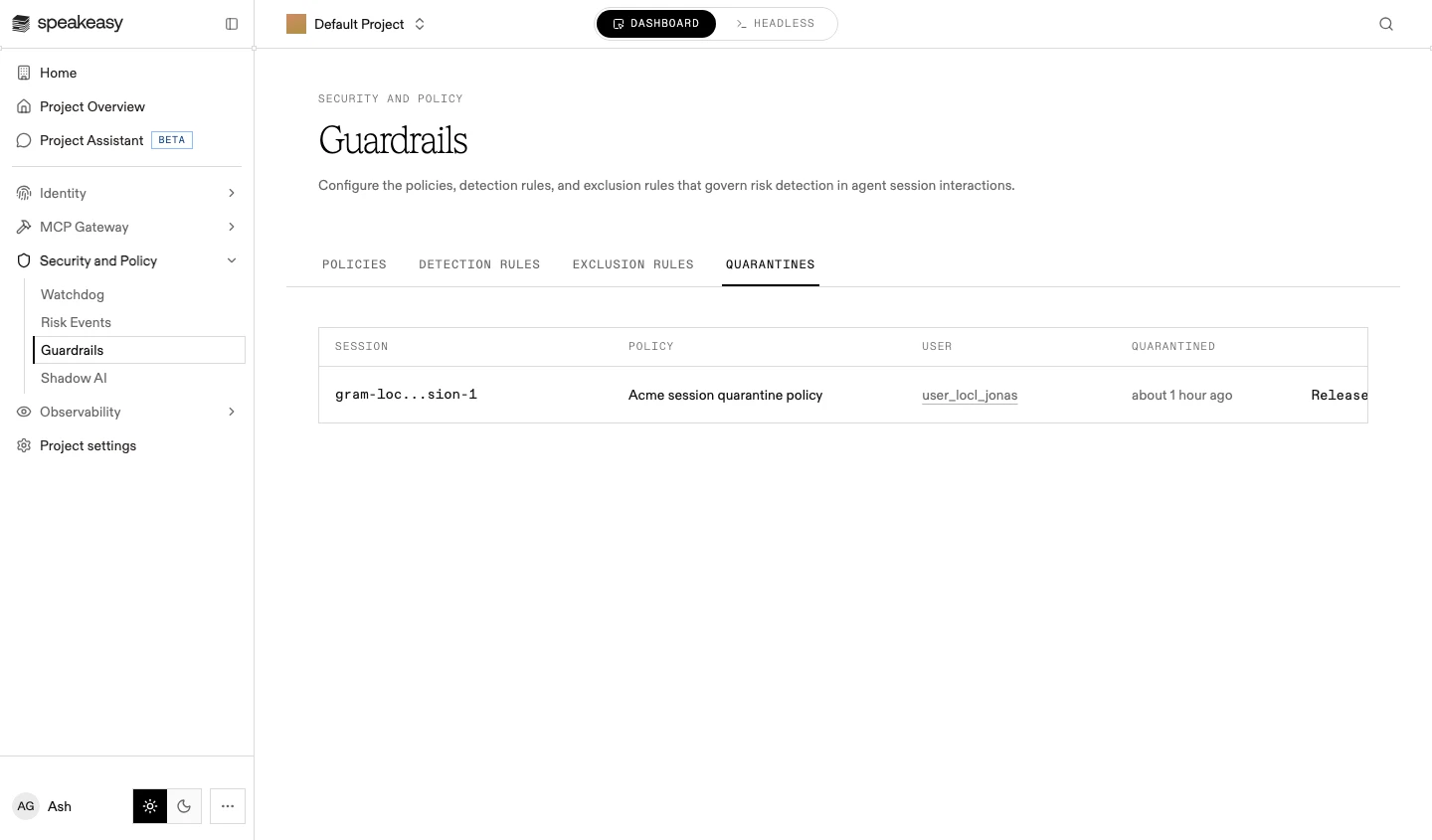
To lift a quarantine, select Release on its row. Release is immediate: there is no confirmation step, and the session’s prompts and tool calls resume.
Bypass requests
Section titled “Bypass requests”When an enforcing policy blocks a shadow MCP call, the block message carries a request-access link. Opening it signs the member in and files a bypass request, so an exception can be granted for that member without weakening the policy for anyone else.
To review a request:
- Open Security and Policy > Shadow AI. A server with an open request shows Pending in the MCPs inventory.
- Open the server and select Review Request. The Decide access sheet opens with the request beside the server’s gathered evidence.
- Decide the request, and record the rationale:
- Approve: grants an exception for an audience the approval names, everyone or selected people and roles. A granted exception can be revoked later
- Deny: blocks the server for everyone
See Shadow MCP allow and block lists for how decisions and policy URL lists interact.
How many policies to create
Section titled “How many policies to create”The four bindings determine how many policies a project needs: one catch-all policy cannot enforce for one group while auditing another, and one policy per rule is unmanageable. Split policies where a binding genuinely differs:
- Enforcement: keep auditing and enforcing policies separate, so enforcement can be introduced without disturbing detection coverage
- Audience: a policy for contractors and a policy for everyone are separate policies, not one policy with a filter
- Severity: group detections of similar severity so the badge stays meaningful for triage
Detection categories that share an enforcement posture, an audience, and a severity belong in the same policy.