Organization settings / AI Integrations
AI Integrations
Optionally connect provider compliance and admin APIs to enrich usage, spend, and review data.
AI Integrations connect AI providers’ compliance and admin APIs to the platform and control the event and metric streams they import. Open the page from Organization settings > Settings > AI Integrations in the dashboard.
Optional
These integrations are optional. The platform works with the basic instrumentation from the observability plugin and the device agent alone; provider APIs add richer usage, spend, and review data on top.
Access requirements
Section titled “Access requirements”Viewing this page requires the org:read scope, so both default Admin and
Member roles can see connection status. Connecting, configuring, pausing, or
deleting providers requires the org:admin scope, held only by the Admin
role by default.
Providers
Section titled “Providers”- LiteLLM: a push integration that enforces risk policies on LiteLLM-routed model traffic and receives usage telemetry from the proxy; see LiteLLM for setup
- Cursor: connects the Cursor Admin API to track Cursor usage and spend across the organization; see Cursor for setup
- Anthropic inference hooks: captures governed conversations across the Claude Enterprise suite and enforces project security policies before inference; see Anthropic inference hooks for setup
- Anthropic Compliance: imports Claude chats from claude.ai web and desktop for security review; see Anthropic Compliance for setup
- OpenAI Compliance Logs: imports Codex usage and spend from OpenAI Compliance Logs; see OpenAI Compliance Logs for setup
- Azure AI Foundry: publishes MCP servers to a Foundry private tool catalog so agents built in Foundry Agent Service can call them with per-user OAuth; see Private tool catalog for setup
Unlike the pull-based providers, the LiteLLM section appears only for organizations where push integrations are enabled, and requires the org:admin scope to view. Contact Speakeasy to enable push integrations.
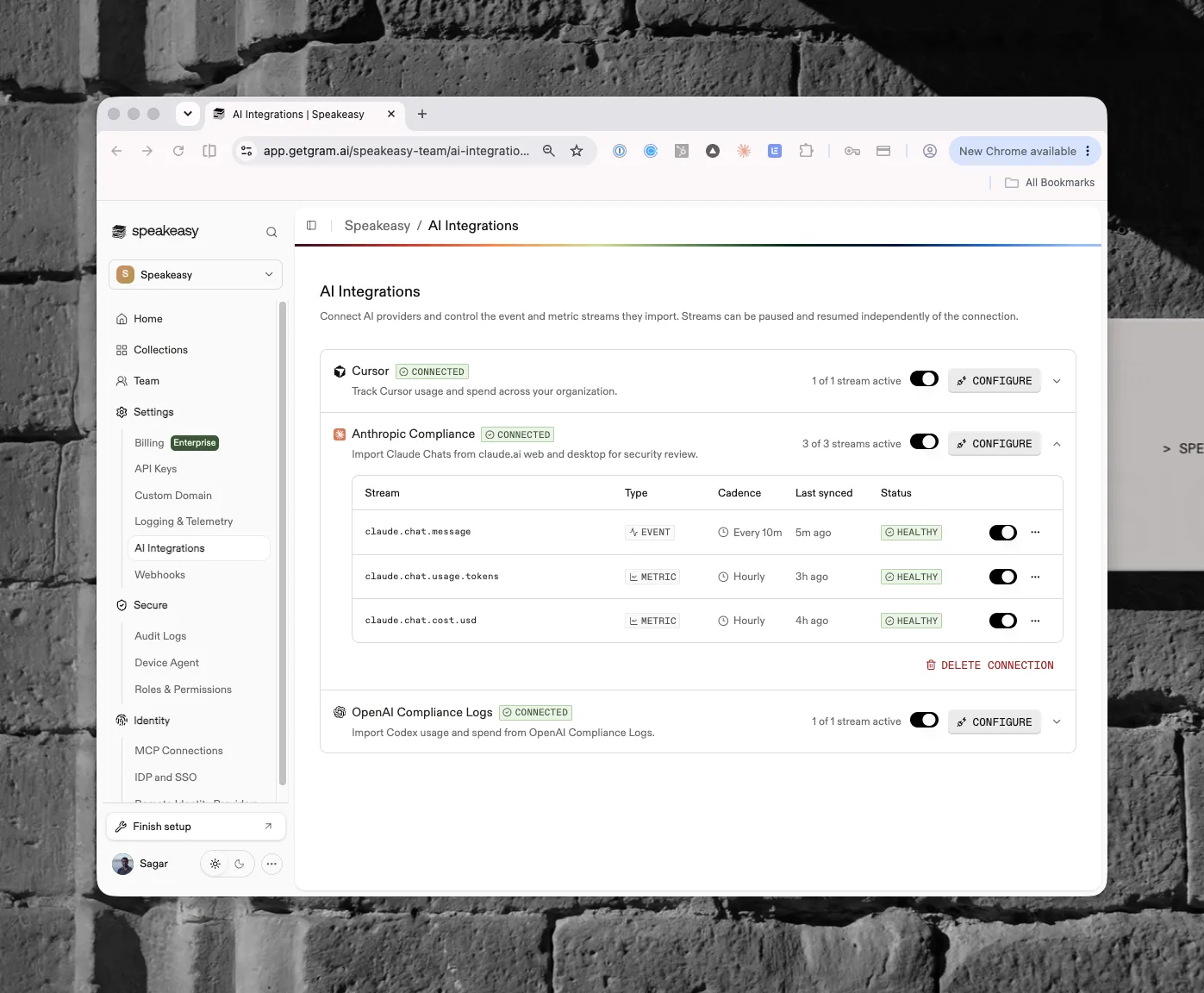
Each provider card shows its connection status, how many of its streams are active, and a Configure action. Providers can also be connected during the setup wizard’s Additional agent configuration step.
Streams
Section titled “Streams”Expanding a connection lists its streams, each with a type (event or metric), sync cadence, last-synced time, and health status. For example, the Anthropic Compliance connection imports a chat message event stream every ten minutes alongside hourly token-usage and cost metrics.
Streams pause and resume individually, independent of the connection, so one stream can be turned off without disconnecting the provider. Delete Connection removes the provider entirely.
Used by
Section titled “Used by”- Costs and Agent Sessions
- Guardrails and Risk Events, for traffic through LiteLLM and Anthropic inference hooks