Organization settings / LiteLLM
LiteLLM
Enforce risk policies on LiteLLM-routed model traffic and ingest LiteLLM usage telemetry for observability and cost attribution.
LiteLLM often acts as the gateway and router for model inference across OpenAI, Anthropic, and other providers. This integration makes the platform the risk enforcement point and observability sink for an existing LiteLLM proxy: prompts are checked against risk policies before they reach a model provider, allowed prompts and responses are captured for asynchronous risk analysis, and normalized usage telemetry flows into Observability and Costs. LiteLLM keeps model selection, provider credentials, retries, and budgets; the platform never becomes the model proxy.
Access requirements
Section titled “Access requirements”The LiteLLM integration requires the AI Platform Push Integrations product feature on the organization — contact Speakeasy to enable it. Creating, rotating, or revoking an instance requires the org:admin scope, held by the default Admin role. Members do not see the LiteLLM section on the AI Integrations page.
How it works
Section titled “How it works”The integration has two independent data paths. The guardrail path is synchronous: LiteLLM calls the platform before each model request (pre_call) and after each response (post_call) using LiteLLM’s Generic Guardrail API, so no custom callback code is required. The telemetry path is asynchronous: LiteLLM’s OTel exporter pushes metadata-only traces and optional metrics.
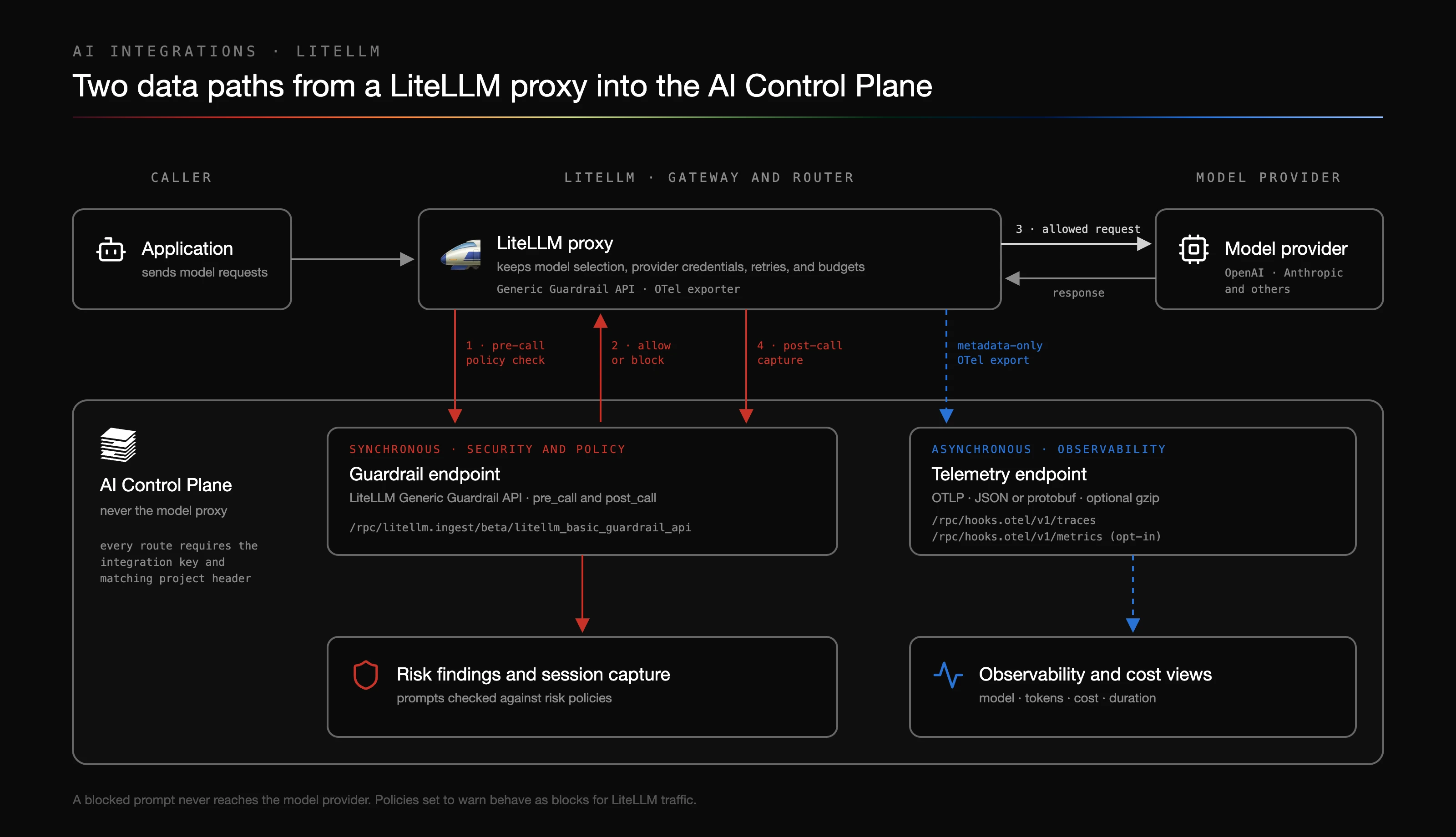
A blocked prompt never reaches the model provider; LiteLLM returns the configured policy message to the caller. Because LiteLLM model API calls have no interactive acknowledgement channel, policies configured to warn behave as blocks for LiteLLM traffic.
The platform exposes three routes for the proxy. All of them require the integration key and matching project header.
| Route | Schema owner | Carries |
|---|---|---|
/rpc/litellm.ingest/beta/litellm_basic_guardrail_api | LiteLLM Generic Guardrail contract | Prompt and response content, virtual-key identity |
/rpc/hooks.otel/v1/traces | OTLP | Metadata-only spans: model, tokens, cost, duration, streaming state |
/rpc/hooks.otel/v1/metrics | OTLP | Opt-in operational aggregates |
LiteLLM owns the guardrail wire format and appends the /beta/litellm_basic_guardrail_api suffix to the configured api_base. Every OTLP signal shares the one /rpc/hooks.otel endpoint — the platform resolves LiteLLM semantics from the integration key, not the route — so the exporter needs no LiteLLM-specific path. The OTLP routes accept JSON and protobuf encodings, with optional gzip compression, up to 4 MiB per request.
Supported versions
Section titled “Supported versions”LiteLLM v1.94.0 is the qualified version: every configuration fragment on this page is exercised against that exact image by an end-to-end suite before a version is documented as supported. Other versions may work but are not verified. OpenAI Chat Completions, OpenAI Responses, Anthropic Messages, streaming, and pass-through routes are covered through the one integration contract.
Create an integration
Section titled “Create an integration”Open Organization settings > Settings > AI Integrations, expand the LiteLLM section, and click New instance. Each instance represents one LiteLLM deployment: pick the project it reports into, name it, and choose the failure posture (see failure posture below).
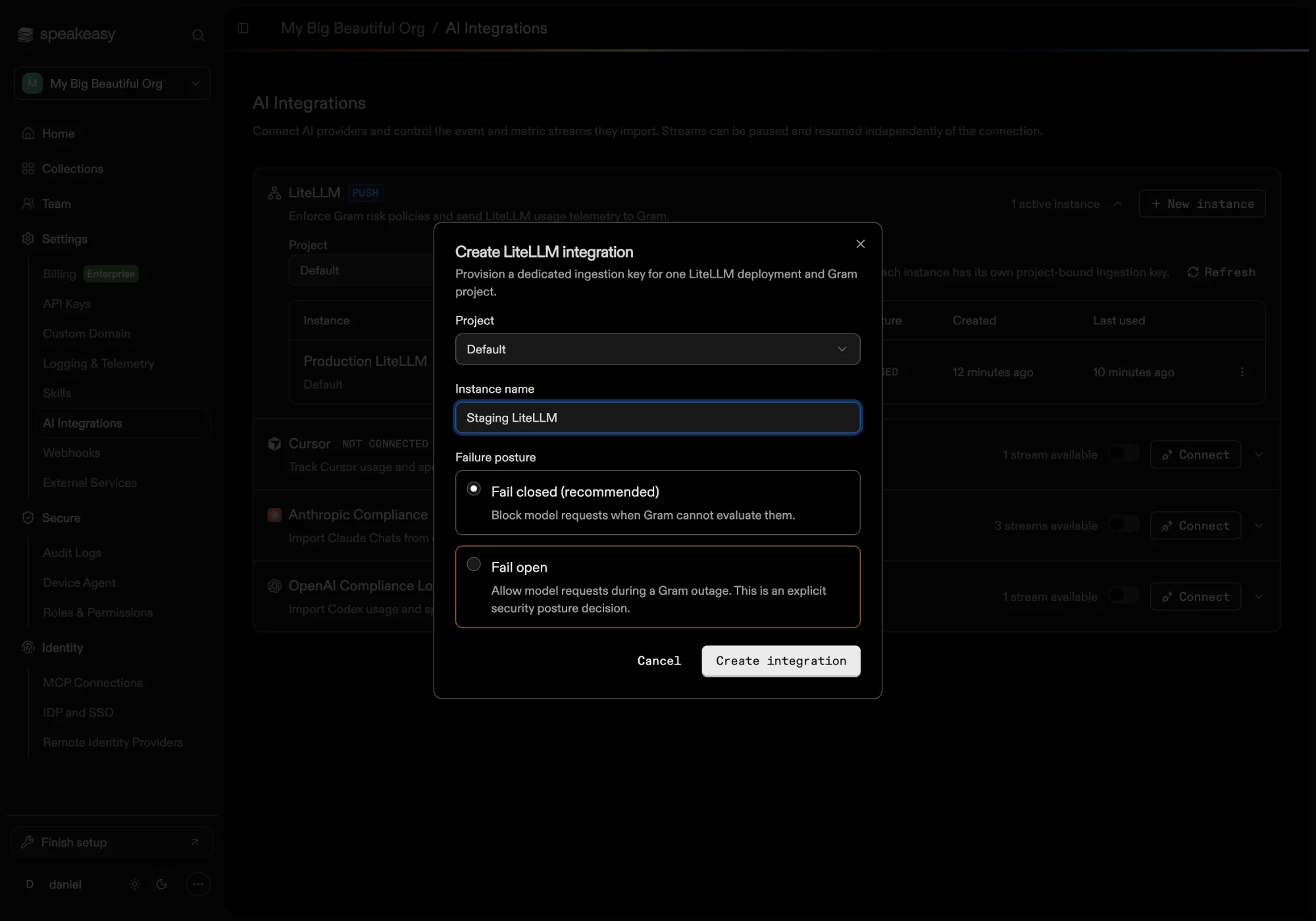
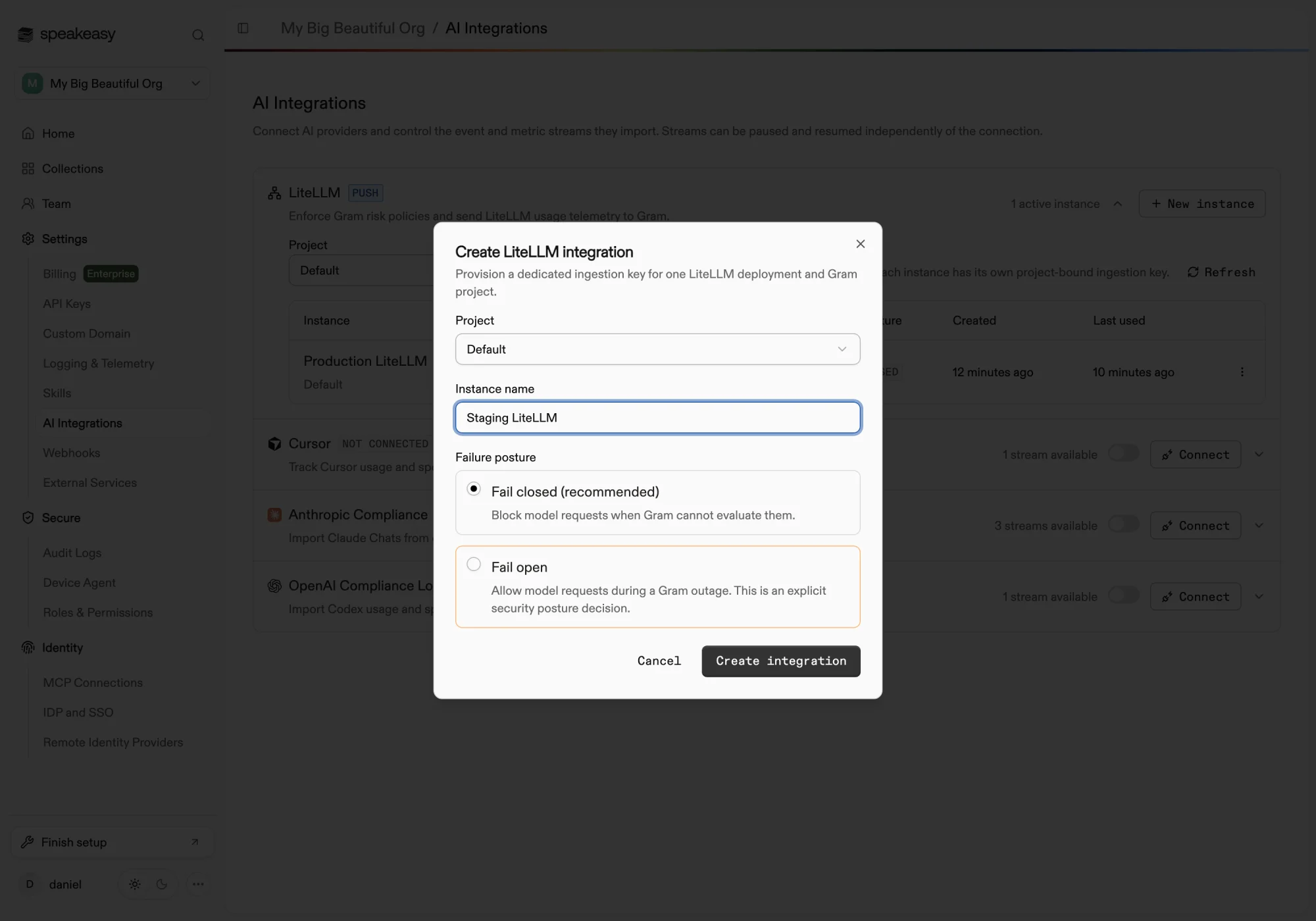
Creating the instance mints a dedicated ingestion key bound to the chosen project. The key is shown once — copy it before closing the dialog, because only its hash is stored. The same dialog shows the generated environment variables, the guardrail configuration fragment, and two verification commands. Keys rotate and revoke per instance from the row menu, so one deployment can be rotated without touching others.
The key authenticates the LiteLLM deployment and fixes the organization and project. It carries a write-only ingestion scope: it cannot read prompts, telemetry, policies, or findings, and it never identifies the person making a model request.
Configure the proxy
Section titled “Configure the proxy”Set the environment variables on the LiteLLM proxy, pasting the key into the first one. The values below match what the dashboard generates.
export GRAM_LITELLM_INGEST_KEY="<PASTE_KEY_FROM_DASHBOARD>"export GRAM_PROJECT_SLUG="default"export LITELLM_OTEL_V2=trueexport OTEL_EXPORTER=otlp_httpexport OTEL_ENDPOINT="https://app.getgram.ai/rpc/hooks.otel"export OTEL_HEADERS="Gram-Key=${GRAM_LITELLM_INGEST_KEY},Gram-Project=${GRAM_PROJECT_SLUG}"export OTEL_SERVICE_NAME=litellmexport OTEL_INSTRUMENTATION_GENAI_CAPTURE_MESSAGE_CONTENT=no_contentexport LITELLM_OTEL_INTEGRATION_ENABLE_METRICS=trueexport LITELLM_OTEL_LEGACY_COMPAT=falseMerge the guardrail fragment into the LiteLLM configuration file. Secrets stay environment references — never inline key values in the file.
guardrails: - guardrail_name: gram-risk litellm_params: guardrail: generic_guardrail_api mode: [pre_call, post_call] api_base: https://app.getgram.ai/rpc/litellm.ingest headers: Gram-Key: os.environ/GRAM_LITELLM_INGEST_KEY Gram-Project: os.environ/GRAM_PROJECT_SLUG extra_headers: - x-gram-session-id default_on: true streaming_end_of_stream_only: true fail_on_error: true unreachable_fallback: fail_closedRequired settings
streaming_end_of_stream_only: true is required — without it LiteLLM’s default streaming mode sends repeated cumulative callbacks that the platform does not accept. extra_headers is required to forward the x-gram-session-id value; without it LiteLLM sends a placeholder instead of the session identifier.
The proxy needs outbound HTTPS to the platform host for both the guardrail and OTel endpoints. Endpoints must use HTTPS; plain HTTP is accepted only for loopback hosts during local development. A deployment that serves multiple projects configures one guardrail destination and one key per project.
Docker Compose
Section titled “Docker Compose”services: litellm: image: ghcr.io/berriai/litellm:v1.94.0 command: ["--config", "/app/config.yaml", "--port", "4000"] ports: - "4000:4000" volumes: - ./litellm-config.yaml:/app/config.yaml:ro environment: GRAM_LITELLM_INGEST_KEY: ${GRAM_LITELLM_INGEST_KEY} GRAM_PROJECT_SLUG: ${GRAM_PROJECT_SLUG} LITELLM_OTEL_V2: "true" OTEL_EXPORTER: otlp_http OTEL_ENDPOINT: https://app.getgram.ai/rpc/hooks.otel OTEL_HEADERS: Gram-Key=${GRAM_LITELLM_INGEST_KEY},Gram-Project=${GRAM_PROJECT_SLUG} OTEL_SERVICE_NAME: litellm OTEL_INSTRUMENTATION_GENAI_CAPTURE_MESSAGE_CONTENT: no_content LITELLM_OTEL_INTEGRATION_ENABLE_METRICS: "true" LITELLM_OTEL_LEGACY_COMPAT: "false"With the LiteLLM Helm chart, place the guardrail fragment under proxy_config and deliver the two secrets through a Kubernetes secret referenced by environmentSecrets; the remaining OTel variables go in environmentVariables. The values are identical to the Docker example.
Employee attribution
Section titled “Employee attribution”Authentication and attribution are separate. The integration key identifies the deployment and fixes the organization and project. People are resolved from LiteLLM’s virtual keys: LiteLLM injects the authenticated virtual key’s user email into each guardrail callback, and the platform matches that email against active members of the organization.
- A virtual key bound to a LiteLLM user with an email attributes enforcement, captured messages, findings, and telemetry to the matching member.
- A shared master key, or a virtual key without a bound email, produces organization- and project-level attribution only. Organization-wide policies still apply; user-targeted policies do not, and the traffic shows as unattributed.
- Caller-supplied end-user identifiers are stored as an external dimension only. They are never trusted for membership resolution or policy targeting, and unattributed traffic is never assigned to the administrator who created the key.
Employee attribution therefore requires issuing LiteLLM virtual keys per user with email addresses that match people in the Identities roster. The pre-call resolution is cached per LiteLLM call, so the response capture and telemetry rows attribute to the same person and session as the enforced request.
Session grouping uses the forwarded x-gram-session-id header when the application sets one, then LiteLLM’s trace ID, then the call ID.
Verify the connection
Section titled “Verify the connection”The setup dialog provides two commands, also shown below. Set LITELLM_VIRTUAL_KEY and LITELLM_MODEL in the shell first. The safe request completes normally through the provider:
curl "${LITELLM_PROXY_URL:-http://localhost:4000}/v1/chat/completions" \ --header "Authorization: Bearer $LITELLM_VIRTUAL_KEY" \ --header "Content-Type: application/json" \ --data '{"model":"'"$LITELLM_MODEL"'","messages":[{"role":"user","content":"Reply with OK."}]}'The blocked request carries a synthetic credential and is rejected before the provider is called, provided the project’s secret-detection policy is enabled:
curl "${LITELLM_PROXY_URL:-http://localhost:4000}/v1/chat/completions" \ --header "Authorization: Bearer $LITELLM_VIRTUAL_KEY" \ --header "Content-Type: application/json" \ --data '{"model":"'"$LITELLM_MODEL"'","messages":[{"role":"user","content":"token=ghp_R2D2C3POLuk3Skywalker1234567890ab"}]}'Back on the AI Integrations page, the instance flips from Waiting for traffic to Connected shortly after the first authenticated event arrives. The table shows each instance’s health, key prefix, failure posture, and last-used time.
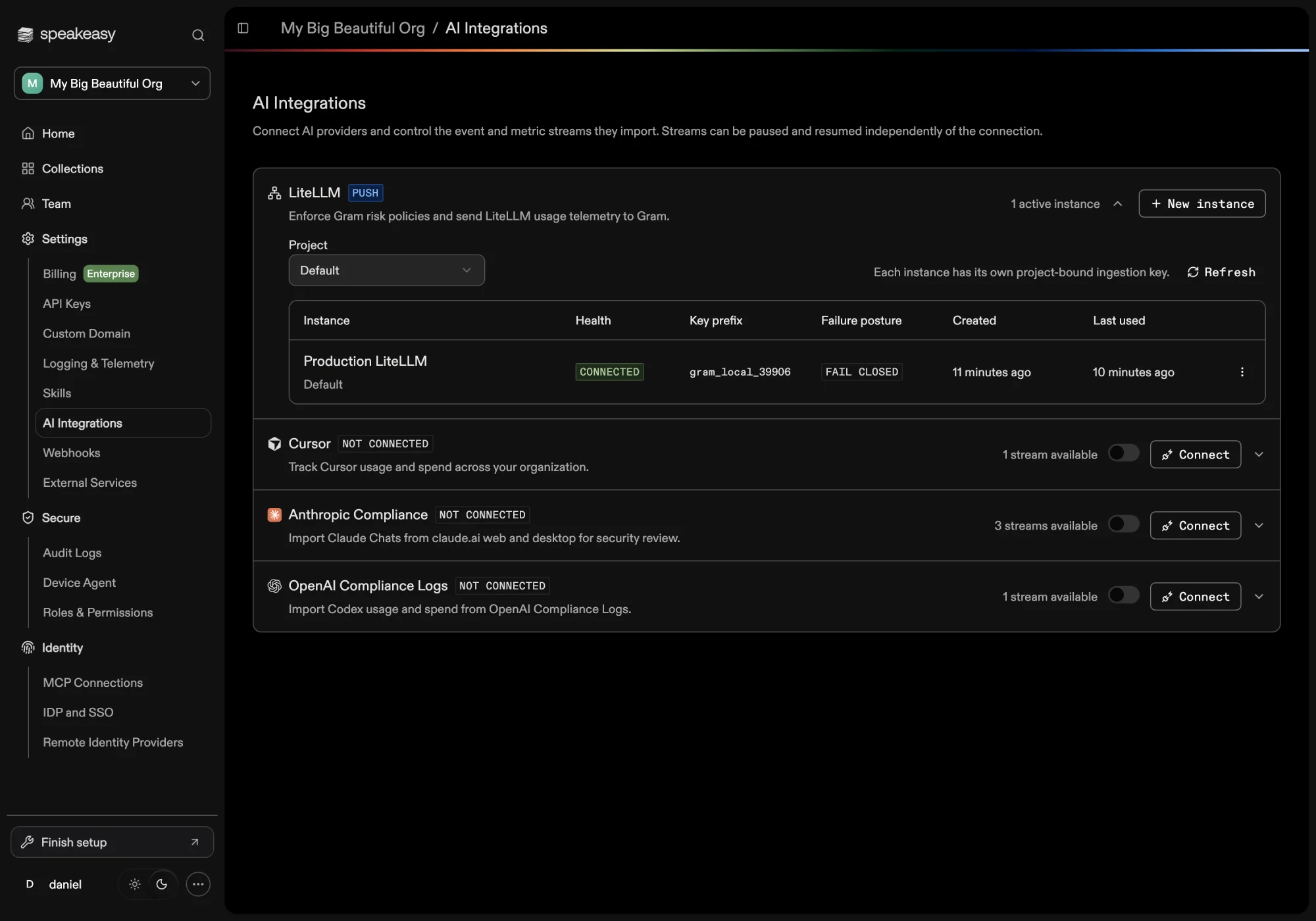
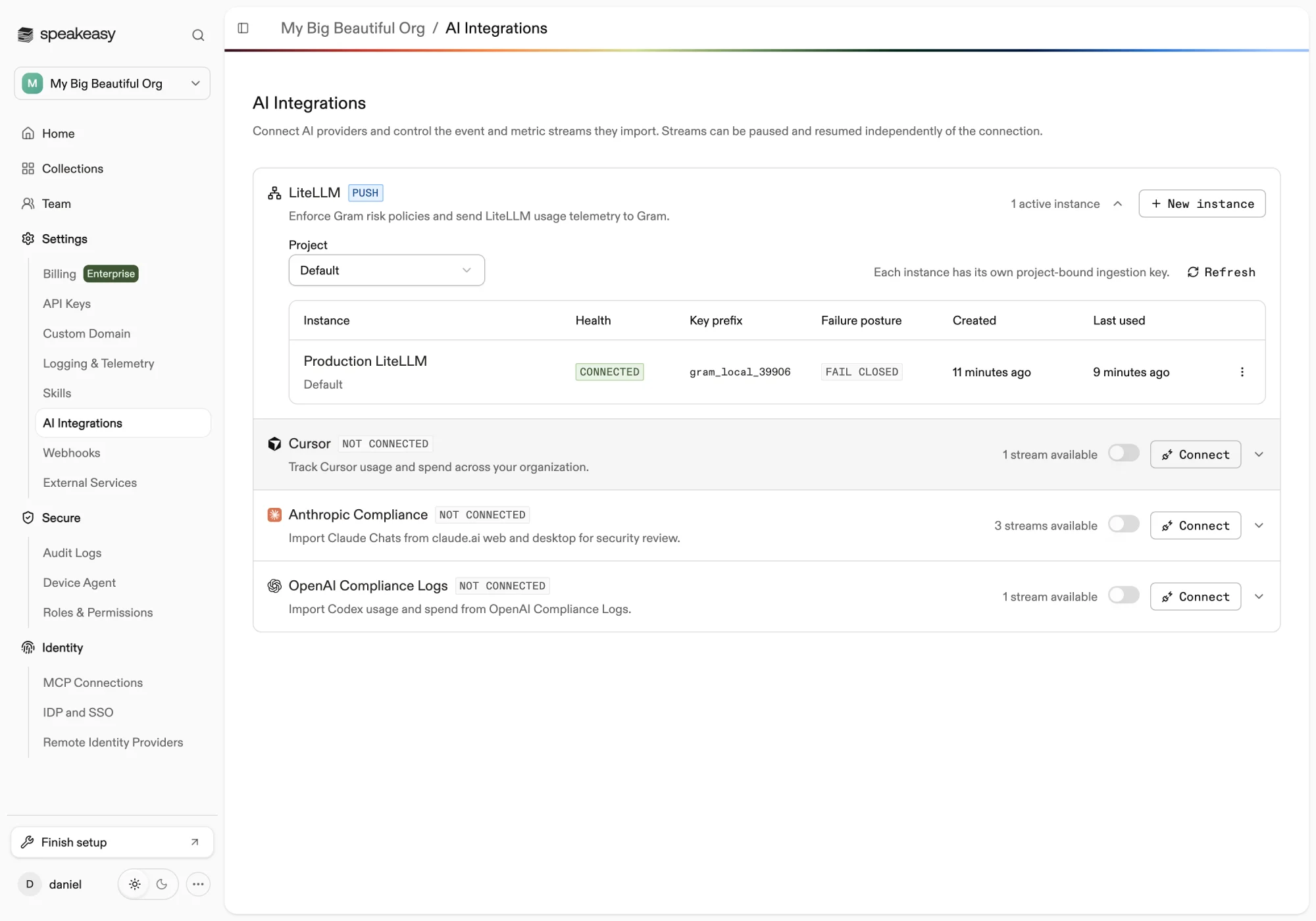
After traffic arrives, LiteLLM appears as its own source in Observability, Costs, and risk views, with sessions linking findings and per-call model telemetry through the shared call identity.
Streaming
Section titled “Streaming”Streaming requests are supported with the required streaming_end_of_stream_only: true setting: a streaming call produces one pre-call check and one end-of-stream response capture. A blocked streaming request is rejected before the provider and the stream never starts. Response text is analyzed asynchronously after the stream completes; generated output is not blocked mid-stream.
Metrics
Section titled “Metrics”OTel metrics are opt-in via LITELLM_OTEL_INTEGRATION_ENABLE_METRICS=true. They are success-path operational aggregates — operation duration, token usage, request cost, time to first token, time per output token, and provider response duration — useful for operational charts. Per-call trace spans remain the authoritative source for cost and session records, so disabling metrics loses nothing from billing or session views.
Telemetry boundaries
Section titled “Telemetry boundaries”The documented scope stops at what LiteLLM v1.94.0 verifiably emits. The following are not part of the integration:
- Retry and fallback visibility. Stock LiteLLM telemetry has no retry count, attempt, or fallback attributes. Retries and fallbacks remain LiteLLM routing responsibilities and are not modeled.
- MCP and tool execution. Tool definitions and model-emitted tool calls are recorded as context, but LiteLLM does not execute tools, so no tool-execution records are created and LiteLLM traffic does not appear in tool views.
- Finish reasons. LiteLLM emits finish reasons only when message content capture is enabled, which the recommended privacy configuration keeps off.
- Synchronous output blocking. Model responses are captured and analyzed asynchronously; only prompts are blocked inline.
Failure posture
Section titled “Failure posture”Each instance declares what the proxy should do when the platform cannot evaluate a request, and the choice is baked into the generated configuration as unreachable_fallback:
- Fail closed (default, recommended) — model requests are blocked when the guardrail endpoint is unreachable or errors. No traffic escapes policy evaluation.
- Fail open — model requests proceed during an outage. This is an explicit security posture decision: requests made during the outage are neither evaluated nor captured.
A valid policy denial always blocks regardless of posture. The configured posture is displayed on the instance row so the tradeoff stays visible.
Privacy
Section titled “Privacy”Prompt and response content reaches the platform through exactly one channel: the authenticated guardrail endpoint, where it is required for policy evaluation and session capture, under the same retention and authorization controls as other captured sessions. The OTel path is metadata-only by design — OTEL_INSTRUMENTATION_GENAI_CAPTURE_MESSAGE_CONTENT=no_content disables content at the source, and the platform additionally drops content attributes at ingest if a client sends them anyway. Provider credentials never leave LiteLLM.
Troubleshooting
Section titled “Troubleshooting”View diagnostics on an instance row shows connection health, the reported LiteLLM version, last ingestion and OTel event times, the last error, and attribution rates for the past 24 hours.
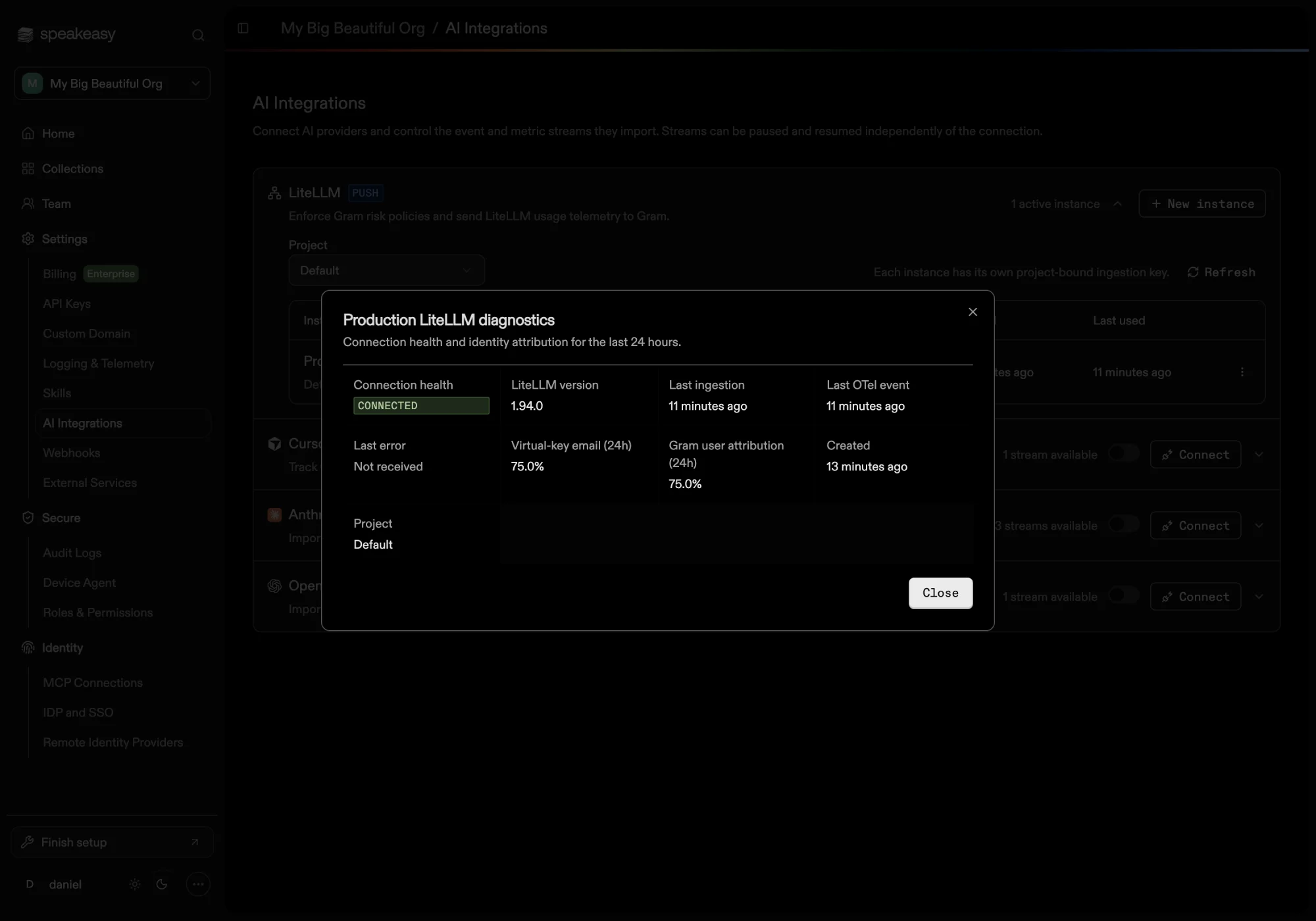
- Waiting for traffic with no last ingestion — no event has authenticated with this instance’s key yet. Check that the guardrail fragment is merged,
default_on: trueis set, and the proxy restarted after configuration. - Connected but no OTel events — enforcement works but the exporter does not. Check the
LITELLM_OTEL_V2,OTEL_EXPORTER,OTEL_ENDPOINT, andOTEL_HEADERSvariables; without them, usage and cost views stay empty even though policies are enforced. - Last ingestion missing while OTel flows — traffic is observed but unenforced; the guardrail configuration is missing or disabled on the proxy.
- Authentication failure — the proxy uses a rotated or revoked key, or the
Gram-Projectheader does not match the project the key is bound to. - Invalid payload — malformed export, usually an unqualified LiteLLM version or a non-LiteLLM sender using the key.
- Payload limit exceeded — an OTel export over 4 MiB. Reduce the exporter batch size or interval.
- Version shows “Not reported” — set
OTEL_SERVICE_NAME=litellmso trace resources carry the proxy version; guardrail callbacks alone do not report it. - Low virtual-key email rate — callers use the master key or email-less virtual keys. Issue per-user virtual keys with emails to restore employee attribution.
- Emails present but low user attribution — virtual-key emails do not match enrolled members; check the Identities roster and email aliases.
Health updates are written shortly after traffic arrives and the table refreshes every few seconds while expanded, so allow a brief lag after the first request before the badge flips.