Organization settings / Team
Team
How organizations and projects structure the platform, and how to invite, manage, and remove organization members.
The Team pages cover who belongs to the organization and what they can do. This page explains how organizations and projects divide the platform, and how to manage members from Organization settings > Team > Members in the dashboard. Two subpages cover the rest of the group:
- Roles and Permissions defines roles, grants scopes to members and agents, and resolves authorization challenges.
- IDP and SSO connects the organization’s identity provider for Single Sign-On and Directory Sync.
Access requirements
Section titled “Access requirements”Viewing the Members page requires the org:read scope, which both the Admin and Member default roles include. Sending invites, changing roles, and removing members require the org:admin scope, held by Admins only.
Organizations and projects
Section titled “Organizations and projects”An organization is the company-level tenant, and most companies need exactly one. Everything about people and governance lives at the organization level: membership, roles and permissions, SSO and Directory Sync, billing, security policies, and audit logs. Members join the organization, not individual projects.
A project is a workspace inside the organization that scopes the tool surface: sources, MCP servers, environments, skills, and deployments all belong to a project. Every organization starts with a default project, which cannot be deleted.
When to create another project
Section titled “When to create another project”Staying on the default project is the right call for most teams; create additional projects when separation starts to matter:
- Different teams or products need their own tool catalogs, MCP servers, and environments.
- Credentials need a boundary. Environments and their secrets are scoped to a project, so a project keeps one team’s credentials out of another team’s MCP servers.
- Usage should break down by team. Tokens and costs attribute to the organization through its projects, so a project per team gives per-team views in Observability and Billing on top of the org-wide totals.
- API keys need a narrower blast radius. An API key can be bound to a single project at creation time, so a key issued for one team’s automation cannot reach another team’s project.
An MCP server that already lives in one project can be redeployed into another with the migrate-mcp-between-projects skill bundled with the Platform MCP. It re-creates the server in the target project, so setup and authorization are completed again there, and the original stays in place until an admin chooses to disable it.
Team members
Section titled “Team members”The Members page (titled Team Members on the page itself) lists everyone in the organization and handles invites, role changes, and removals. Its Team Members section lists every member with their join date, roles, and last activity. Search by name or email; each row’s menu has actions for that member, including View profile, Manage roles, Remove from the organization, and shortcuts for security challenges and kill switches.
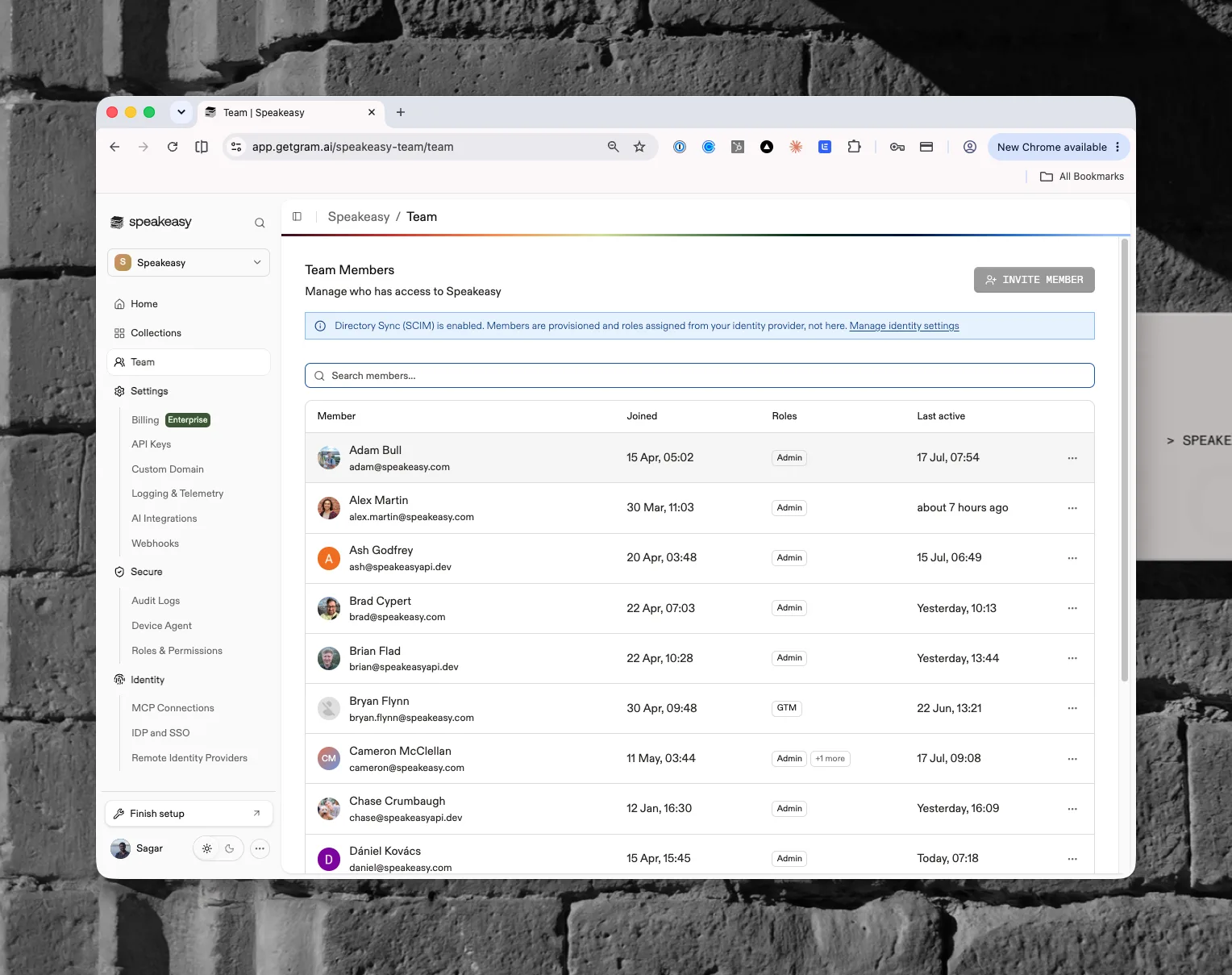
View profile opens the member’s identity profile in the Identity section, which shows the roles they hold, the MCP servers and skills they can reach, and their MCP sessions. Manage roles opens the Manage Roles dialog, where the member’s roles are added or removed; this is where system roles such as Admin are assigned, since the role editor and the challenge shortcut only assign custom roles.
People whose AI tool activity is seen but who have no member row appear on Identities with a No linked account badge; inviting them here links that activity to a member once they sign in.
The page guards against lockouts. Removing the last remaining admin is blocked, and members cannot remove themselves from the list.
Inviting members
Section titled “Inviting members”The Invite Member button opens the Invite Team Member dialog with an Email address field. When RBAC is enabled, the dialog also includes a Role select for choosing the role the new member receives. Click Send Invite to submit.
When Directory Sync (SCIM) is enabled, a Directory Sync is enabled notice states that team membership and role assignments are managed by the identity provider, the Invite Member button is disabled, and the notice links to the identity settings. See the IDP and SSO page for setup details. Without Directory Sync, the same panel offers Set up SSO & SCIM.
Pending invites
Section titled “Pending invites”The Pending Invites section lists invitations that have been sent but not yet accepted, with the email, assigned role, who sent it, when it was sent, and when it expires. Each pending invite supports resending the invitation, changing the assigned role, and revoking the invite.
Used by
Section titled “Used by”- Identity
- MCP servers, environments, and skills, which are scoped to projects
- Costs and Billing, which break usage down by project
- Roles and Permissions