Organization settings / IDP and SSO
IDP and SSO
Manage employee sign-in, directory sync, and agent access through your identity providers.
IDP and SSO manages employee sign-in, directory sync, and agent access through the organization’s identity providers. People sign in through Single Sign-On, and membership and roles follow the directory through Directory Sync. Open the page from Organization settings > Team > IDP and SSO in the dashboard. The page has a Single sign-on tab. Admins also see a Slack workspaces tab (preview) and, where it is enabled for the organization, an Identity providers tab (preview) for Enterprise Managed Auth.
Access requirements
Section titled “Access requirements”Viewing this page requires the org:read scope, so both default Admin and Member roles can see it. Configuring SSO or Directory Sync requires the org:admin scope, held by Admins only, and the features are entitlement-gated by plan. Roles and scopes are managed in Roles and Permissions.
Configuring a connection
Section titled “Configuring a connection”The Single sign-on tab has three sections: Domain verification, Single Sign-On, and Directory Sync. Single Sign-On needs a verified domain. The Single Sign-On and Directory Sync cards each have a Configure button whose behavior depends on the current state:
- When the feature is already active, the card shows Connected and the button opens the admin portal for managing the connection.
- When the feature is available but not yet set up, the button enters the setup wizard at the matching step. See getting started for the full wizard flow.
- When the feature isn’t included in the current plan, the button contacts the team to enable SSO and Directory Sync.
The Directory Sync card spells out what turning it on changes: members are provisioned automatically from the directory, roles are assigned from identity provider group mappings, members can’t be invited manually, and roles can’t be assigned to members manually.
Once a directory is connected, admins see the directory’s role mappings in place of the Directory Sync card, with a Manage connection button below them that opens the directory connection. See Directory sync and roles for how mappings work.
Identity providers
Section titled “Identity providers”The Identity providers tab connects the identity providers the organization uses. The platform syncs their applications and, where a provider supports it, manages how AI agents access those applications through Enterprise Managed Auth. Employee sign-in and directory sync stay on the Single sign-on tab.
The tab is in preview, is enabled per organization, and appears only to people with the org:admin scope. It shows one card per supported provider. Okta is supported today: its card shows the connection status, such as Verified, the Okta organization URL, and a Connect Okta or Manage Okta button. The Okta workspace has Setup, Applications, and Cross App Access tabs for connecting Okta, syncing its applications, and setting up resource connections for the Speakeasy AI agent. See Enterprise Managed Auth for the full setup.
How federated sign-in works
Section titled “How federated sign-in works”Speakeasy identity keeps enterprise roles and members in lockstep between the organization’s identity provider and the AI Control Plane. Sign-in is federated: the organization’s IDP does the authentication, and the Speakeasy identity layer is the broker. The flow is synchronous and runs on every sign-in, typically in about 500ms end to end.
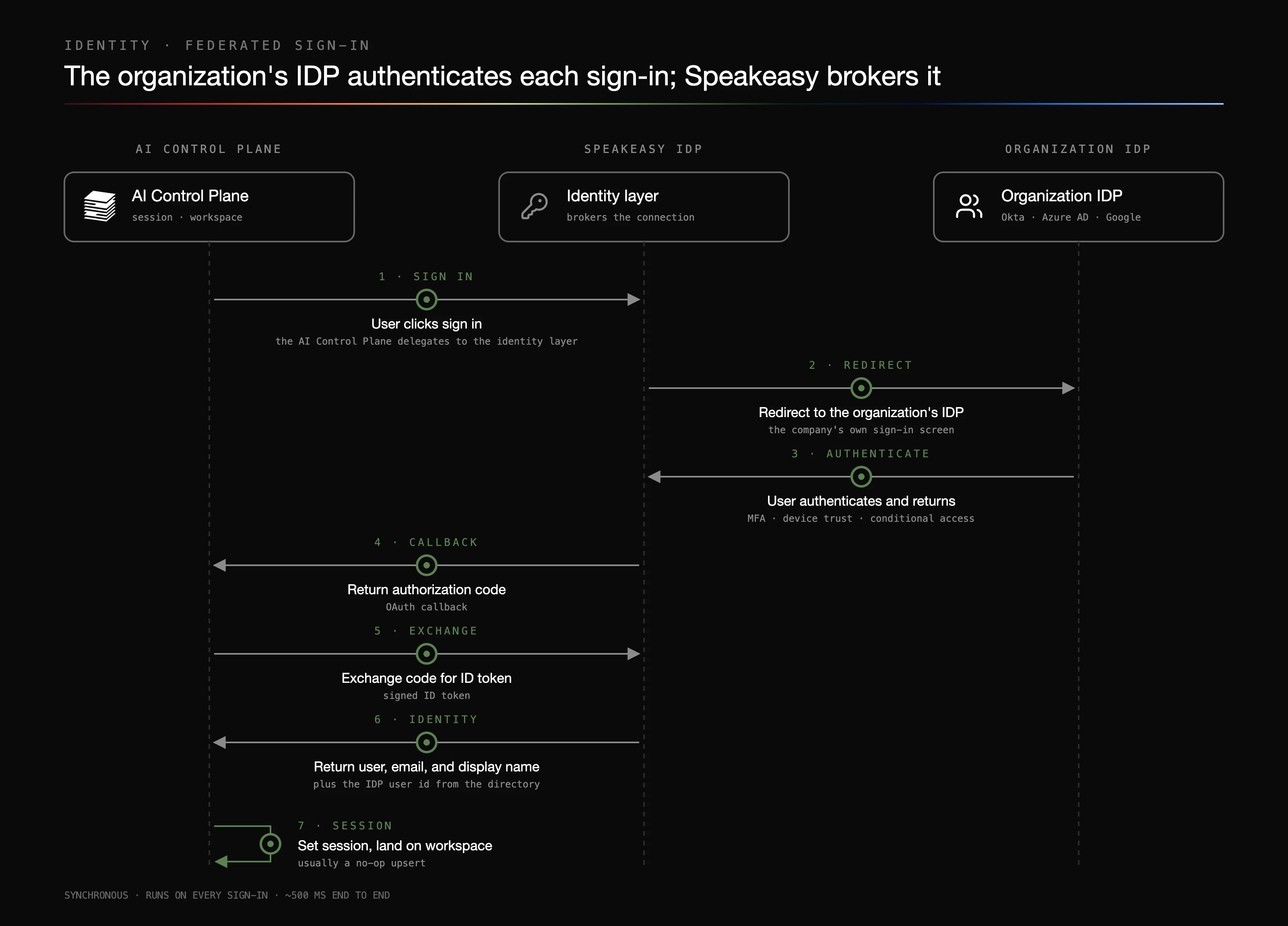
- Sign in - The user clicks Sign in, and the Control Plane delegates the entire chain to the Speakeasy identity layer.
- Redirect - The identity layer routes to the organization’s federated connection (for example Okta, Azure AD, or Google). The user sees the company’s own sign-in screen, not a Speakeasy one.
- Authenticate - The user authenticates under the organization’s credentials and policies (MFA, device trust, conditional access), and the IDP posts the assertion back.
- Callback - The identity layer hands an authorization code back to the Control Plane through the OAuth callback.
- Exchange - The Control Plane exchanges the code for a signed ID token.
- Identity - The validated token provides the user, email, display name, and the original IDP user id linking back to the directory.
- Session - The session cookie is set and the user lands in their workspace. This last write is typically a no-op upsert, because Directory Sync has already provisioned the user and their memberships.
How Directory Sync works
Section titled “How Directory Sync works”Directory Sync keeps the Control Plane’s users and roles current from the organization’s directory of record. It runs continuously and asynchronously, with no admin intervention needed after setup.
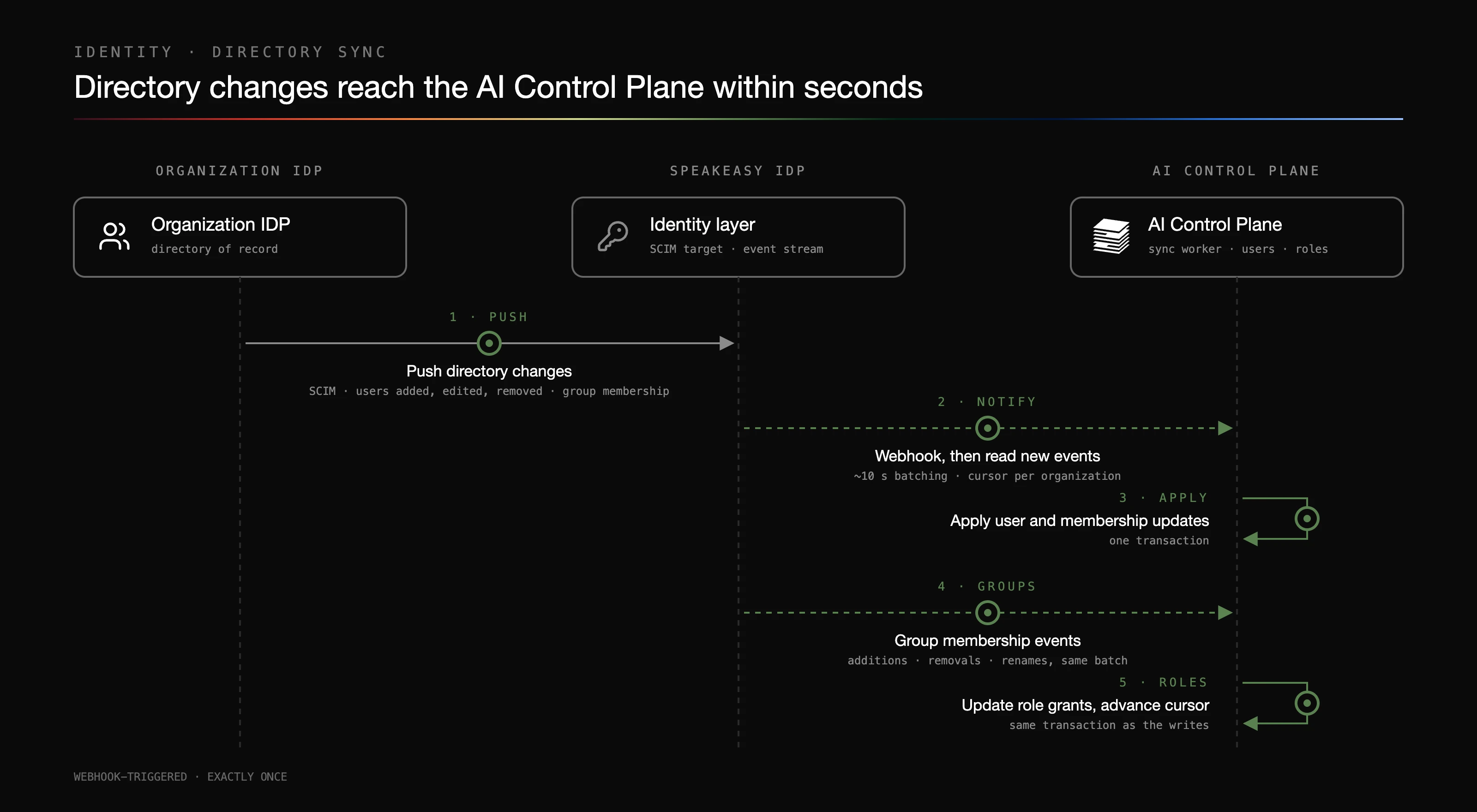
- Push - When an admin adds, edits, or removes a user, or changes a group’s membership, the directory pushes the change to the Speakeasy identity layer via SCIM.
- Notify - The identity layer sends the Control Plane a webhook when new events arrive. The sync worker waits about 10 seconds to batch closely spaced changes, then reads the event stream with a cursor per organization.
- Apply - User and membership events apply in a single transaction, so a member’s account already exists by the time they first sign in.
- Groups - Group membership events (additions, removals, and renames) arrive in the same batch.
- Roles - Groups and attribute values that an admin has mapped to a Control Plane role grant that role. Unmapped groups grant nothing. Grants are inserted or revoked, and the cursor advances in the same transaction as the writes, giving exactly-once semantics: no event is applied twice or dropped.
Synced members, departments, job titles, employment types, and directory groups populate the Identities roster and its Department and Team filters, and appear in the header of each identity page.
To map directory groups and attribute values to roles, and for what deprovisioning does, see Directory sync and roles.
Used by
Section titled “Used by”- Roles and Permissions and Team, which become read-only for people assignment under Directory Sync
- Identity profiles, which show directory attributes
- Costs, Budgets, the Billing usage explorer, and Data export, which break usage down by directory attributes
- Authorization Servers, a separate setting that authenticates MCP clients rather than dashboard sign-in