Organization settings / Logging Settings
Logging Settings
Control which tool-call logs, telemetry, and agent session data the platform records for an organization.
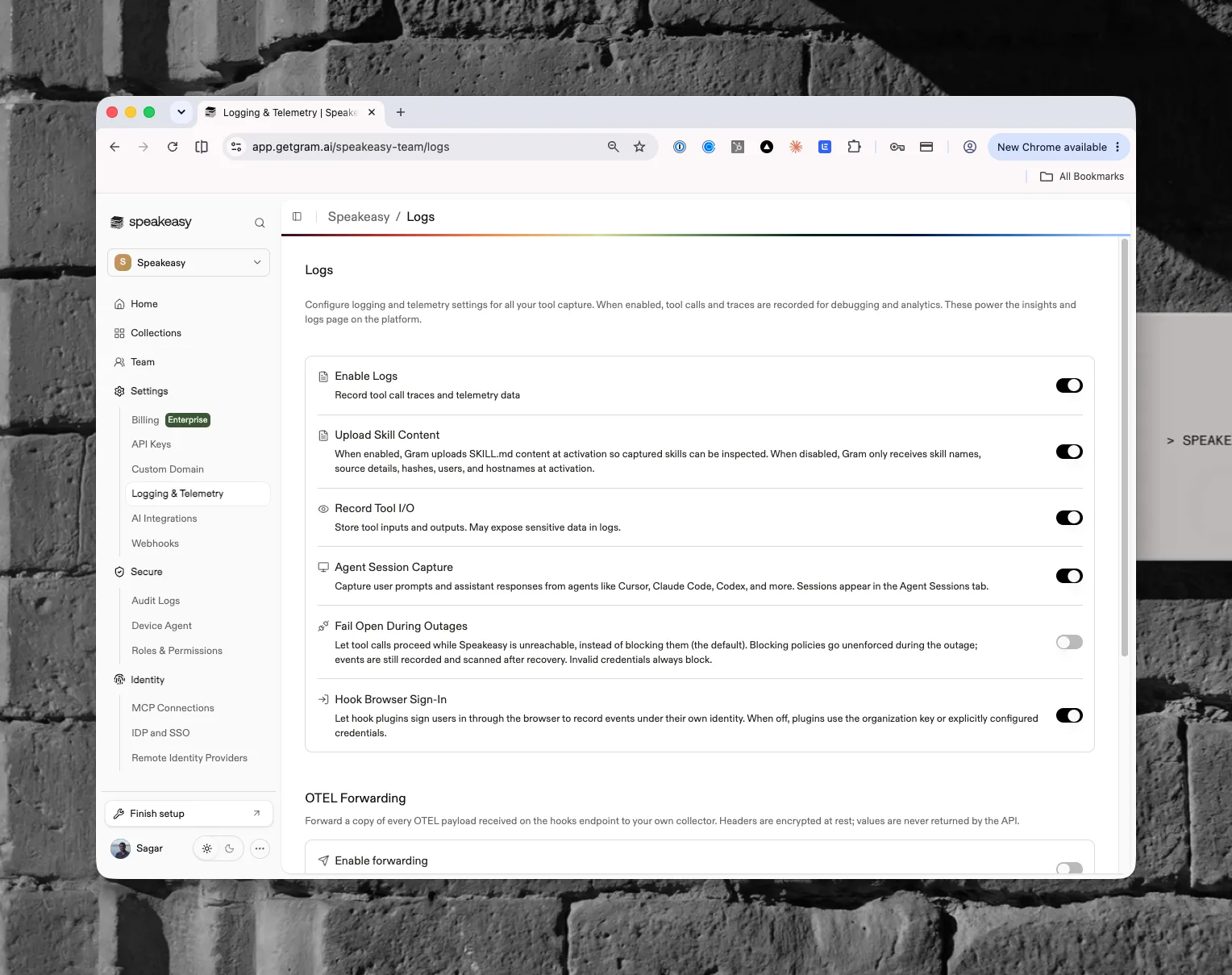
Logging Settings control what the platform captures from instrumented agents, from tool-call traces to agent session transcripts. Everything in the Observability section is powered by these switches. Open them from Organization settings > Settings > Logging & Telemetry in the dashboard; the page itself is titled Logs.
Access requirements
Section titled “Access requirements”Viewing this page requires the org:read scope, so both default Admin and
Member roles can see current settings. Changing any toggle requires the
org:admin scope, which only the default Admin
role holds. Members
without that scope see the switches rendered but disabled.
Data retention
Section titled “Data retention”Tool logs and agent sessions are retained for 90 days, then age out automatically; a banner at the top of the page states the retention period. See platform security for how that data is stored and isolated.
Logging toggles
Section titled “Logging toggles”The page presents a set of toggle rows that control what the platform records. The Enable logging step of the setup board (see getting started) turns on Enable Logs, Record Tool I/O, and Agent Session Capture at once. New organizations start with Enable Logs on; every other setting except Upload Skill Content is off until an admin turns it on.
- Enable Logs records tool-call traces and telemetry. This is the master switch for the settings below it.
- Upload Skill Content uploads each skill’s SKILL.md content at activation so captured skills can be inspected. When disabled, the platform receives only skill names, source details, hashes, users, and hostnames at activation. This row appears only when skills are enabled for the organization, and it is on by default. The same toggle also appears in Skill capture settings, and the two stay in sync.
- Record Tool I/O stores the inputs and outputs of tool calls. Stored payloads may expose sensitive data, so enable it deliberately.
- Agent Session Capture captures user prompts and assistant responses from supported coding agents. Captured sessions appear in Agent Sessions. The toggle applies to every instrumented agent, including ones without an OpenTelemetry exporter such as OpenCode and OpenClaw, whose transcripts arrive through the observability plugin instead.
- Fail Open During Outages lets tool calls proceed when the platform is unreachable instead of blocking them (blocking is the default). Tool calls then only ever block when a blocking policy fires, so with no blocking policies nothing blocks (this was formerly called Observability Mode). Blocking policies go unenforced during the outage; events are still recorded and scanned after recovery, and invalid credentials always block. Flipping this setting is recorded in Audit Logs.
- Hook Browser Sign-In lets hook plugins sign users in through the browser so events record under their own identity. When off, plugins use the organization key or explicitly configured credentials.
How Enable Logs cascades
Section titled “How Enable Logs cascades”Record Tool I/O and Agent Session Capture both depend on Enable Logs:
- Turning Enable Logs off also turns Record Tool I/O off.
- While Enable Logs is off, both switches are frozen at their stored value and cannot be changed. Turn logs back on to edit them.
Upload Skill Content, Fail Open During Outages, and Hook Browser Sign-In are independent of Enable Logs.
Settings save immediately, one switch at a time, and the rest of the page is locked while a change is in flight. If a save fails, the switch reverts to its stored value and an error appears.
Related settings
Section titled “Related settings”- Data export sends normalized OTLP logs, metrics, and traces from each project to an external collector.
- AI Integrations connects provider compliance and admin APIs for LiteLLM, Cursor, Anthropic, and OpenAI on its own settings page. Those integrations are optional; the platform works with basic instrumentation alone.
Used by
Section titled “Used by”- Tool Logs and MCP Insights, which need Enable Logs
- Agent Sessions and Costs, which need Agent Session Capture
- Skills, which show SKILL.md content only with Upload Skill Content
- Guardrails, whose outage behavior follows Fail Open During Outages
- Plugins and the Device Agent, which honor Hook Browser Sign-In