Organization settings / Anthropic inference hooks
Anthropic inference hooks
Set up Anthropic inference hooks for organization-wide Claude observability and inline security policy enforcement.
Anthropic inference hooks send each governed Claude prompt to Speakeasy before inference. Speakeasy records the conversation for observability, evaluates it against the project’s security policies, and returns an allow or deny verdict. A denied request never reaches the model.
One organization-level hook covers Claude Chat on the web, desktop, and mobile; Claude Code on the web and in the CLI; Cowork; Claude Design; and the rest of the Claude Enterprise suite. This makes inference hooks the broadest way to establish baseline visibility and security controls across Claude surfaces without installing software on each user’s device.
Claude Code and Cowork
Inference hooks cover Claude Code and Cowork, but Speakeasy also provides richer, product-native options for them. The Anthropic logging and telemetry setup adds tool-level telemetry, while managed Anthropic plugins add hooks, skills, and centrally distributed controls. Use those integrations when you need deeper visibility or control than the organization-wide inference hook provides.
What the hook captures and controls
Section titled “What the hook captures and controls”Anthropic calls the hook before each governed inference request and waits for Speakeasy’s verdict. The request includes the user-visible conversation transcript, including text, tool calls and results, and text extracted from attachments. It does not include raw file or image bytes, system prompts, tool definitions, or Anthropic-internal context. Voice mode is not covered.
Because the hook runs before inference, Speakeasy can both:
- Surface conversations in Agent Sessions for organization-wide observability and review.
- Evaluate prompts and tool results against project security policies, then allow or block the next inference request.
Inference hooks currently govern prompt-side inference only. Anthropic does not yet provide a response-side hook, and inference hooks cannot rewrite or redact a prompt.
Requirements
Section titled “Requirements”- A Claude Enterprise organization. Anthropic currently offers inference hooks in beta.
- The Owner or Primary owner role in Claude. Anthropic requires the
organization:managepermission; the Claude Admin role alone is not sufficient. - Speakeasy organization-admin access to complete the setup and save the signing secret.
Set up the integration
Section titled “Set up the integration”The recommended path is the Set up Anthropic observability task in the Speakeasy onboarding flow. It generates the organization-specific endpoint, walks through the matching Claude settings, and confirms that traffic arrives. You can also open Organization settings > Settings > AI Integrations, find Anthropic inference hooks, and select Connect.
1. Enable logging and generate the endpoint
Section titled “1. Enable logging and generate the endpoint”In Speakeasy, open Set up Anthropic observability and complete Enable logging. Under Enable inference hooks, select Generate endpoint, then copy the generated HTTPS URL. The endpoint is assigned to your organization automatically and uses the security policies from its Speakeasy project.
2. Add the endpoint in Claude
Section titled “2. Add the endpoint in Claude”Open Claude’s Inference hooks settings as an Owner or Primary owner. If inference hooks are not yet available to the organization, turn on Allow for your organization. Select Edit or Configure, paste the Speakeasy endpoint URL, and test the connection.
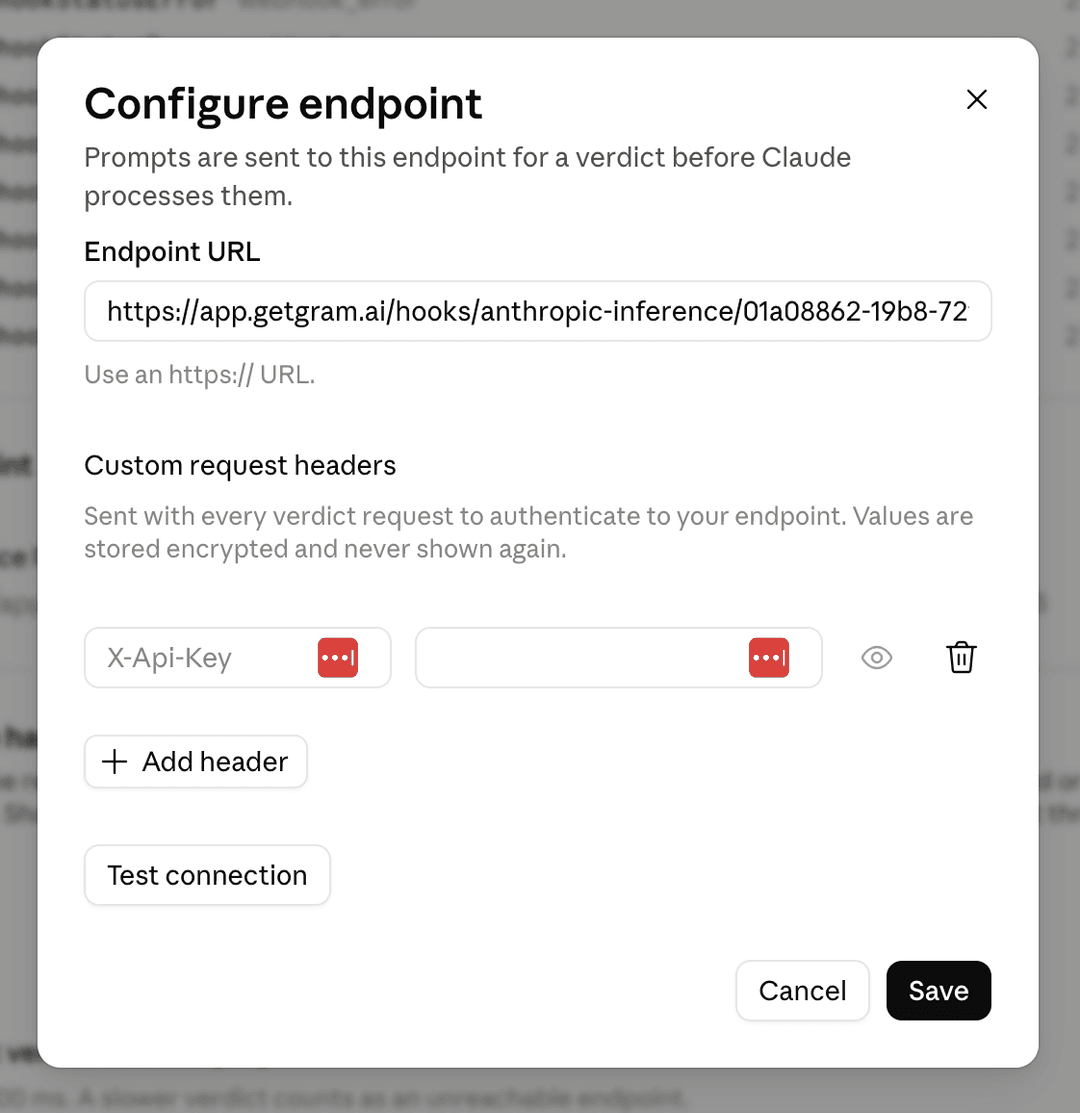
Anthropic’s Configure inference hooks page is the authoritative reference for these controls.
3. Start in Shadow mode
Section titled “3. Start in Shadow mode”Turn on Enforce verdicts, then set Failure handling > Mode to Shadow mode for the initial rollout. In Shadow mode, Claude sends prompts and records verdicts without blocking users, which gives you time to validate traffic and tune policies safely.
Keep Requests inspected at 100% if you want complete organization-wide observability. A sampled-out request is not sent to Speakeasy and cannot be evaluated or recorded by this integration.
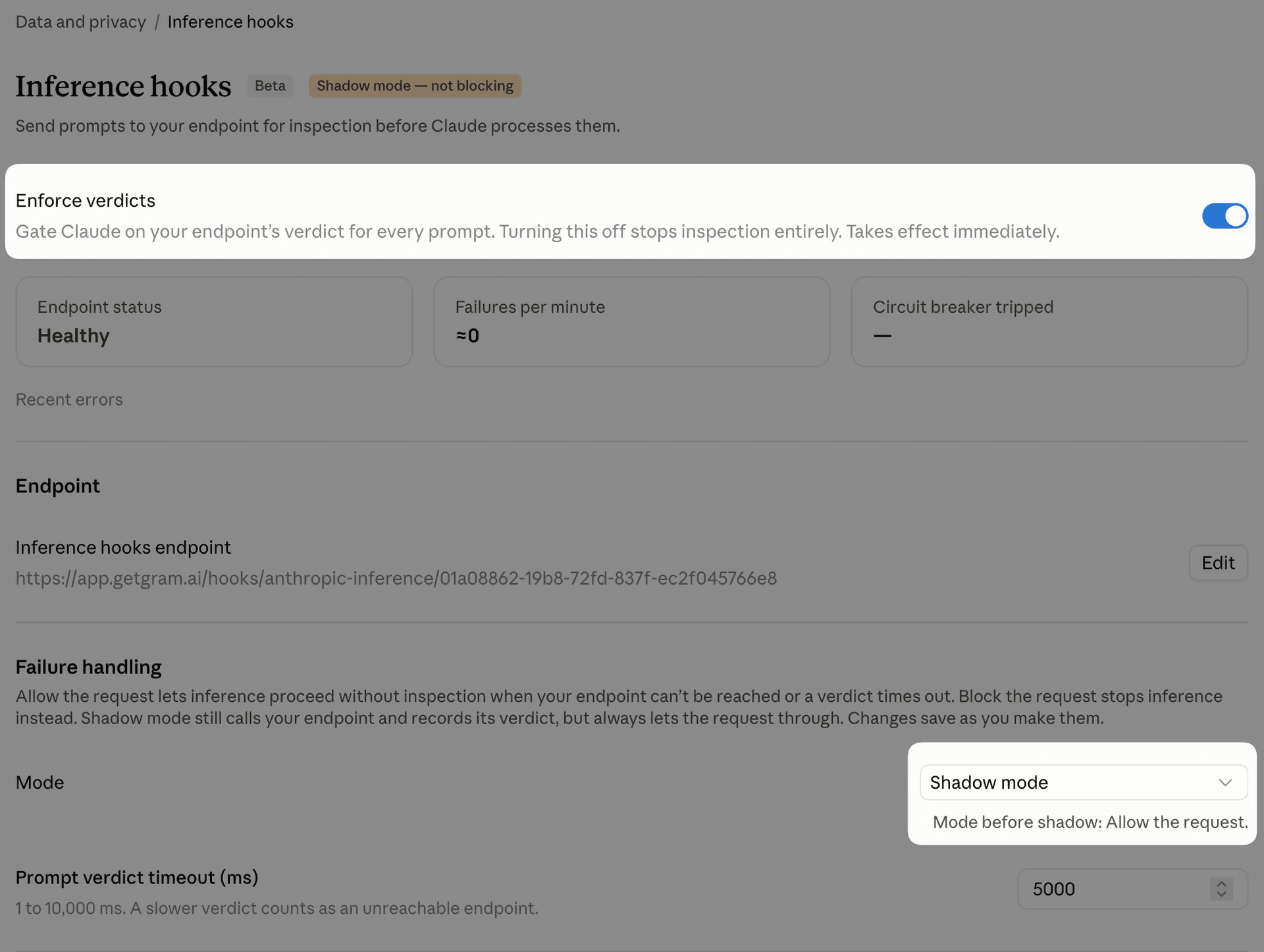
4. Save the signing secret in Speakeasy
Section titled “4. Save the signing secret in Speakeasy”Under Request signing in Claude, generate the signing secret. Anthropic displays the whsec_... value only once. Copy it immediately, return to the Speakeasy onboarding task, paste it into Save the signing secret, and save. Speakeasy uses the secret to authenticate deliveries from Anthropic.
If the secret is lost, rotate it in Claude and save the new value in Speakeasy.
5. Confirm traffic
Section titled “5. Confirm traffic”Send a new message from any governed Claude surface, such as Claude Chat on the web or desktop. Return to Confirm traffic in the Speakeasy onboarding task. The conversation should appear within a few seconds and then be available in Agent Sessions.
If no traffic appears, check that Enforce verdicts is on, the endpoint test succeeds, the signing secret has been saved in Speakeasy, and the inspection percentage is greater than zero. Anthropic notes that configuration changes can take about one minute to propagate.
Move from observation to enforcement
Section titled “Move from observation to enforcement”After reviewing Shadow mode verdicts and tuning your project policies, change Claude’s failure handling from Shadow mode to Block the request. For fail-closed protection, set the verdict timeout to 10 seconds and save. Claude then blocks a request when Speakeasy returns a deny verdict or when the hook cannot return a verdict before the timeout.
Roll out fail-closed mode carefully
Endpoint failures and timeouts affect whether users can continue. Validate your policies and normal traffic in Shadow mode before selecting Block the request. Anthropic also applies retry and circuit-breaker behavior to unhealthy endpoints; review its inference hook endpoint documentation before enforcing broadly.
For less restrictive availability behavior, select Allow the request instead. Claude continues when the hook is unavailable, but those requests are not protected by a Speakeasy verdict.
Disconnect the hook
Section titled “Disconnect the hook”Disable enforcement in Claude before disconnecting Speakeasy. Then open Organization settings > Settings > AI Integrations > Anthropic inference hooks in Speakeasy and select Disconnect. Disconnecting revokes the generated webhook URL; leaving Claude configured with that URL causes its failure posture to determine whether requests continue.