MCP Gateway / Building MCP servers
Building MCP servers
Generate an MCP server from OpenAPI documents or TypeScript functions, follow the build lifecycle from source to distribution, and understand what changes once the platform owns the protocol.
A built MCP server is one the platform generates and serves itself. Its tools are generated from OpenAPI documents or TypeScript functions, shipped in immutable deployments, and curated into a server that the platform hosts. Instead of proxying to somebody else’s MCP server, it implements the MCP protocol, executes each tool call, and talks to the underlying API or code directly.
Two first-party sources can be built into tools:
- An OpenAPI document, where every operation becomes a tool.
- A TypeScript functions project, where tools are declared in code.
A single server can mix both. Tools from several sources land in the same curated tool selection and look identical to the MCP client.
Create a built server from MCP Gateway > MCP in the project sidebar: click Add new and pick an option under Advanced, either From your API (upload an OpenAPI document), From an existing source (an OpenAPI document or function the project already has), or, where functions are enabled for the organization, Write custom code (TypeScript functions).
Build a server when the tools do not exist as an MCP server yet: an HTTP API has an OpenAPI document, or the logic needs custom code. When an MCP server already exists, the platform fronts it instead of rebuilding it. Add a server a third party already runs as a remote MCP server, and connect a server running inside a private network as a tunneled MCP server.
Access requirements
Section titled “Access requirements”Uploading an OpenAPI document or pushing functions requires the project:write scope. Creating a built server from a source and curating its tools require mcp:write. The default Admin role holds both; the Member role can view built servers but cannot create or change them.
The build lifecycle
Section titled “The build lifecycle”A built server goes from a source to connected clients through these stages:
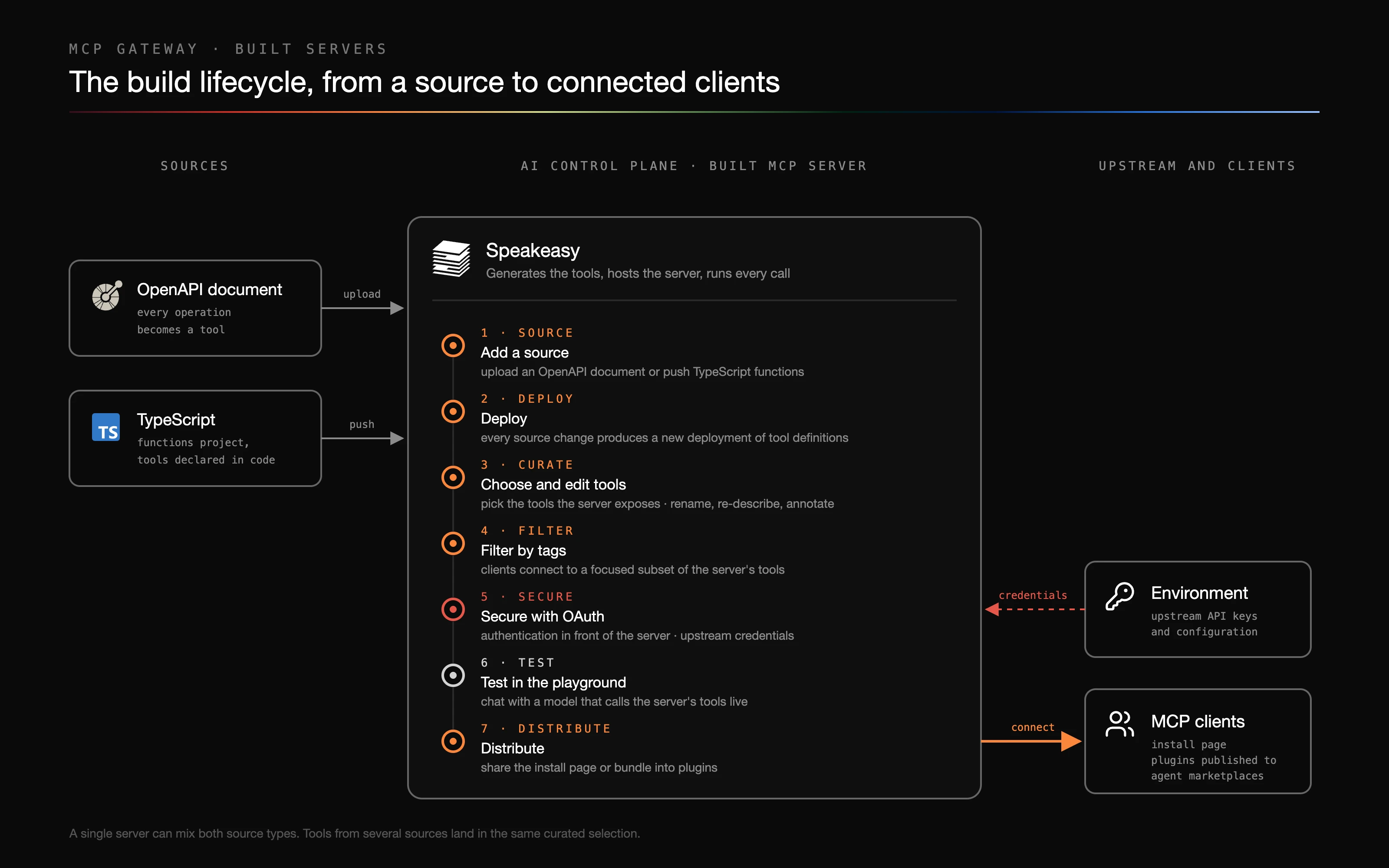
- Add a source. Upload an OpenAPI document or push TypeScript functions. Sources are listed on the Sources tab of the MCP page.
- Deploy. Every source change produces a new deployment, which turns the project’s sources into tool definitions.
- Choose and edit tools. Curate which of the deployed tools the server exposes, and rename, re-describe, or annotate them with tool variations.
- Filter by tags. Let clients connect to a focused subset of the server’s tools with tag-based tool filtering.
- Secure with OAuth. Put authentication in front of the server and supply upstream credentials from an environment.
- Test in the playground. Chat with a model that calls the server’s tools live in the playground.
- Distribute. Share the server’s install page, or bundle it into plugins that publish to agent marketplaces.
In this section
Section titled “In this section”- Sources: manage the OpenAPI documents and functions the project deploys, and build servers from them.
- Add tools from an OpenAPI spec: upload an OpenAPI document to generate a tool for every operation and curate them into a server.
- Add tools with TypeScript: write custom tools with the Functions Framework or the MCP SDK, test them locally, and push them as a source.
- Deployments: review the deployment history for the project’s sources, and retry or roll back a deployment.
- Tag-based tool filtering: tag tools so clients can connect to a focused subset of a server.
- Secure with OAuth: choose between access tokens, client credentials, Speakeasy OAuth, and a user-facing OAuth flow for a built server.
- Playground: test servers against a live model before distributing them.
What building adds
Section titled “What building adds”Because the platform owns the protocol implementation on this path, it can act on individual tool calls rather than relaying a session:
- Tool arguments are validated against a generated JSON schema before anything is called.
- Credentials are assembled server-side from an environment, so the MCP client never holds the upstream API key.
- Tools can be renamed, re-described, retagged, or marked as requiring confirmation with tool variations, and filtered with tag-based filtering.
- Responses can be trimmed with a filter before they reach the model.
- Failed calls are retried where retrying is safe, and every call is logged with a stable tool identity.
Sources, deployments, and servers
Section titled “Sources, deployments, and servers”Building runs through a three-step chain:
- A source is an OpenAPI document or a functions project.
- A deployment is an immutable snapshot of every source in the project. Tools exist only inside a deployment.
- An MCP server holds a curated selection of tools drawn from the active deployment and serves it.
Deployments cannot be edited. Every change produces a new deployment, even a one-character description edit. When a deployment completes it becomes the project’s active deployment, and the servers built from it start serving the new tools.
Building from OpenAPI
Section titled “Building from OpenAPI”Upload a document in the dashboard or push it with the CLI. Processing walks the document and generates one tool per operation.
Processing follows these rules:
- GET, POST, PUT, DELETE, HEAD, and PATCH operations are walked. OPTIONS and TRACE are not, so they never become tools.
- Deprecated operations are skipped, and the deployment log records why.
- Tool names are built as the document slug plus the snake-cased operation ID, then truncated to 60 characters with an 8-character hash suffix to stay inside common MCP client limits. Names set explicitly with
x-gramorx-speakeasy-mcpare not truncated. - Operations that declare their own
serversarray are rejected. The server URL has to be defined at the document level. - Annotations are inferred from the HTTP method. GET and HEAD are read-only, DELETE is destructive, and every operation is treated as open-world.
- Operation tags carry through verbatim and are what tag-based filtering matches on.
- Security schemes and the default server URL become environment variable names, which is what an environment fills in.
Full walkthrough: Add tools from an OpenAPI spec.
Building from TypeScript functions
Section titled “Building from TypeScript functions”Functions are compact TypeScript units that declare tools in code, bundled with a manifest and run on a platform-operated runner. They fit cases an OpenAPI document cannot express: calls that need to combine several endpoints, reshape a response, or run logic that has no HTTP equivalent.
Tool names come verbatim from the manifest. There is no source prefix and no truncation, which is the largest divergence from OpenAPI naming.
Annotation defaults for function tools are the inverse of OpenAPI defaults. A function tool that declares no annotations is treated as destructive and not read-only. Declare annotations explicitly on any tool that only reads.
Start here: TypeScript functions, then Using the Functions Framework, Build and deploy, Tool annotations, and Tool tags.
Choosing between them
Section titled “Choosing between them”| OpenAPI | TypeScript functions | |
|---|---|---|
| Best when | An HTTP API already has a spec | Logic spans endpoints or has no HTTP equivalent |
| Tool set | One tool per operation, generated | Whatever the code declares |
| Naming | Prefixed and truncated | Verbatim from the manifest |
| Annotation defaults | Inferred from the HTTP method | Destructive and not read-only |
| Credentials | Environment variables mapped from security schemes | Environment variables declared in the schema |
| Iteration | Re-upload or push the document | Rebuild and push the bundle |
How a change propagates
Section titled “How a change propagates”Pushing a changed source clones the latest deployment, re-extracts every tool, and activates the result. Extraction is a clean rebuild rather than a merge, so removing an operation removes its tool.
Tool identity is a URN built from the source slug and the tool name. Renaming an operation ID, or changing a name enough that it truncates differently, produces a different URN. Tool variations keyed to the old URN stop applying, and a server’s curated tool selection referring to the old tool goes stale.
Built servers can still contain proxied tools
Section titled “Built servers can still contain proxied tools”Servers added from the MCP Catalog today become remote MCP servers. Catalog servers installed before that change live in the project deployment, and their tools can still sit in a built server’s tool selection, proxied to the upstream at call time. To put built and remote servers behind one address, use a gateway endpoint.
“Built” and “remote” describe the server’s backend, not every tool it carries. A server whose backend is a remote MCP server proxies the entire session; a built server executes its own tools and may proxy a few individually.