What is the difference between an AI gateway, an MCP gateway, and an AI control plane?

Cameron McClellan
May 7, 2026 · 24 min read
An AI gateway is a reverse proxy for model API calls: routing, failover, provider credentials, and cost tracking. An MCP gateway is the same pattern for Model Context Protocol (MCP) tool calls: credentials, access control, and tool-call logs. An AI Control Plane puts both gateways on a shared identity, policy, and observability foundation so model calls and tool calls share one enforcement path.
Most organizations discover they need this infrastructure the same way: an AI audit finds a shadow AI problem, with agents making tool calls against production systems with no audit trail, credentials in dotfiles that predate the employees who created them, and tool access that was never formally granted and cannot be formally revoked. The organizations feeling this most acutely are typically the ones that moved fastest on AI adoption.
Today, the typical developer AI setup looks something like this:
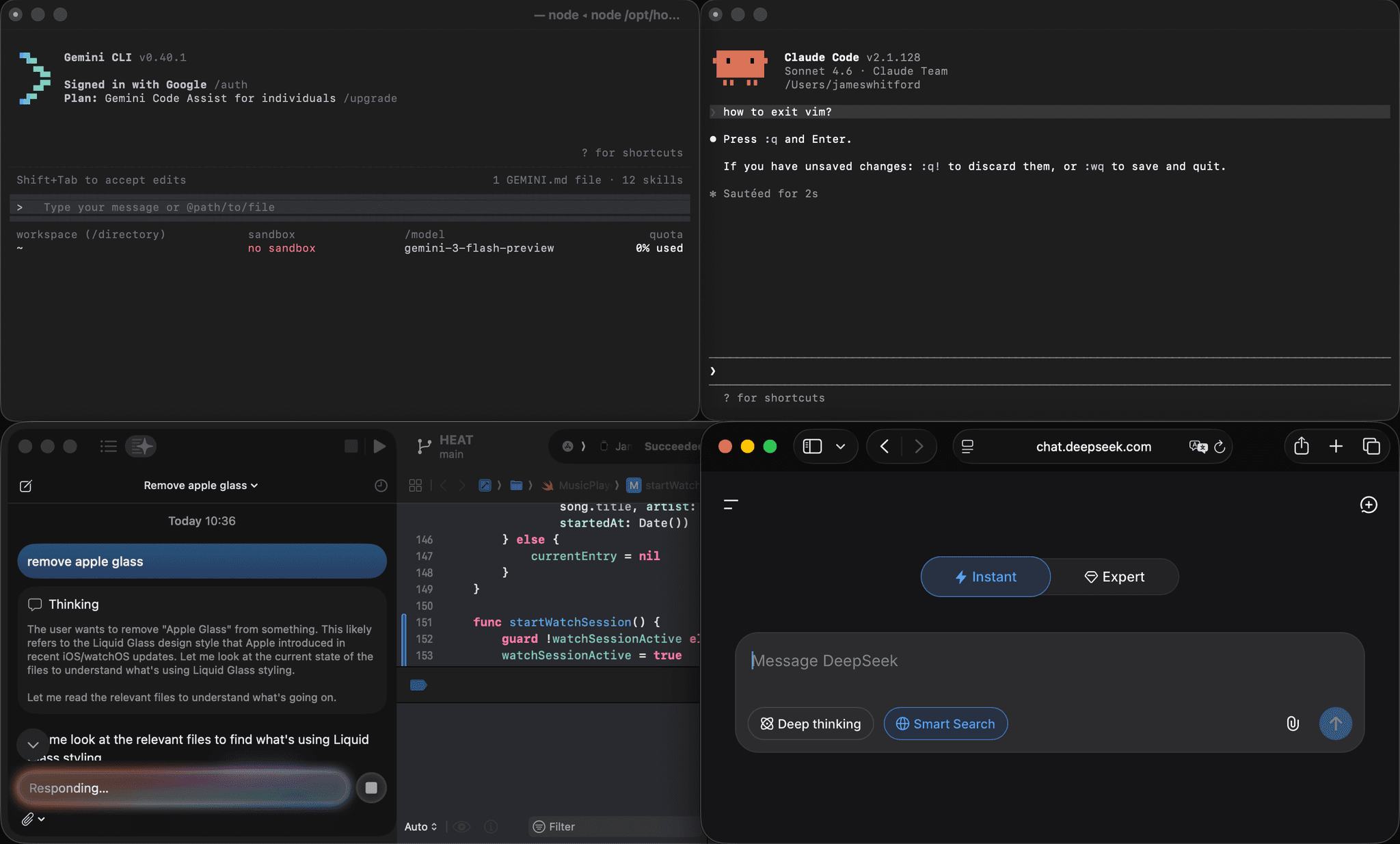
Boards have told CTOs to deliver AI transformation. That mandate has been pushed down to teams expected to move fast and govern carefully at the same time. New categories of AI infrastructure have emerged to close that gap:
- AI gateways act as a proxy between your application and your model provider (like OpenAI, Anthropic, and Mistral). They handle routing, failover, API key management, and cost tracking.
- MCP gateways act as a proxy between your AI agents and your MCP servers. They manage credentials, enforce access control, and log every tool call. MCP is the standard that defines how AI agents like Cursor and Claude Code connect to external tools and data.
- AI control planes are the governing layer that puts both gateways on a shared foundation with a common identity layer. They add real-time policy enforcement on the content of traffic, and produce a single correlated view across every model call and tool call in your system.
This article explains what each layer does, what problems it solves, and how to decide which ones you actually need.
What goes wrong when AI agents connect to real systems
Real problems start to arise when this infrastructure isn't in place. Company data gets shared with third-party providers without anyone knowing, credentials left in config files outlast the employees who put them there, and when something goes wrong, there is no trail to follow.
These problems correspond to four gaps that map directly to the four functions of the AI control plane:
- Connect: no central place for managing which AI tools are in use across the organization
- Control: no consistent identity layer governing who can access what via AI tools
- Secure: no mechanism for detecting or preventing AI agents from leaking sensitive data
- Observe: no correlated audit trail for reconstructing what happened when something goes wrong
Connect: managing AI tools across the organization
Right now, individuals and teams across a company largely decide on their own which AI tools, agents, and services to use. Engineering picks one set of MCP servers. Sales picks another. There is no central registry.
In this fragmented picture, tools that could benefit one team are invisible or inaccessible to others in the same company. When a new AI capability is approved, every team has to set it up independently. When a tool is retired, there is no single place for removing it across the organization.
Without a central registry:
- Teams duplicate effort as each builds and maintains its own integrations
- New AI capabilities take months to reach teams that would benefit from them
- There is no way to know which tools are in use across the organization at any given time
- There is no way to ensure that teams only use approved tools
Control: governing who has access to company data
AI agents like Cursor, Claude Code, and Copilot were built for individual users. They commonly run as attended individual agents, although runs from the same products can also be unattended. The default way someone connects one of these tools to company data is by pasting their own API key or OAuth token directly into the client's config file.
That credential is invisible to IT, so there is no central record of who has access to what. When someone leaves the company, their credentials may still be active because offboarding processes were never designed to cover AI tool configurations.
Without a central access layer:
- Personal credentials sit in config files with no central visibility
- There is no way to revoke access to company data when an employee leaves
- There is no consistent policy governing which employees can access which systems via AI tools
- Access is granted informally and cannot be formally audited
Secure: preventing data leakage through AI agents
Access control tells you who can call which tools. It does not tell you what the tool returns or what the model does with that data. An agent that is legitimately authorized to read Jira tickets will also read every customer email address, internal comment, and personally identifiable information (PII) in those tickets, and may include it in its response, without violating any access rules.
This is a structurally different problem from identity. Identity controls are binary, and answer whether a user can call a tool. Content-level threats are semantic, and require inspecting what the traffic actually contains.
Without content-level inspection:
- PII from tool results ends up in model responses without triggering any policies
- Prompt injection attacks go undetected, allowing malicious instructions embedded in content to override the agent's behavior
- Data exfiltration goes uncaught when an agent reads internal data and writes it to an external system
- There are no alerts or blocking because there is no layer inspecting traffic content
Observe: reconstructing what happened when something goes wrong
When an agent misbehaves or produces an unexpected result, there is often no correlated record of what happened. An AI gateway log and an MCP gateway log are two disconnected records with no shared identity. You can see that a model was called around the same time a tool was called, but you cannot reconstruct the chain.
This is a debugging and incident response problem. Without a correlated trace, you cannot determine the root cause of a failure, demonstrate to an auditor what data was accessed and by whom, or detect a data exfiltration event after the fact.
Without a correlated audit trail:
- There is no way to connect a specific user to a specific model call to a specific tool call to the data it returned
- Incident investigations dead-end because the two logs share no common identity
- There is no audit trail that satisfies a compliance requirement
- Cost and usage data cannot be attributed to a team or individual
What is an AI gateway?
The AI gateway addresses the model-access layer directly. It's the interface between the agent and the model provider. Without one, every service that calls a model is an ungoverned endpoint: provider credentials scattered across config files and developer environments, costs invisible until the end-of-month invoice, and no central record of what is being sent to which provider.
An AI gateway is a reverse proxy that centralizes those calls. Instead of your agent talking directly to OpenAI, Anthropic, or Mistral with its own hardcoded credentials, it talks to one gateway endpoint. The gateway handles routing, credential injection, logging, and failover. The application never needs to know which provider is running behind it.
How an AI gateway works
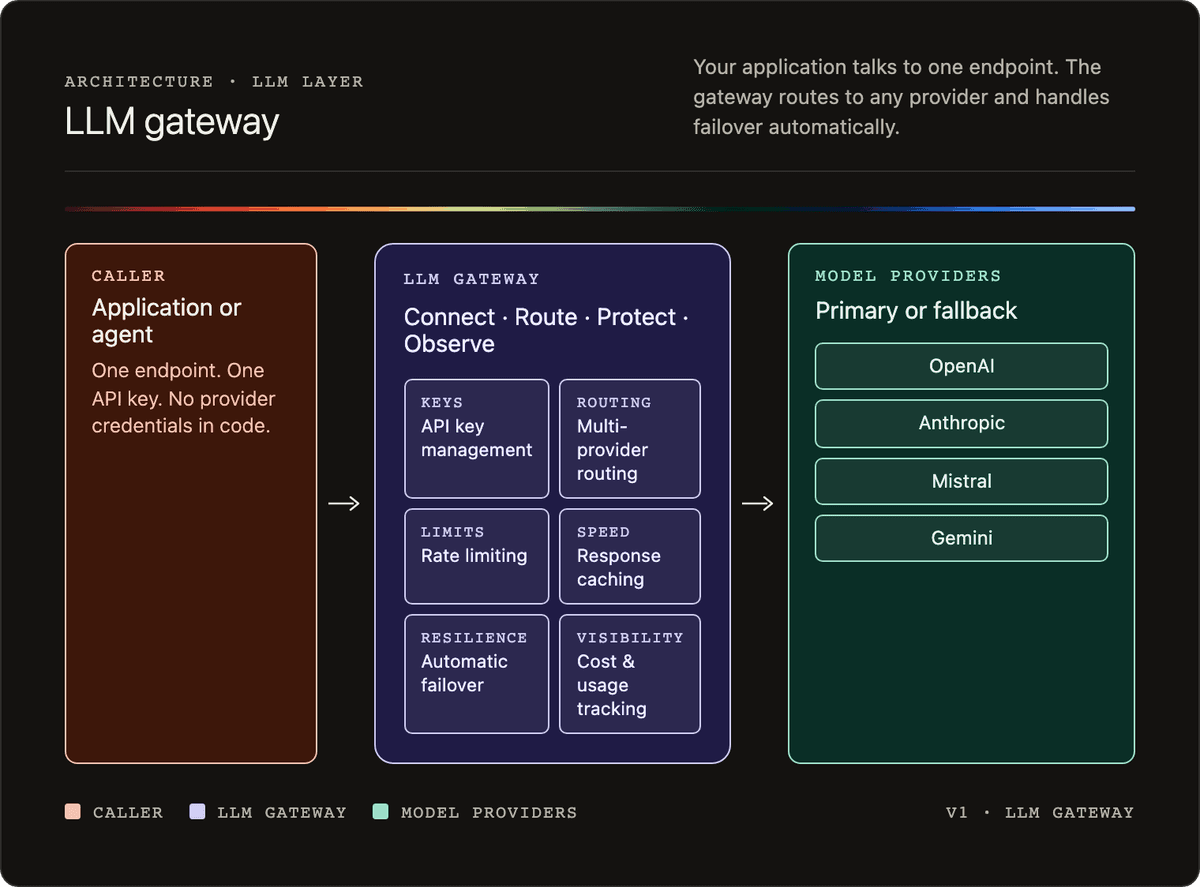
An AI gateway is a reverse proxy for model API calls. Your application sends every request to a single gateway endpoint. The gateway decides which provider to route the request to, injects the appropriate credentials, and returns the response.
A typical request flow looks like this:
- The application sends a request to the gateway with a model name and prompt.
- The gateway applies routing rules to select a provider.
- The gateway injects the provider API key and forwards the request.
- The provider responds; the gateway logs the result and returns it to the application.
- If the provider is unavailable, the gateway retries with the configured fallback.
Features of an AI gateway
An AI gateway typically covers six core functions.
API key management
All provider credentials are stored in the gateway. The application code talks to one endpoint with one key. No provider credentials live in application code or developer config files.
Multi-provider routing
Routing rules determine which provider handles each request. Rules can be based on cost, latency targets, task type, or data residency requirements.
Failover
If a provider returns an error or is unavailable, the gateway automatically retries the request against a configured fallback provider. The application sees a successful response either way.
Rate limiting
You can set limits per user, per team, or per application. This prevents a runaway agent loop from generating unexpected costs.
Caching
Identical or semantically similar prompts can return cached responses, reducing latency and cost for repeated queries.
Cost tracking and observability
Every model call is logged with the model used, token counts, latency, and cost. This gives you a single view across all providers, rather than separate billing dashboards per vendor.
An AI gateway in practice: LiteLLM
LiteLLM is an open-source AI gateway that you can run locally or self-host. You configure your providers and fallback rules in a single YAML file, then point your application at the gateway instead of directly at a provider.
Here is a minimal config that registers GPT-4o as the primary model and Claude Sonnet as the fallback:
model_list:
  - model_name: gpt-4o
    litellm_params:
      model: openai/gpt-4o
      api_key: os.environ/OPENAI_API_KEY

  - model_name: claude-sonnet
    litellm_params:
      model: anthropic/claude-sonnet-4-5
      api_key: os.environ/ANTHROPIC_API_KEY

litellm_settings:
  fallbacks:
    - gpt-4o:
        - claude-sonnet
Your application code does not change at all. It still uses the standard OpenAI agent, just pointed at the gateway URL:
from openai import OpenAI

client = OpenAI(
    api_key="anything",
    base_url="http://localhost:4000"
)

response = client.chat.completions.create(
    model="gpt-4o",
    messages=[{"role": "user", "content": "Summarize this ticket in one sentence: User reports login fails after password reset."}]
)

print(response.choices[0].message.content)
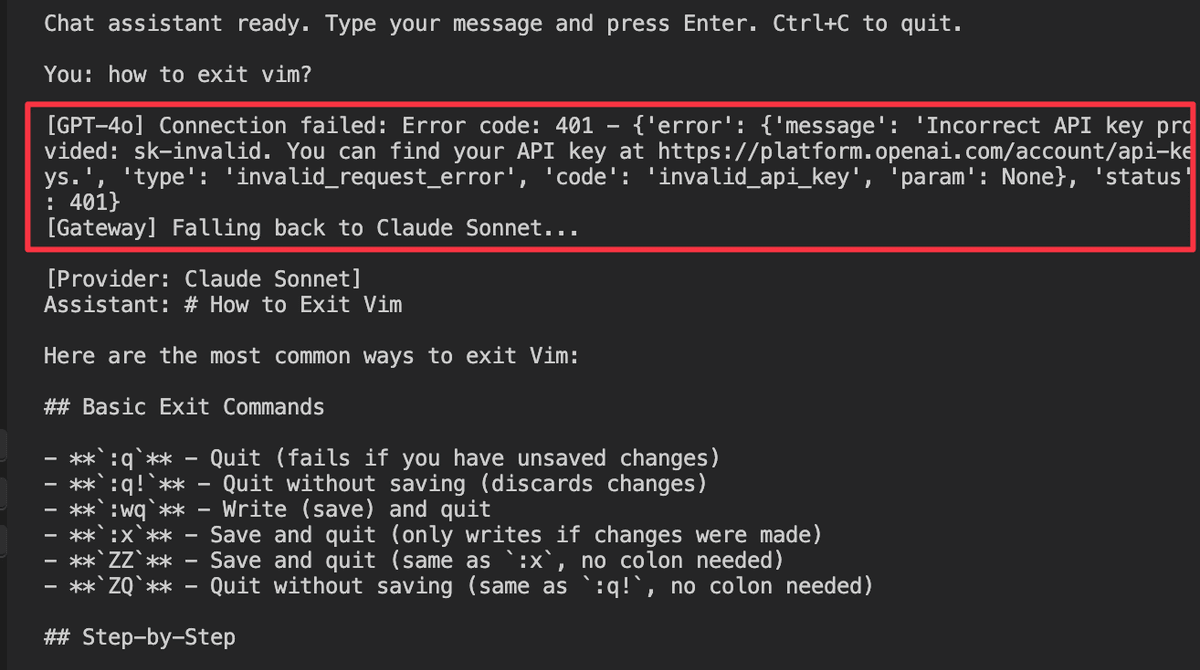
If the OpenAI API is unavailable or returns an error, LiteLLM automatically retries the request against Claude Sonnet. The application receives a response either way.
What problems does an AI gateway solve?
An AI gateway closes the credential scatter and reliability gaps at the model layer, and partially closes the observability gap. Here is what each core feature covers — and where the coverage ends.
Centralized API key management
Without a gateway, every provider API key lives in application code or developer config files. An AI gateway stores all provider credentials centrally. Applications authenticate to the gateway with a single key, and no provider credential ever touches application code.
Automatic failover
When a provider is down, requests fail unless your application has explicit retry logic for each provider. The gateway handles this automatically. The fallback config shown above means a provider outage is invisible to the application.
Model-layer cost visibility
Every model call is logged in one place, with its token counts, latency, and cost. Instead of two separate billing dashboards for OpenAI and Anthropic, you get a single view across all providers. This is a partial answer to the Observe gap: model calls are accounted for, but tool calls triggered by those models fall outside the gateway's view.
What an AI gateway does not fix
An AI gateway operates at the model call layer only. It sees prompts and completions as text.
It has no visibility into which tools a model calls or what data those tools return. The credential management it provides covers provider API keys, but not the credentials your agents use to access company data via tools.
AI gateways do not address the Secure gap or the full Observe gap at all.
What is an MCP gateway?
The AI gateway addresses the model call layer. A separate problem exists at the tool layer, where AI agents connect to the external systems those models call.
Since Anthropic introduced MCP in late 2024, it has become supported by every notable AI agent: Claude Code, Cursor, and Copilot, etc. It defines how AI agents connect to external tools and data sources, the same way HTTP defines how browsers connect to web servers. Before MCP, every tool integration was bespoke. MCP standardized those connections — and standardization made the gateway category both possible and necessary. Possible because there is now a single interface to govern. Necessary because the surface is growing fast.
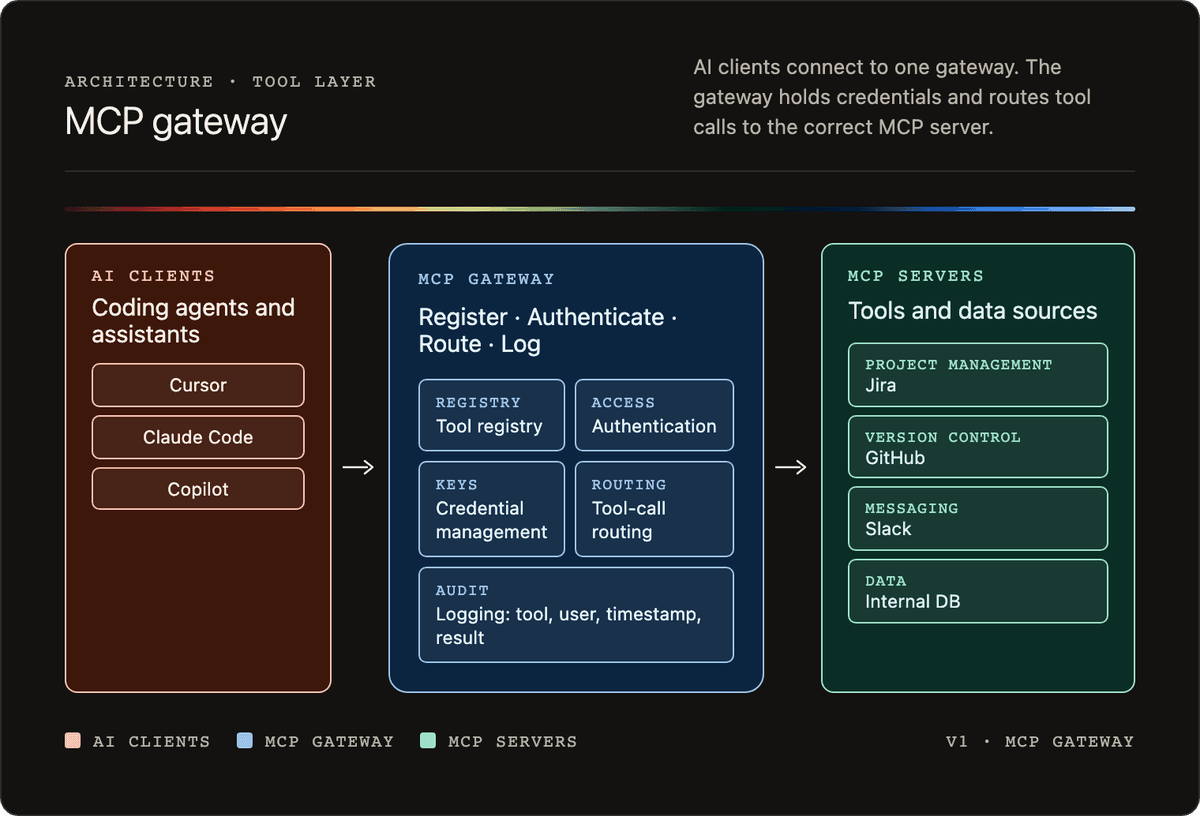
An MCP gateway sits between your AI agents and your MCP servers. It applies a similar gateway pattern to an AI gateway, but at the tool-calling boundary instead of the model-calling boundary.
Organizations arrive at MCP gateways through two distinct entry points. The first is enablement: teams building with AI agents face an N × M integration problem. Four agents connecting to ten MCP servers means 40 separate authentication flows to build and maintain, 40 credential stores to secure, and 40 places where something breaks when a server changes or an employee leaves. A gateway centralizes that work — one authentication integration, one credential store, one place to update. Teams often describe this as buying back weeks of engineering time that was going into authentication plumbing rather than product.
The second entry point is governance: security and IT teams who have run an AI audit, found agents making tool calls against production systems they couldn't see, and realized that the policy they thought was in place wasn't being enforced at runtime. The gateway is the enforcement point that closes that gap.
These are not two separate products. The same gateway that simplifies authentication for developers is the one that enforces policy for security teams. Treating them as separate initiatives produces either a governance program that blocks adoption or an adoption program that bypasses governance.
How an MCP gateway works
Without a gateway, every developer configures their own MCP client with their own credentials pointing directly at each MCP server. There is no central registry, audit trail, or way to revoke access without hunting through individual config files.
With a gateway, clients connect to one endpoint. The gateway holds the registry of available tools, manages credentials centrally, routes each tool call to the correct backend server, and logs every call.
A typical tool call flow looks like this:
- The AI agent sends a tool call request to the gateway.
- The gateway authenticates the request against its access rules.
- The gateway injects the stored backend credential and forwards the request to the correct MCP server.
- The MCP server responds; the gateway logs the result and returns it to the client.
- If access is revoked, authentication fails and the request goes no further.
Features of an MCP gateway
An MCP gateway applies the same gateway pattern as an AI gateway but at the tool-calling boundary. It typically covers five core functions.
Tool registry
Tools are published once in the gateway. Clients discover available tools from a single source rather than each developer maintaining their own list of server URLs.
Authentication
The gateway is the access control point. Clients authenticate to the gateway, not to individual servers. The gateway applies access rules centrally and enforces them on every request.
Credential management
Real backend credentials are stored encrypted in the gateway. When a tool call comes in, the gateway injects the appropriate credential before forwarding the request. The actual API key never reaches the client's config file.
Routing
The gateway routes each tool call to the correct backend MCP server. Clients do not need to know where each server lives.
Logging
Every tool call is logged with the tool name, user identity, timestamp, and success or failure status. This gives you a central audit trail for all tool activity across every AI agent in your organization.
An MCP gateway in practice
The pattern looks the same regardless of vendor. Instead of each developer pointing an AI agent directly at every MCP server with a personal credential, every client config points at one gateway endpoint:
{
  "mcpServers": {
    "internal-tools": {
      "url": "https://mcp-gateway.internal.example.com/mcp",
      "headers": {
        "Authorization": "Bearer ${MCP_GATEWAY_TOKEN}"
      }
    }
  }
}
The agent authenticates to the gateway with a token tied to the employee's identity. The real backend credentials (the Jira API key, the database connection string) stay in the gateway's encrypted store and are injected on each request. The client never sees the backend server locations or their credentials.
Because the gateway speaks standard MCP, you can verify that a tool call works without involving an AI agent at all:
curl -s -X POST "https://mcp-gateway.internal.example.com/mcp" \
  -H "Authorization: Bearer $MCP_GATEWAY_TOKEN" \
  -H "Content-Type: application/json" \
  -d '{"jsonrpc":"2.0","id":2,"method":"tools/call","params":{"name":"get_ticket","arguments":{"id":"TICKET-42"}}}'
The gateway authenticates the request, injects the backend credential, forwards the call to the MCP server that implements get_ticket, and logs the call with the tool name, timestamp, status, and user identity.
Which of the four problems does an MCP gateway solve?
An MCP gateway directly solves two of the four problems and partially addresses a third. Here is how each feature maps back to the problems from the opening section.
Central tool registry
The gateway is the registry. You publish tools once, then clients pull from that single source of truth. No developer needs to hunt down individual server URLs or maintain their own list of integrations.
Centralized credential management
Managed credentials replace personal tokens in config files. Real API keys are stored encrypted in the gateway and injected on the user's behalf. You can revoke someone's access in a single action, without searching through every developer's config.
Tool-call audit trail
Every tool call is logged with the tool name, user identity, timestamp, and status. This closes the tool-layer visibility gap. You now have a record of which tools were called when and by whom.
What an MCP gateway does not fix
An MCP gateway enforces access control at the structural level, answering whether a user can call a given tool.
It does not inspect what the tool returns. If a tool response contains PII, the gateway logs that the tool was called but has no visibility into the content of the response.
It also has no visibility into the model call that triggered the tool call. The tool-call log and the model-call log are still two disconnected records with no shared identity. You cannot reconstruct the full chain of what happened in a single interaction.
What is an AI control plane?
Both AI and MCP gateways solve real problems, but they solve different parts of the core problem. An AI gateway handles the model layer, while an MCP gateway handles the tool layer, but neither can see what the other sees. They remain disconnected.
An AI control plane is what you get when both gateways exist on a shared foundation, underpinned by a common identity layer, as well as a policy and observability layer that can see across both tool and model layers. The term "control plane" comes from networking. In Kubernetes and service meshes, the control plane is the part that governs the system, while the data plane is where traffic flows. The same pattern applies to AI.
Both gateways sit inside it, on a shared foundation they cannot provide on their own. The Speakeasy AI Control Plane is the reference implementation of this architecture — built around the MCP gateway as its foundation and expanding across Connect, Control, Secure, and Observe.
How an AI control plane works
The control plane sits between every AI agent in your organization and every system those clients can reach. All traffic, including both model calls and tool calls, passes through it.
AI control plane
The control plane is organized around four functions.
Connect
Tools are published once in a central registry. Every entitled team pulls from it automatically. When a new tool is approved, it becomes available to all entitled clients. When a tool is retired, it is removed in one place.
Control
Every AI agent authenticates through the control plane. Permissions are scoped by team or by role, not just org membership. Raw API keys are stored centrally and never reach employee config files. Access policy is enforced on every request.
Secure
The control plane inspects every prompt, response, and tool call in real time. It redacts PII before data reaches a model or is returned to a user. It detects and blocks both prompt injection attempts and data exfiltration attempts (where an agent reads internal data and writes it to an external system). Policy alerts feed into existing incident response tooling.
This is the layer that goes beyond what either gateway can provide on its own. Both AI and MCP gateways enforce structural access control, answering whether a user can call a tool, but this layer inspects the actual content of that traffic to determine whether it is safe.
Observe
Every prompt, response, and tool call is logged with shared identity, covering which user, which AI agent, which model call, which tool call, and which data was accessed.
An AI gateway log and an MCP gateway log in isolation are two disconnected records. With a shared identity layer underneath both, you can reconstruct the full chain of any interaction. That is what makes incident response possible and compliance audits tractable.
Beyond debugging, the observability layer tracks token usage by team, client, tool, and individual user. This gives leadership the data to measure AI adoption against organizational targets, to attribute costs accurately, and to show whether the investment is producing real outcomes rather than just activity.
What Speakeasy covers today
The Speakeasy control plane started with connection and identity, using the MCP gateway as the foundation, and is expanding from there.
The diagram below maps the full reference architecture against what Speakeasy covers today. Identity and access, the MCP gateway lane, policy and threat, and observability and auditing are all marked as supported. The AI gateway lane is not — the Speakeasy Agents API routes to OpenAI, Anthropic, Google, and Mistral and supports multi-turn conversations and sub-agents, but is in early beta; rate limiting, caching, cost-based routing, and failover are not yet available. The sections below cover what each of the four supported functions does in practice.
Where Speakeasy plays
Here is where each of the four functions stands in the Speakeasy control plane today.
Connect
Speakeasy lets you deploy MCP servers from an OpenAPI spec or TypeScript functions, hosted at a domain you control. Private servers are restricted to Speakeasy org members or API key holders.
Control
Users authenticate via a browser using their Speakeasy account. API credentials are stored encrypted in Speakeasy environments and injected on the user's behalf. Revoking a user's access is one action.
Secure
Speakeasy covers the compliance properties of the platform (SOC2 Type II, ISO 27001, GDPR, and CCPA). Real-time policy enforcement on traffic content, including PII detection, prompt injection blocking, and SIEM integration, is not yet part of the Speakeasy MCP Gateway.
Standalone tools like Vijil and Lakera cover this layer and can be run alongside Speakeasy.
Observe
Insights, currently in beta, provides per-tool-call traces with timestamps, tool names, and HTTP status. Logs are OpenTelemetry-compatible with W3C trace IDs for correlating with external distributed tracing systems. You can filter by user identity if you pass a user_id on calls.
Insights covers tool-call telemetry and includes token usage metrics, call volume, success and failure rates, and most-used tools. It does not yet correlate tool calls with the model calls that triggered them, so the full interaction chain cannot be reconstructed from one place.
Do I need an AI gateway, an MCP gateway, or an AI control plane?
An AI control plane encompasses both an AI gateway and an MCP gateway, so anything those layers do, it does. The question is rarely "which one" but rather "what's the lightest layer that solves the problem in front of me, knowing the others will follow." The table below maps common starting problems to the minimum layer that addresses them.
Most teams reach for a gateway at the layer where they're already feeling pain — ungoverned model costs or unaudited tool calls. Both problems share the same root cause: AI infrastructure adopted without a governing layer underneath it. Starting with the Speakeasy AI Control Plane puts both gateways on a shared identity foundation from day one, so when the second problem surfaces, the architecture is already in place.
What is an AI gateway?
An AI gateway is a reverse proxy for model API calls. Applications send every model request to one gateway endpoint, and the gateway handles routing between providers like OpenAI, Anthropic, and Mistral, retries against a fallback provider when one fails, injects provider credentials so they never live in application code, and logs every call with its token counts and cost.
What is an MCP gateway?
An MCP gateway is a reverse proxy for Model Context Protocol (MCP) tool calls. It sits between AI agents and MCP servers, holds the registry of available tools, stores backend credentials centrally instead of in personal config files, enforces access control on every request, and logs every tool call with the tool name, user identity, timestamp, and status.
What is an AI control plane?
An AI control plane is the governing layer that puts an AI gateway and an MCP gateway on a shared identity, policy, and observability foundation. Model calls and tool calls share one enforcement path, so policy applies to the content of traffic in both directions and every interaction is logged with a common identity that connects the user, the model call, the tool call, and the data it returned.
Do I need an AI gateway, an MCP gateway, or both?
Start at the layer where the pain is. Ungoverned model spend, provider outages, and provider API keys scattered across config files point to an AI gateway. Unaudited tool calls, personal credentials in agent config files, and no central tool registry point to an MCP gateway. Organizations running AI agents against internal systems usually end up needing both, because the model layer and the tool layer fail independently.
How is an AI control plane different from stacking the two gateways?
Two independently deployed gateways produce two disconnected logs with no shared identity, so an incident cannot be reconstructed across a model call and the tool call it triggered. An AI control plane runs both gateways on one identity layer, enforces policy on the content of traffic across both, and correlates every model call and tool call into a single audit trail.
Where does Speakeasy fit?
The Speakeasy AI Control Plane is built around its MCP gateway. It deploys MCP servers from an OpenAPI spec or TypeScript functions, manages credentials and access centrally, and logs every tool call in Insights. The Speakeasy Agents API, which routes model calls to OpenAI, Anthropic, Google, and Mistral, is in early beta.
Last updated on