Every MCP server needs an install page

Sagar Batchu
May 17, 2026 · 4 min read
There is a nice post going around on Hacker News arguing that an MCP server should respond to a browser the same way it responds to an agent: with content negotiation on the Accept header. Agents send application/json or text/event-stream and get the protocol. Humans send text/html and get something they can actually read.
We have been quietly doing this for every MCP server hosted on Speakeasy for a while now, and the post is a good excuse to make the case more loudly. If you ship an MCP server, it should have an install page, and that install page should live at the same URL as the protocol.
The problem with a bare /mcp
Every MCP URL eventually ends up pasted into a browser. Sometimes it is the developer who built the server checking that it deployed. Sometimes it is a colleague the developer sent it to. Often it is a customer who clicked a link in a doc or a Slack message and wanted to see what the thing actually is.
Today, that person almost always gets a 406, a blank page, or a wall of JSON-RPC error text. The kind reaction is “this is broken.” The less kind reaction is “MCP is broken.” Neither is a great first impression for a protocol that is trying to be the way agents talk to the rest of the internet.
The fix is small. A server that knows how to read the Accept header can serve HTML to humans and the protocol to agents from the same URL, with no redirect, no second domain, no separate /install route to keep in sync.
What we put on the page
Every MCP server hosted on Speakeasy has an install page at the same URL the agent connects to. When you hit it with a browser you get:
- A one-click install button for Claude, Cursor, VS Code, Windsurf, and the other clients that support deep-linked installs.
- The full tool list with descriptions, so you can see exactly what the server exposes before you connect.
- The OAuth flow, if the server is gated. We start the dance from the install page so a human can authorize the server the same way they would any other app.
- A copy-pasteable JSON snippet for the clients that still need manual config.
Here is what that looks like for the Polar MCP server, which we host:
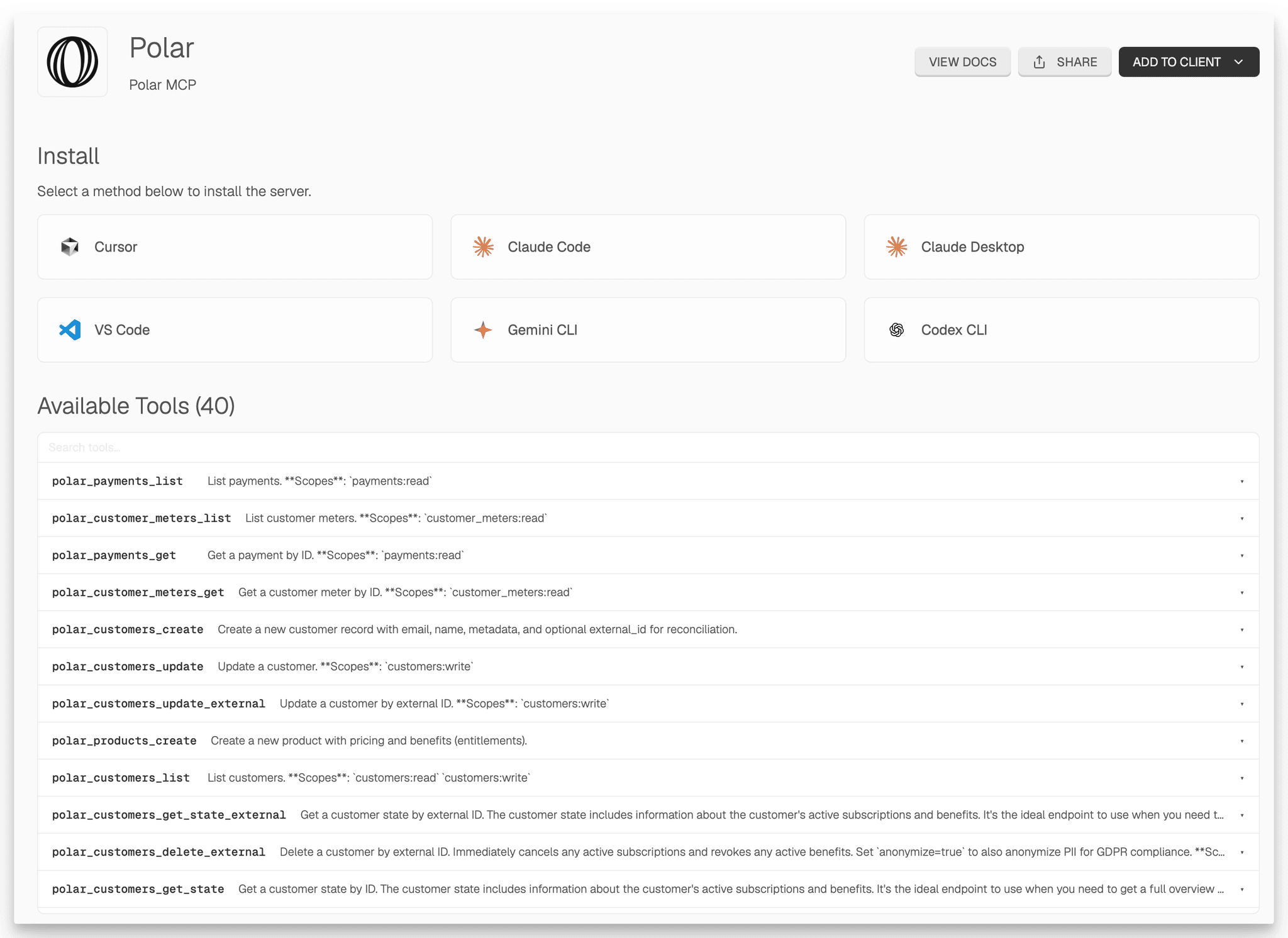
The agent path is unchanged. An MCP client that sends application/json or text/event-stream gets exactly what it expects, including the SSE stream and the JSON-RPC responses. Nothing about the protocol is altered. The HTML response is purely a second representation of the same resource.
The OAuth angle
There is a subthread on the Hacker News post about RFC 9728 protected resource metadata and the awkward state of OAuth discovery in MCP. An install page is the natural place to land this.
When a browser hits a gated MCP server we render the install page and offer to start the OAuth flow. When an MCP client hits the same URL without credentials we return 401 with a WWW-Authenticate header pointing at the resource metadata document, which is what the spec asks for. Same URL, three audiences served, no extra hops.
Why a second URL is worse
The “purer” REST move is to return 303 See Other on Accept: text/html and redirect to a separate /install route. We tried that. It is fine, but it loses in practice for a few reasons.
Redirects get stripped, cached, and rewritten by link previewers, chat clients, and corporate proxies. The URL someone pastes is the URL someone shares, and you want that URL to render something sensible without an intermediate hop. A 303 also means you now have two URLs to think about, two things to keep deployed, and two surfaces to keep in sync when the tool list changes.
Content negotiation on the same URL avoids all of that. The protocol response and the human response are two views of one resource, which is exactly what HTTP was designed for.
A small ask of the spec
The MCP spec does not say anything about what should happen when a browser hits a server URL. It probably should. A SHOULD recommending content-negotiated HTML on GET with Accept: text/html would cost nothing to implementers who do not want it, would set a sensible default for everyone else, and would make the protocol feel substantially less hostile to anyone who is encountering it for the first time.
In the meantime, if you ship an MCP server, give it an install page. If you ship one on Speakeasy, you already have one.
Further reading
- The original Hacker News post
- RFC 9728: OAuth 2.0 Protected Resource Metadata
- Hosting an MCP server on Speakeasy
Last updated on