MCP Gateway / Add an internal MCP
Add an internal MCP
Connect an MCP server from your private network with an outbound tunnel. Set up caller identity, team access, and a highly available deployment.
Connect an MCP server in your own infrastructure to the Speakeasy AI control plane. A tunnel agent runs beside your server and connects outbound to Speakeasy. Your team gets a hosted MCP endpoint with authentication and access controls. The server stays inside your network without a public IP, inbound firewall rule, or public ingress.
Use a tunnel for internal APIs, operational tools, or services that need private access to databases and other systems. For high-traffic services, run multiple replicas behind one endpoint. See High availability.
How the tunnel works
Section titled “How the tunnel works”The agent opens the connection from inside the private network. Speakeasy uses that connection to send MCP requests back to the server.
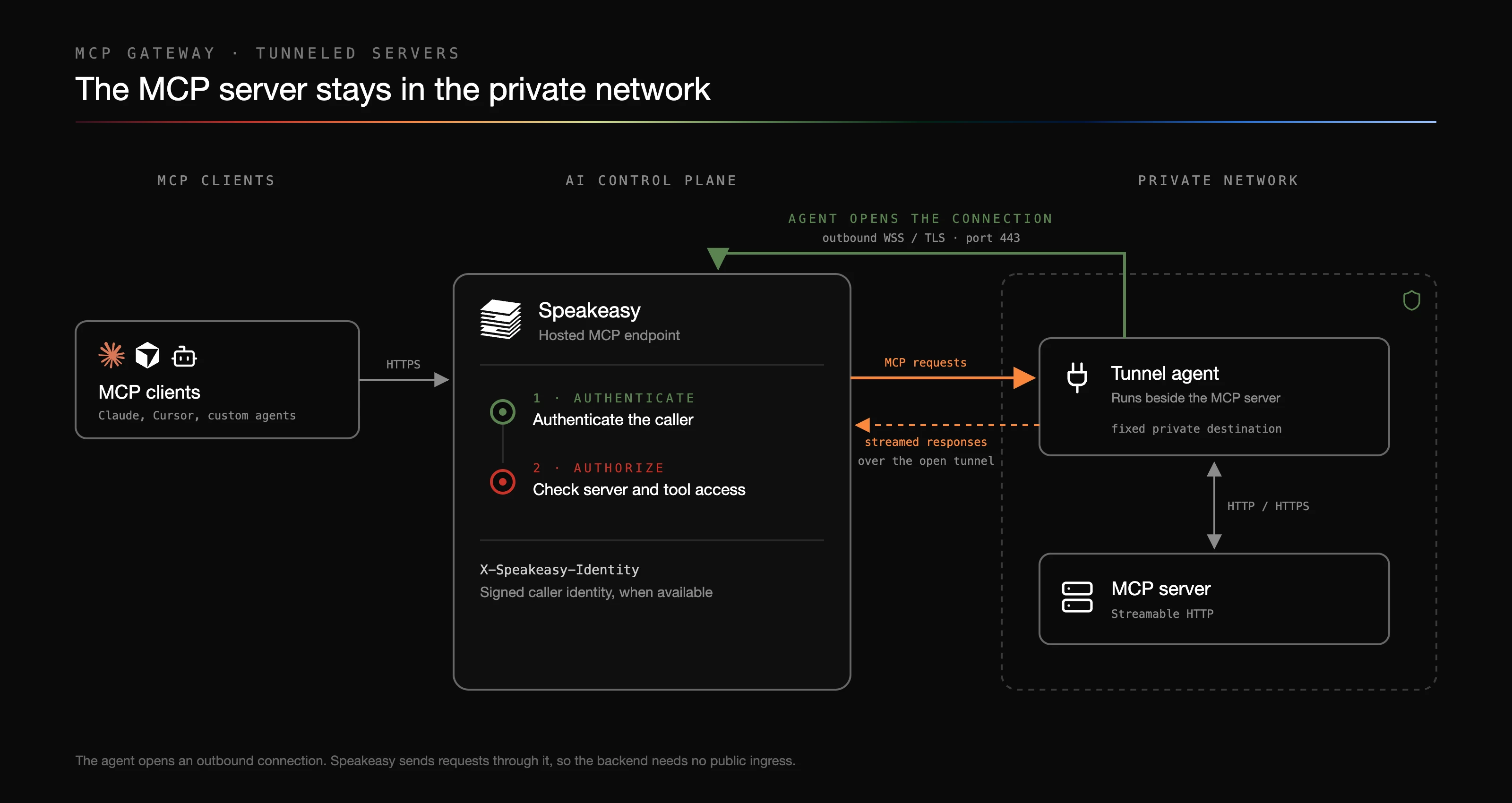
- The tunnel agent authenticates with a tunnel key and opens an outbound, TLS-protected WebSocket to Speakeasy.
- An MCP client connects to your hosted endpoint. Speakeasy authenticates the caller and checks their access to the server and its tools.
- Speakeasy sends requests over the existing connection. The agent forwards them to your configured private MCP URL and streams responses back along the same path. Multiple requests share the connection.
Your MCP server uses the standard Streamable HTTP transport. It can use any framework and keep its existing authentication. Servers that only support stdio need an HTTP adapter before they can be tunneled. The agent’s destination is fixed at startup; a client cannot choose another address on your network.
The hosted endpoint is reachable by MCP clients over the internet and requires authentication when its visibility is Private. To also restrict that client-facing endpoint to your network, combine the tunnel with Tailscale private access.
Create the source
Section titled “Create the source”You need an MCP server with a Streamable HTTP endpoint, a host that can reach it, and a plan with tunneled MCP servers. Creating and managing a tunnel requires mcp:write access to the project; the default Admin role includes it.
- On the MCP page under MCP Gateway > MCP, click Add new and choose Reachable through a tunnel.
- Name the source. If your server has a protected resource identifier, enter it in Resource identifier (optional), for example
https://mcp.internal.example.com/mcp. This identifies the server for upstream credentials and the assertion audience. Speakeasy never connects to this address. - Create the source and save the tunnel key in your secret manager. It is shown once and cannot be retrieved later.
- Under Tunnel endpoint, choose Existing server and enter the private MCP endpoint the agent will reach. Choose New server to try a sample hello-world server instead.
- Copy the generated Docker, Kubernetes, or CLI setup snippet and start the agent.
Speakeasy creates a linked MCP server and a default endpoint for the source. Once the agent connects, open that server’s Inspect tab to connect and list its tools. Use the hosted endpoint in your MCP client, then make a tool call to check the full path.
Keep the server’s visibility Private for internal services. Grant access before distributing the endpoint to your team.
Deploy the agent
Section titled “Deploy the agent”Run the agent wherever you can keep an outbound WebSocket connection open and reach the MCP server. For example:
| Environment | Deployment |
|---|---|
| Kubernetes, including EKS and GKE | A container beside your MCP server in the same Pod, or a Deployment pointing at an in-cluster Service. |
| AWS | An ECS task or EC2 process with access to the server in your VPC. |
| Google Cloud | A GKE workload or Compute Engine process with access to the private endpoint. |
| Docker | A container on the same network as the MCP server. |
| A VM, on-premises host, or laptop | The agent container or gram tunnel run, managed by your process supervisor. |
Allow outbound HTTPS/WebSocket traffic to the gateway URL in your generated snippet, normally on port 443. The agent also needs network access to its configured MCP endpoint. Run it as a long-running process and account for your platform’s connection timeouts and instance shutdown policies.
Agent configuration
Section titled “Agent configuration”The agent reads environment variables:
| Variable | Required | Value |
|---|---|---|
TUNNEL_GATEWAY_URL | Yes | The TLS gateway URL from your setup snippet. |
TUNNEL_KEY | Yes | The secret issued when you created the source. Multiple agent replicas can share it. |
TUNNEL_LOCAL_MCP_URL | Yes | The MCP endpoint the agent can reach, such as http://internal-mcp:3000/mcp. |
TUNNEL_SERVICE_VERSION | Yes | The version of your MCP service, recorded with the connection. |
TUNNEL_METADATA | No | A JSON object of string values, up to 1,024 bytes, for deployment metadata. |
The gateway URL must use wss:// or https:// outside local development. The private MCP endpoint can use HTTP or HTTPS. If your MCP server’s OAuth endpoints live on another origin, place a local reverse proxy in front of both: the agent forwards MCP and OAuth traffic to its configured origin.
Docker example
Section titled “Docker example”Suppose your MCP container is named internal-mcp, listens on port 3000, and belongs to the Docker network mcp-network. Create a local tunnel.env file using the gateway URL and key from the dashboard:
TUNNEL_GATEWAY_URL=<GATEWAY_URL_FROM_SETUP>TUNNEL_KEY=<YOUR_TUNNEL_KEY>TUNNEL_LOCAL_MCP_URL=http://internal-mcp:3000/mcpTUNNEL_SERVICE_VERSION=1.0.0Keep this file out of version control and restrict access to it. Start the agent:
docker run -d --name mcp-tunnel \ --restart unless-stopped \ --network mcp-network \ --env-file tunnel.env \ ghcr.io/speakeasy-api/gram-tunnel-agent:latestlocalhost inside the agent container refers to that container, so use the MCP container’s network name. For production, pin the agent image to a released version or digest. Inject TUNNEL_KEY from your platform’s secret manager.
Kubernetes
Section titled “Kubernetes”The dashboard generates a Secret and a Deployment for an existing server, or a sample server with an agent. Set TUNNEL_LOCAL_MCP_URL to the MCP Service’s internal address, such as http://internal-mcp.default.svc.cluster.local:3000/mcp.
For a server that keeps MCP session state in memory, run an agent beside each MCP container in the same Pod and point it at http://127.0.0.1:3000/mcp. This keeps a tunnel connection attached to a specific server replica. The HA deployment pattern below covers replica placement and session recovery.
Grant users and roles access
Section titled “Grant users and roles access”Speakeasy enforces access before forwarding requests through the tunnel. Configure access in the control plane even if your MCP server does not implement user authentication itself.
- Open Organization settings > Secure > Roles & Permissions as an organization admin.
- Create a role for the people who should use this server. Add an
mcp:connectgrant scoped to the specific MCP server. Use Specific tools to limit the grant to selected tools. - Assign the role to the intended users on the Members tab. When Directory Sync is enabled, assign roles through your identity provider.
- Open the MCP server’s Team Access tab to review the resulting grants. Test with a member account that has the intended roles.
If Specific tools is empty, connect from the server’s Inspect tab first to record its tool metadata.
Permissions from all of a user’s roles add together. The default Member role grants broad MCP read and connect access, and mcp:read and mcp:write also imply connect access. A narrow custom role does not remove an existing broad grant. To restrict a server to selected users, review those existing grants and adjust the baseline roles before assigning scoped access. Changes to a system role affect everyone who holds it.
See Roles and permissions for scope inheritance and directory-managed roles. An upstream server can also apply its own policy using signed caller identity.
Signed caller identity
Section titled “Signed caller identity”Private tunneled servers receive a short-lived JWT on each forwarded request from a supported authenticated caller:
X-Speakeasy-Identity: <JWT>The header contains the JWT without a Bearer prefix. Your server can ignore this extra header and work unchanged. Upstream OAuth credentials continue to use Authorization.
JWT contract
Section titled “JWT contract”The protected JWT header contains alg=RS256, typ=speakeasy-identity+jwt, and a kid identifying the signing key. The kid is the public key’s RFC 7638 SHA-256 thumbprint.
| Claim | Value |
|---|---|
version | 1. |
iss | https://tunnel.speakeasy.com. |
aud | The destination’s saved resource identifier, or tunneled-mcp-server:<TUNNELED_MCP_SERVER_ID> if it is unset. |
sub | A stable, typed principal ID: user:<USER_ID>, api_key:<API_KEY_ID>, or agent:<AGENT_ID>. The prefix identifies the principal type. |
organization_id | The destination owner’s Speakeasy organization ID. |
organization_slug | The organization’s current slug, for readability in logs. Slugs can change; never authorize on it. |
email | The human caller’s profile email. Absent for API keys and agents. |
iat, exp | Issuance and expiry in Unix seconds. Valid for at most 60 seconds, and capped by the source credential’s expiry where available. |
jti | A unique identifier for this assertion. Each forwarded request or retry gets a fresh assertion. |
allowed_methods | Present only during authenticated consent discovery; lists the methods Speakeasy permits in that context. Treat a token that carries it as discovery-only. |
The audience matches the saved resource identifier exactly, including trailing slashes and escaped characters. In a gateway with several servers, it identifies the selected destination. A caller cannot override it with a request parameter. If you change the saved identifier, update your verifier and reconnect any upstream OAuth credentials associated with the old resource.
Use sub as the stable identity key because email addresses can change. Subject IDs come from the Speakeasy control plane, not the external IdP. The contract does not include role names, IdP groups, or an email_verified claim. API keys and agents have their own identities; their subjects do not identify their human owners.
Verify the assertion and refresh keys
Section titled “Verify the assertion and refresh keys”The issuer is the Speakeasy AI control plane. Its public keys are available at:
https://tunnel.speakeasy.com/.well-known/jwks.jsonIf your server uses these claims to identify a caller:
- Use a JWT library to select the RSA signing key by
kidfrom this fixed JWKS URL. Do not follow key URLs or issuers supplied by a token. - Verify the signature with an explicit RS256 allowlist. Require
typ=speakeasy-identity+jwt,version=1,iss=https://tunnel.speakeasy.com, and the exact audience you expect for your server. If your server is reachable other than through the tunnel agent, also requireorganization_idequal to your organization’s ID. - Require
iatandexp. Reject expired or future-dated tokens, and enforce a maximum 60-second lifetime with at most five seconds of clock tolerance. - Apply your own access policy to the verified identity.
The tunnel connection is the primary binding: only Speakeasy can deliver requests through your tunnel, and it forwards only assertions minted for this server. The assertion identifies the caller for your policy and audit, and proves the request came from Speakeasy. The default tunneled-mcp-server:<ID> audience is unique to your server. A saved resource identifier is not: another organization can save the same identifier and receive assertions with that audience. Do one of the following:
- Accept requests only from the tunnel agent, for example with a network policy, so every request arrives through your tunnel.
- If your server is reachable any other way, such as from the internet, require
organization_idto match your organization’s ID. This rejects assertions minted for another organization that saved the same identifier. The ID is shown under Caller Identity in the MCP server’s settings.
The JWKS endpoint supports GET, HEAD, ETag, and conditional GET. It advertises a five-minute cache lifetime (Cache-Control: public, max-age=300, must-revalidate). On an unknown kid, refresh from that fixed URL once before rejecting the assertion. The JWKS always includes the current signing key and the next one, and keeps the previous key while it may still be in use. The signing key changes about every two months. Each key is published about a day before it signs and stays published about a day after it stops, so verifiers that follow this refresh rule see no gap during rotation.
Verify each request whose claims you use. An initialization assertion covers only that request. A response admitted before expiry can continue streaming afterwards. Use jti to correlate an assertion with a request; it does not prevent replay before expiry. Keep assertions out of application logs, tool arguments, and error responses.
High availability
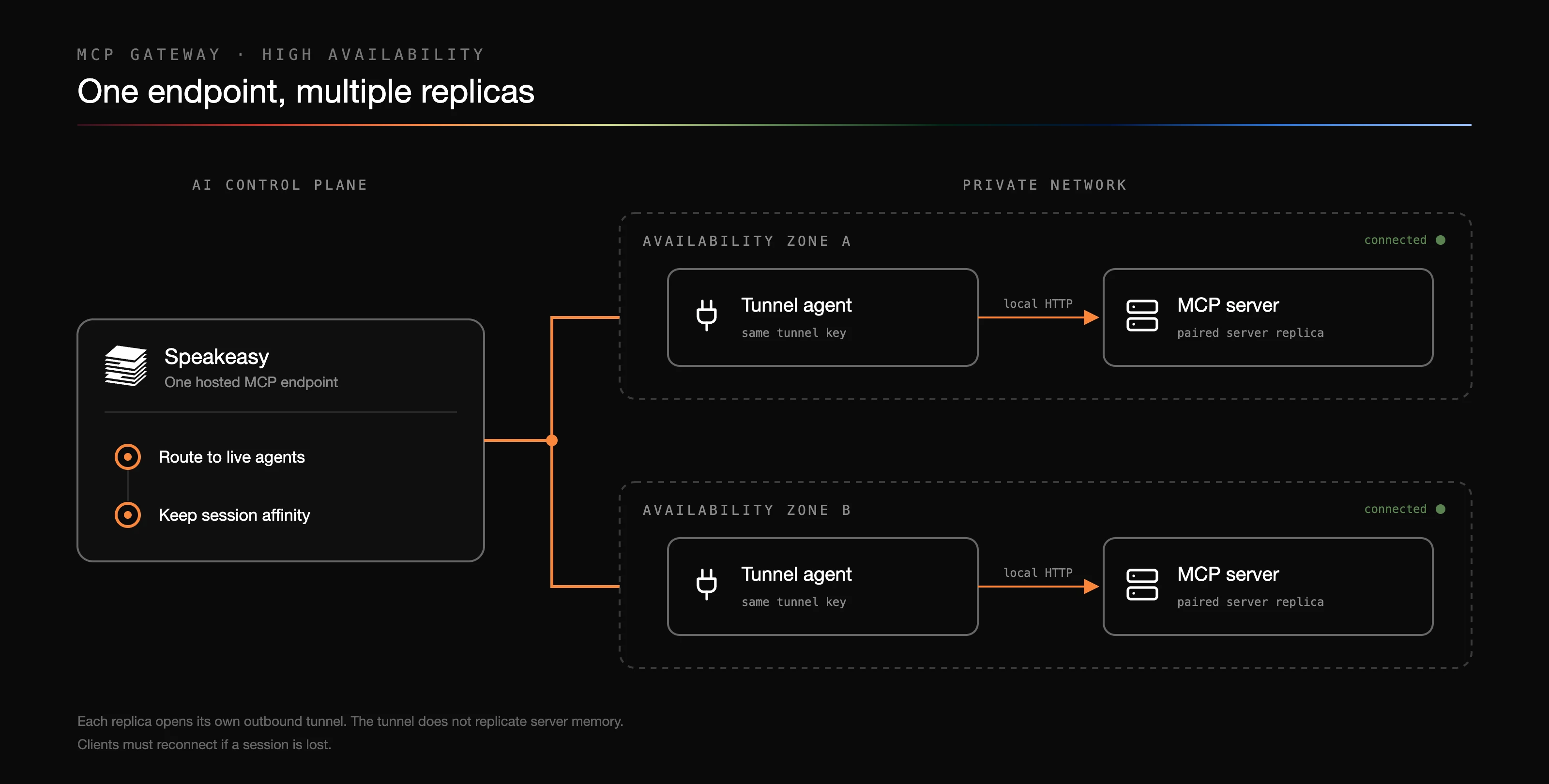
Section titled “High availability”Run multiple tunnel agents with the same tunnel key to serve one source. Each agent opens its own connection. Speakeasy routes traffic across live connections and keeps established MCP sessions attached to the agent serving them.
HA deployments have sustained healthy traffic at 300 requests per second. That observation does not establish a per-replica capacity limit or guarantee throughput. Size your deployment for your tools’ latency, concurrency, and streaming behavior.
For production:
- Run at least two agent and MCP server replicas. Place replicas on different nodes, and across availability zones when your infrastructure supports it.
- For stateful servers, pair an agent with each MCP process, for example in the same Kubernetes Pod or ECS task. Point each agent at its paired server. If agents instead connect through a shared Service or load balancer, the MCP tier must preserve session routing or share its state.
- Use readiness checks for the MCP service, restart failed processes, and retain enough spare capacity to lose a replica. In Kubernetes, use topology spread or pod anti-affinity and a disruption budget appropriate to your replica count.
- Test rolling updates and the loss of an agent, server, and node under representative traffic. Include long-lived streams and slow tools in the test.
Session recovery
Section titled “Session recovery”The agent reconnects automatically when its connection drops, with jittered backoff from half a second up to 30 seconds. A healthy connection for 30 seconds resets the backoff.
Routing affinity does not replicate an MCP server’s in-memory state. If the agent serving a session disappears, that session can fail and the client must initialize a new one. Plan for interrupted streams during failures or deployments. Retry mutating tool calls only when the tool’s semantics or an idempotency key make that safe.
Rate limits and capacity
Section titled “Rate limits and capacity”For private, authenticated traffic, enforce any application-specific per-user quotas in your MCP server or its local proxy. Use the verified, stable sub claim as the quota key. Monitor concurrent requests and tool latency when setting capacity; a long-running stream occupies capacity even at a low request rate.
If you publish a tunneled server for anonymous use, open its Settings > Anonymous Rate Limit section and set Requests per second and Burst. All anonymous callers and MCP methods share one token bucket for that source. Requests over the limit receive HTTP 429 with Retry-After. These controls limit aggregate anonymous traffic; they do not set per-user quotas for private access. The dashboard shows the effective limits, including defaults when fields are blank.
Public access requires both source-level permission and Public visibility on the MCP server. It allows anonymous access to the exposed tools and does not carry signed caller identity. See Public visibility before enabling it.
Monitor and maintain the connection
Section titled “Monitor and maintain the connection”The dashboard shows connected tunnel agents, heartbeats, service versions, and active streams. Check both the tunnel connection and the health of the MCP service behind it. A connected agent alone does not prove that a tool call will succeed.
Use tool logs to investigate calls, errors, and latency. Enable tool I/O logging to record arguments and results. For longer retention, export the tool_call_logs data source to an OTLP/HTTP destination and set retention there. See OpenTelemetry exports for destination configuration and sensitive-data controls.
To replace a lost or compromised tunnel key, rotate it in the dashboard and update every replica. Rotation invalidates the previous key and disconnects agents using it, so plan for clients to reconnect. This key authenticates the agent; it is separate from the JWT signing keys published through JWKS.