MCP Gateway / OAuth client registration: DCR and CIMD
OAuth client registration: DCR and CIMD
How MCP clients identify themselves to the platform's OAuth authorization server with Dynamic Client Registration or a Client ID Metadata Document, and how Client access decides which clients may connect.
Before an MCP client can send a user through OAuth, it needs a client ID that the authorization server recognizes. MCP clients ship long before any particular MCP server exists, so nobody can hand them a client ID in advance. The platform, which acts as the OAuth authorization server for every server with user sessions, accepts two ways for an unknown client to identify itself: Dynamic Client Registration (DCR) and Client ID Metadata Documents (CIMD).
Both mechanisms are on for every server. The Client access setting decides which CIMD clients a server admits. DCR stays open to every client whatever that setting says.
Access requirements
Section titled “Access requirements”Viewing a server’s Client access setting and its allowed clients requires the project:read scope. Changing Client access, adding or removing an allowed client URL, and checking a URL require project:write, which only the default Admin role includes. When a server uses an organization-wide session issuer, the setting is read-only on the server page and changing it requires org:admin.
Why client registration matters
Section titled “Why client registration matters”Client registration is where the authorization server learns the client’s name, which it shows on the consent screen, and the redirect URIs it may send authorization codes to. It is also the only identity the platform can write a policy about, and every tool call carries it next to the user, as described in How tool calls are attributed to clients. How much that client ID can be trusted depends on how the client registered.
Dynamic Client Registration
Section titled “Dynamic Client Registration”DCR is RFC 7591. The client POSTs its own metadata, including a client name and redirect URIs, to the authorization server’s registration endpoint and receives a freshly minted client ID, plus a client secret for confidential clients. The authorization server stores that record and trusts it from then on.
DCR works with any client and asks nothing of the client vendor beyond one HTTP request, which is why MCP adopted it first. The same design creates three problems:
- Everything is self-asserted. The registration request carries no signature and no proof of who sent it. An app can register as “Claude”, and the consent screen then shows a trusted name.
- Every install registers separately. Each copy of a client on each laptop registers on its own and gets its own client ID. A company with 500 engineers on three clients ends up with well over 1,500 registrations, and the count grows with every reinstall.
- There is nothing stable to allowlist. Client IDs are random per install and names can be typed freely, so no rule can say that only certain clients may start an OAuth flow.
The platform’s registration endpoint is open: any MCP client can register against a server’s endpoint without credentials, which is what makes pasting a server URL into a client work at all. It supports:
- Grant types
authorization_codeandrefresh_token, response typecode, and PKCE withS256only. - Client authentication with
client_secret_basic,client_secret_post, ornone. Thenonemethod covers public PKCE-only clients such as CLI tools and mobile apps, which are common among real MCP clients. - Client secrets returned exactly once, at registration, and stored hashed. A secret that is lost has to be replaced by registering again.
Redirect URIs are validated on registration. HTTPS URIs need a host, plain HTTP is accepted only for 127.0.0.1, ::1, and localhost, custom schemes must contain a dot, and script-bearing schemes are rejected outright. At authorization time, a DCR client’s redirect URI must match a registered one byte for byte, with no exception for loopback ports.
Client ID Metadata Documents
Section titled “Client ID Metadata Documents”CIMD turns the direction of trust around. The client ID is an HTTPS URL on the client vendor’s own domain, and that URL serves a JSON document describing the client. When the authorization server sees a URL-shaped client ID, it fetches the document, checks that the client_id inside it matches the URL it came from, and checks the requested redirect URI against the document’s redirect_uris. No registration happens, and the client ID is the same on every install.
A document for a public client looks like this:
{ "client_id": "https://app.example.com/oauth/client-metadata.json", "client_name": "Example MCP Client", "client_uri": "https://app.example.com", "redirect_uris": [ "http://127.0.0.1:3000/callback", "http://localhost:3000/callback" ], "grant_types": ["authorization_code"], "response_types": ["code"], "token_endpoint_auth_method": "none"}The two flows differ in who asserts the client identity:
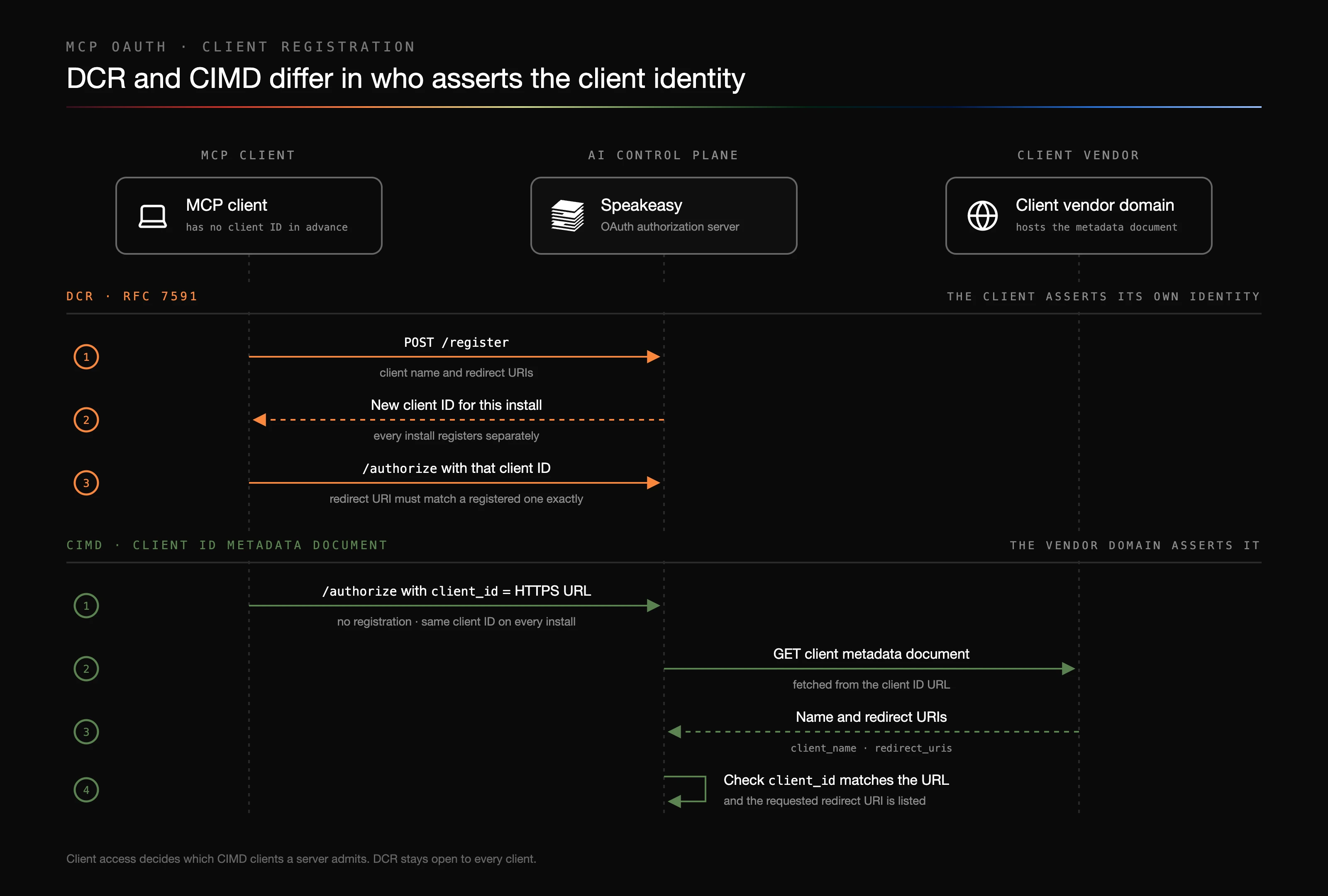
CIMD addresses the DCR problems directly. The consent screen name comes from a document only the vendor can change, there is no registration table growing with every reinstall, and there is no unauthenticated registration endpoint to spam. Most importantly, the client has a durable identity, a URL, that can be allowlisted, searched for, and revoked.
CIMD does not authenticate the running process. A local client with a loopback redirect can still be impersonated by another program that presents the same document URL and binds the same port. The MCP specification treats this as out of scope, and the platform adds a warning on the consent screen for that case.
The current MCP authorization specification says clients and servers SHOULD support CIMD and MAY support DCR, which it marks as deprecated but keeps for backward compatibility. CIMD itself is still an IETF Internet-Draft. For the longer argument, including what CIMD does not fix, see CIMD vs DCR for MCP OAuth.
How the platform handles each
Section titled “How the platform handles each”The platform accepts both on the same authorization server, for built, tunneled, and remote servers and for gateways.
The following diagram shows where client admission sits in a connection. The platform admits or rejects the client URL, fetches and verifies the document, signs the user in through the identity provider, and only then lets tool calls through.
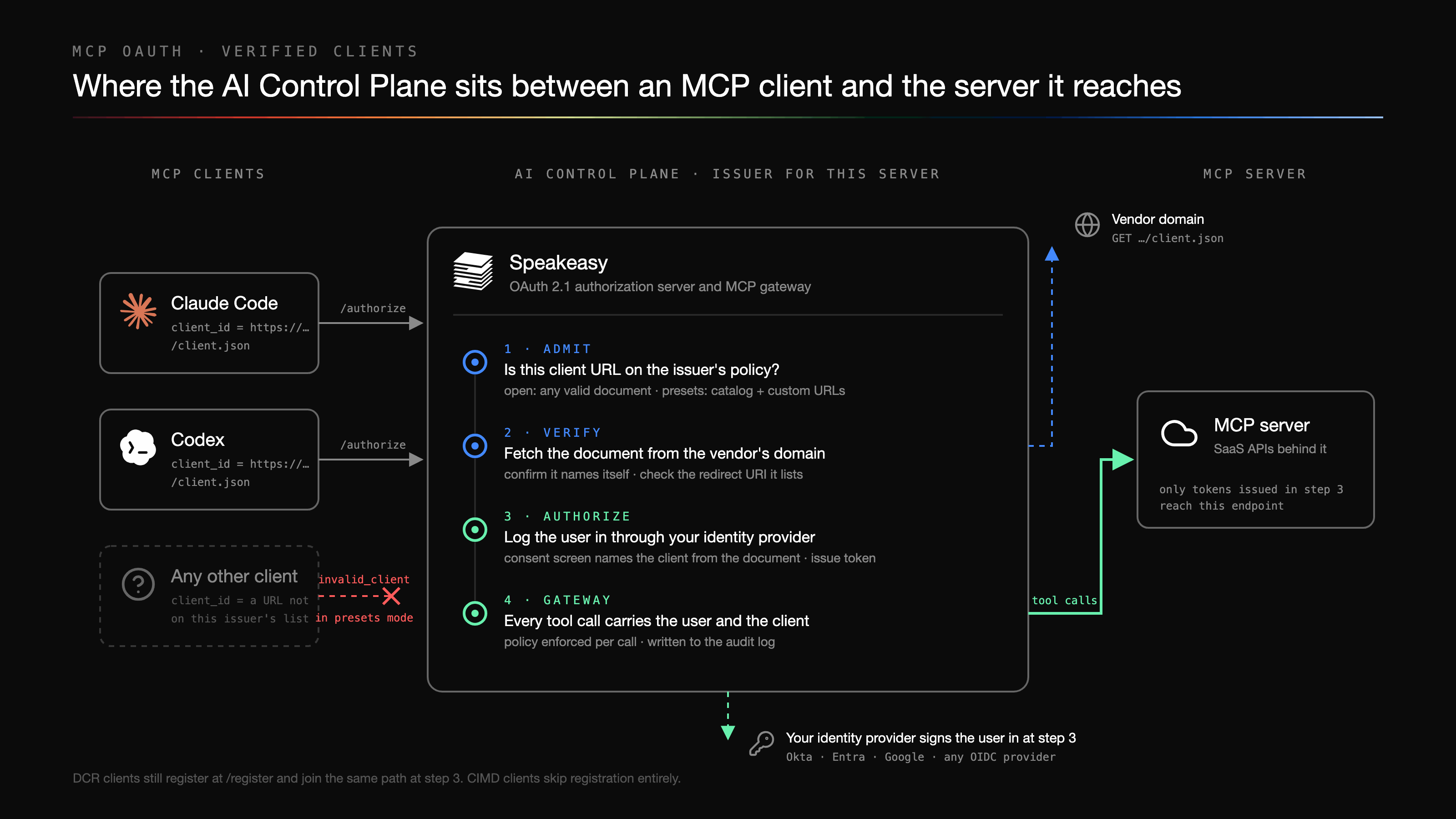
Which mechanism a client uses
Section titled “Which mechanism a client uses”- The authorization server metadata always advertises a registration endpoint, so DCR is available to every client.
- The metadata also advertises
client_id_metadata_document_supported: trueunless Client access is Off. Clients that support CIMD see this and present a URL instead of registering. - When Client access is Off, the flag is omitted, so CIMD-capable clients fall back to DCR on their own rather than starting a flow that is bound to fail.
- The choice happens once, at discovery. A client whose URL is refused at authorization does not retry through DCR.
What the platform checks in a document
Section titled “What the platform checks in a document”- The client ID must be an HTTPS URL with a path, with no fragment and no
.or..path segments. - The document must contain
client_id,client_name, andredirect_uris, and itsclient_idmust equal the URL it was fetched from. - The document must not contain a
client_secret. The client authentication method must benone,private_key_jwt, or absent, which is treated asnone. Aprivate_key_jwtclient must publish its keys withjwksorjwks_uri, and a later document cannot quietly downgrade it tonone. - Redirect URIs must use HTTPS, or HTTP on a loopback address (
127.0.0.1,::1, orlocalhost). For CIMD clients, the port on a loopback redirect is ignored, because clients like Claude Code bind an ephemeral port. - Documents are fetched with a size cap and a timeout, through the platform’s outbound network guard.
Fetched documents are cached according to their HTTP cache headers, for between five minutes and 24 hours, with an hour as the default, and revalidated with an ETag when the host provides one. A failed fetch aborts the authorization rather than serving a stale copy. The cached copy and Refresh metadata appear on the registration details in Clients and sessions.
What the consent screen shows
Section titled “What the consent screen shows”For a CIMD client, the consent screen takes the client name from the document and adds Client verified from, with the host of the client ID URL, under its Configuration details. It also warns when a CIMD client receives its authorization code at a local address. See The consent screen.
Assistants as CIMD clients
Section titled “Assistants as CIMD clients”The platform’s own assistants are OAuth clients too when they connect to an MCP server. The platform publishes a metadata document for each assistant under its own domain. Where this is enabled for the organization, an assistant presents that document URL to any authorization server that advertises CIMD support, and uses DCR otherwise. If an authorization server rejects the assistant’s client ID, the next connection falls back to DCR.
On the platform’s own servers, an assistant’s document URL is admitted under Verified clients and Any client without being added to the allowed list. Off turns it away like any other CIMD client.
Client access
Section titled “Client access”Client access is the per-server policy for CIMD clients. It sits next to Session length, covered in Session length and refresh: on a remote server in the Sessions section of the Settings tab, which appears once User Identity is configured, and on built and tunneled servers and gateways in the Authentication section. See Where authentication is configured.
The setting has three options:
- Verified clients: admits clients Speakeasy has checked, plus any document URLs the organization allows itself. Everything else is refused before any document is fetched.
- Any client: admits any client with a valid document, hosted anywhere on the internet. Nobody vets the client first, and each user decides at the consent screen. This is the default for a server nobody has configured.
- Off: admits no CIMD client. The server stops advertising CIMD, so clients register themselves through DCR instead.
The Sessions section on a remote server shows both fields:
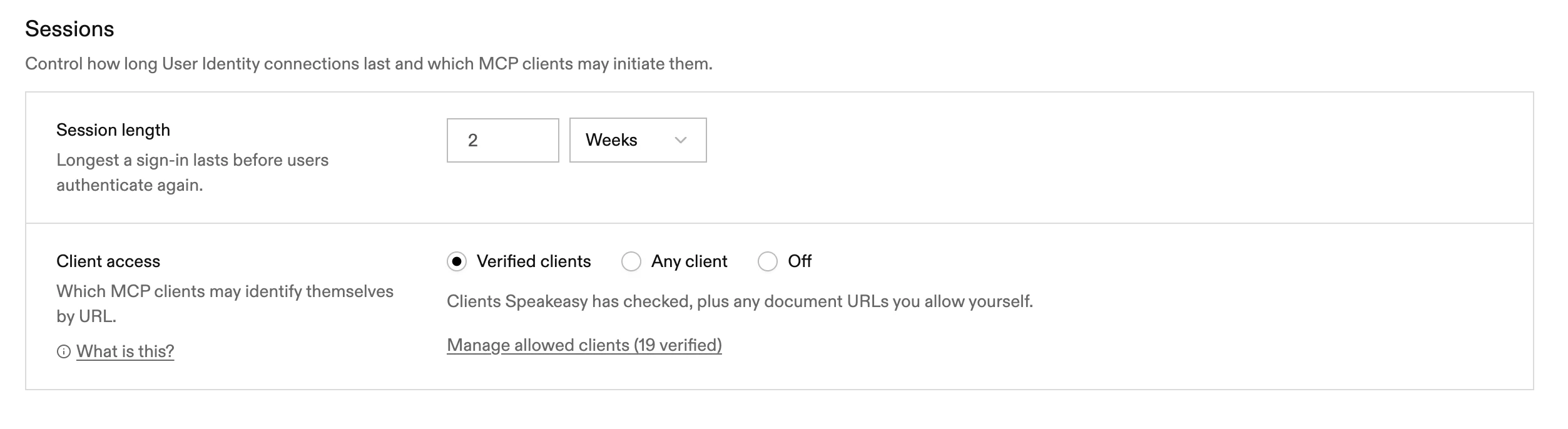
A client refused under Verified clients gets an OAuth invalid_client error saying the document URL is not permitted by the server’s client policy and that the server operator must allow it. A client refused under Off is told the server does not accept client ID metadata documents. Because MCP clients do not retry through DCR after a refused URL, a refusal under Verified clients is final until the URL is allowed.
Admission gates the start of a new authorization, not the continuation of one. Changing the setting does not end sessions that are already authorized, and refreshes keep working. To cut off a client that is already connected, revoke it on the Clients and Sessions tab.
What verified means
Section titled “What verified means”Verified clients are a catalog of client metadata documents that Speakeasy maintains, published by the MCP clients seen most often in production. It includes documents for clients such as Claude Code, Claude, Visual Studio Code, ChatGPT, Codex, Zed, Goose, and Notion. The count on Manage allowed clients shows how many entries are currently in the catalog.
Catalog entries match by exact URL, never by origin, because a whole domain such as claude.ai is far broader than the specific documents worth trusting. The one exception is a single-path-segment wildcard for vendors that publish a separate document per connector or install. When Speakeasy adds a client to the catalog, every server on Verified clients accepts it without any change to its settings.
Verified means Speakeasy has checked that the document belongs to the vendor it names. It does not prove that the program on a user’s machine is genuine, and users still sign in through the identity provider and approve the consent screen.
Allow additional client URLs
Section titled “Allow additional client URLs”Internal clients, or clients not yet in the catalog, can be added per server. The list is used only under Verified clients, so the link appears when that option is selected, and URLs can be added before saving the switch.
Select Verified clients and choose Manage allowed clients. The Allowed clients dialog lists the catalog entries with a Speakeasy source and the server’s own entries with a Custom source. Then:
- Choose Add new and paste the client’s document URL.
- Choose Check it works to run the same fetch and validation the authorization server performs. A failed check explains why, for example an unreachable host, a document that does not parse, or a
client_idthat does not match the URL. Adding a URL does not run this check on its own. - Choose Allow to add the URL, and Save the Client access setting if it changed.
Custom URLs match exactly, so a * in a custom URL has no special meaning. Remove an entry with Remove on its row. Changes to the mode and to the custom list are recorded in the audit log.
The same setting can be read and changed from an agent with the get_mcp_client_admission and set_mcp_client_admission tools on the Platform MCP.