MCP Gateway / Session length and refresh
Session length and refresh
Set how long a User Identity sign-in lasts before people authenticate again, and choose whether the platform refreshes upstream credentials in the background before idle connections lapse.
Two settings decide how long a connection through an MCP server keeps working without the person signing in again. Session length is set per server and caps how long a sign-in to the server lasts. The automatic session refresh policy is set once for the organization and decides whether the platform renews upstream credentials, such as a Linear or GitHub token held for each person, before an idle connection lapses.
Both settings apply to User Identity connections, where each person signs in and the platform holds upstream credentials on their behalf. They have no effect on Agent Identity or No Identity servers, which hold no per-person sign-in.
Access requirements
Section titled “Access requirements”Viewing a server’s session settings requires the mcp:read scope, and saving Session length requires project:write. Viewing the automatic session refresh policy on the MCP Sessions page requires project:read. Changing the policy requires org:admin, which only the default Admin role holds.
Session length
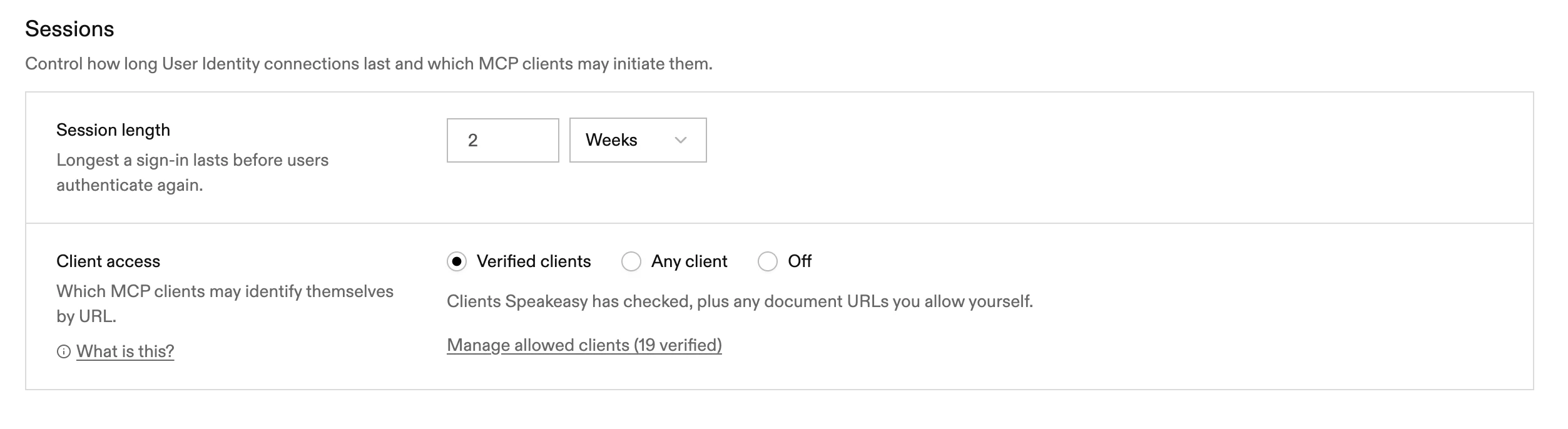
Section titled “Session length”Session length is the longest a sign-in lasts before people authenticate again. It is set as a number and a unit of hours, days, or weeks, with a minimum of one hour.
Session length sets an absolute deadline, not an idle timeout. The deadline is fixed when the person approves access on the consent screen and does not move when the MCP client refreshes its tokens. Access tokens last one hour, or less when the deadline is closer, and refreshing them never extends the sign-in past the deadline. Once it passes, the MCP client has to send the person through sign-in again.
The value is a maximum. The consent screen offers a Session length picker with the server maximum preselected and shorter presets below it, so a person can choose a shorter sign-in than the server allows.
Changing Session length applies to new sign-ins. Existing sign-ins keep the deadline they were issued with. To end a sign-in early, revoke the connection on the server’s Clients and Sessions tab or on the MCP Sessions page.
On a remote server, the field is in the Sessions section of the Settings tab, which shows its controls once User Identity is configured. On built and tunneled servers and on gateways, it is in the Authentication section once an identity provider is set up. See Where authentication is configured. When the server uses an identity provider owned by the organization rather than the project, the field is read-only on the server.
The same panel holds Client access, which decides which MCP clients may start a sign-in. See OAuth client registration.
Automatic session refresh
Section titled “Automatic session refresh”Upstream access tokens expire, and many providers also let a refresh token lapse if nobody uses it. When a person calls a tool, the platform refreshes an expired upstream token just before it is needed, whatever the policy. This on-demand refresh is single-flight, so concurrent tool calls do not each mint a new token. A credential that the upstream returns with no expiry is treated as non-expiring, unless a refresh token came with it, in which case it is refreshed roughly hourly. The automatic session refresh policy governs a second, background refresh for connections nobody is using, so they are still valid when someone comes back to them.
The policy is set at the top of the MCP Sessions page, under Identity > MCP Sessions in the project sidebar, as Automatic session refresh policy. It applies to the whole organization, across every project and server. Until an admin chooses otherwise, the policy is Disabled.
| Option | What it does |
|---|---|
| Disabled | Background refresh never runs. Inactive connections expire. The consent screen shows refresh as off and managed by the organization. |
| User controlled | The consent screen shows an Auto refresh control, on by default for new connections. Each person can turn it off, and background refresh honors that choice. |
| Required | Every eligible connection is refreshed in the background. The consent screen shows refresh as on and managed by the organization, and people cannot turn it off. |
What people see on the consent screen
Section titled “What people see on the consent screen”Whenever a server has upstream services to connect, the consent screen shows an Auto refresh row, described as renewing connections in the background so they don’t expire from inactivity.
Under User controlled, the row is an On or Off selector. A new connection defaults to on, and an existing one keeps the choice the person already made. The choice applies to every upstream service the server connects to. Each person holds one upstream credential per provider, so the choice also applies on other servers that use the same provider.
Under Disabled and Required, the row reads “Off · managed by your organization” or “On · managed by your organization” and cannot be changed. A choice submitted anyway is ignored. Each person’s stored choice is kept rather than overwritten, so switching the organization back to User controlled restores what everyone had chosen.
How background refresh runs
Section titled “How background refresh runs”Background refresh is a best-effort keepalive, not a guarantee:
- It runs about once an hour and picks up connections that have gone unused for 24 hours.
- Only upstream credentials that came with a refresh token can be refreshed.
- A failed attempt is retried after 24 hours. A provider that rate-limits refresh requests is skipped for the rest of that run.
Upstream credentials without a refresh token cannot be renewed. Instead, the platform re-checks them about once a day, whatever the policy, so a token that was revoked at the provider shows up without waiting for the person to open the consent screen.
Agents
Section titled “Agents”A connection an agent holds on its owner’s behalf follows the same organization policy. Under User controlled, the choice stored on that connection applies. The connection stays eligible for background refresh while the agent is active, meaning not revoked or suspended, and its owner is still a member of the organization.
How refresh interacts with expiry and revocation
Section titled “How refresh interacts with expiry and revocation”Background refresh keeps an upstream credential alive. It never extends anything else:
- Session length still applies. Background refresh only runs while the person holds an unexpired sign-in on a server that uses that provider, or while an agent connection keeps it eligible. Once every such sign-in reaches its Session length deadline, background refresh stops until the person signs in again.
- Upstream limits still apply. When the provider’s own refresh token or authorization expires, refresh stops. The consent screen marks the service as expired and the person reconnects, as described in What the end user sees.
- Revoking ends refresh. Revoking a connection or a client registration ends the sign-in it came from, so refresh stops once no live sign-in remains. Disconnecting an upstream service deletes the stored credential, which leaves nothing to refresh. Revoking in the platform does not revoke the grant at the provider, so revoke it there too if needed.
For how sign-ins and tokens are issued to MCP clients, see User sessions. For how upstream tokens are obtained and stored, see Upstream credentials.