MCP Gateway / Serving skills over MCP
Serving skills over MCP
Serve project skills from MCP servers and gateways so connected agents load them over MCP, without installing a plugin.
A plugin ships a skill inside the package an agent installs. Serving a skill over MCP delivers it from the MCP server the agent is already connected to instead. Add a skill to an MCP server, a gateway, or the organization gateway, and any agent connected there can list it and load its SKILL.md on demand. Nothing has to be installed or reinstalled, and an edit to the skill reaches agents on their next load.
Both delivery paths work side by side. A skill can be bundled into plugins and served over MCP at the same time, and serving it over MCP leaves its plugin and assistant distributions unchanged.
Access requirements
Section titled “Access requirements”Viewing the skills a server or gateway serves requires the skill:read
scope. Adding or removing a skill on an MCP server requires the mcp:write
scope on that server. On a gateway it requires project-level mcp:write,
and on the organization gateway it requires project:write on the project
that owns the skill. The default Admin
role includes all of
these.
How serving works
Section titled “How serving works”A skill is served by a link between the skill and one MCP surface. Each link names exactly one target:
- An MCP server: a hosted server built from OpenAPI documents or functions, or a remote server.
- A gateway: a gateway endpoint built in the project.
- The organization gateway: the organization gateway, which also covers project gateways.
When an agent connects, the server declares the MCP Skills extension (io.modelcontextprotocol/skills). The agent lists the served skills with skills/list, which returns each skill’s name, description, and URI, and loads the one it needs by reading its SKILL.md with resources/read. MCP clients that do not support the Skills extension see the same tools as before.
Which version is served
Section titled “Which version is served”A link either tracks the skill’s latest valid version or pins one version. Links added from the dashboard track the latest valid version, so editing the skill updates what agents load. The Platform MCP link_skill_to_mcp tool and the API also accept a version to pin. Only valid versions are served: a skill whose manifest fails validation is not served until a valid version replaces it.
When one skill reaches an agent through several links, for example on a gateway and on one of its member servers, a pinned version wins over the latest one, and between two different pins the newer version wins.
Who receives served skills
Section titled “Who receives served skills”Access follows reachability. Any member of the organization who can connect to a server or gateway receives the skills served there. There is no separate per-person or per-role targeting for served skills, so control who receives a skill by controlling who can connect, with team access.
The caller must be a signed-in person:
- People who sign in to a server or gateway with their Speakeasy account receive its skills.
- Connections that authenticate with an API key, an agent key, or a workload identity receive no skills.
- Unauthenticated callers on a public server receive no skills, although the server still declares the Skills extension.
- A disabled server serves no skills until it is enabled again.
Skills on gateways
Section titled “Skills on gateways”A gateway serves the skills linked to it plus the skills linked to every member server the caller reaches through it. A skill linked to one server therefore also reaches agents who connect through any gateway that includes that server, without adding it to each gateway.
- Gateway endpoints serve their own links plus their members’ links. Agent gateways serve no skills.
- The organization gateway serves skills linked to it from any project in the organization, plus the links on every member server the person can reach.
- Project gateways serve the organization gateway’s links plus the links on member servers in that project.
A member counts only when the caller is actually served through it. On a connection where the person picked tools during consent, a member contributes its skills only when at least one of its tools was approved.
Skills on remote servers
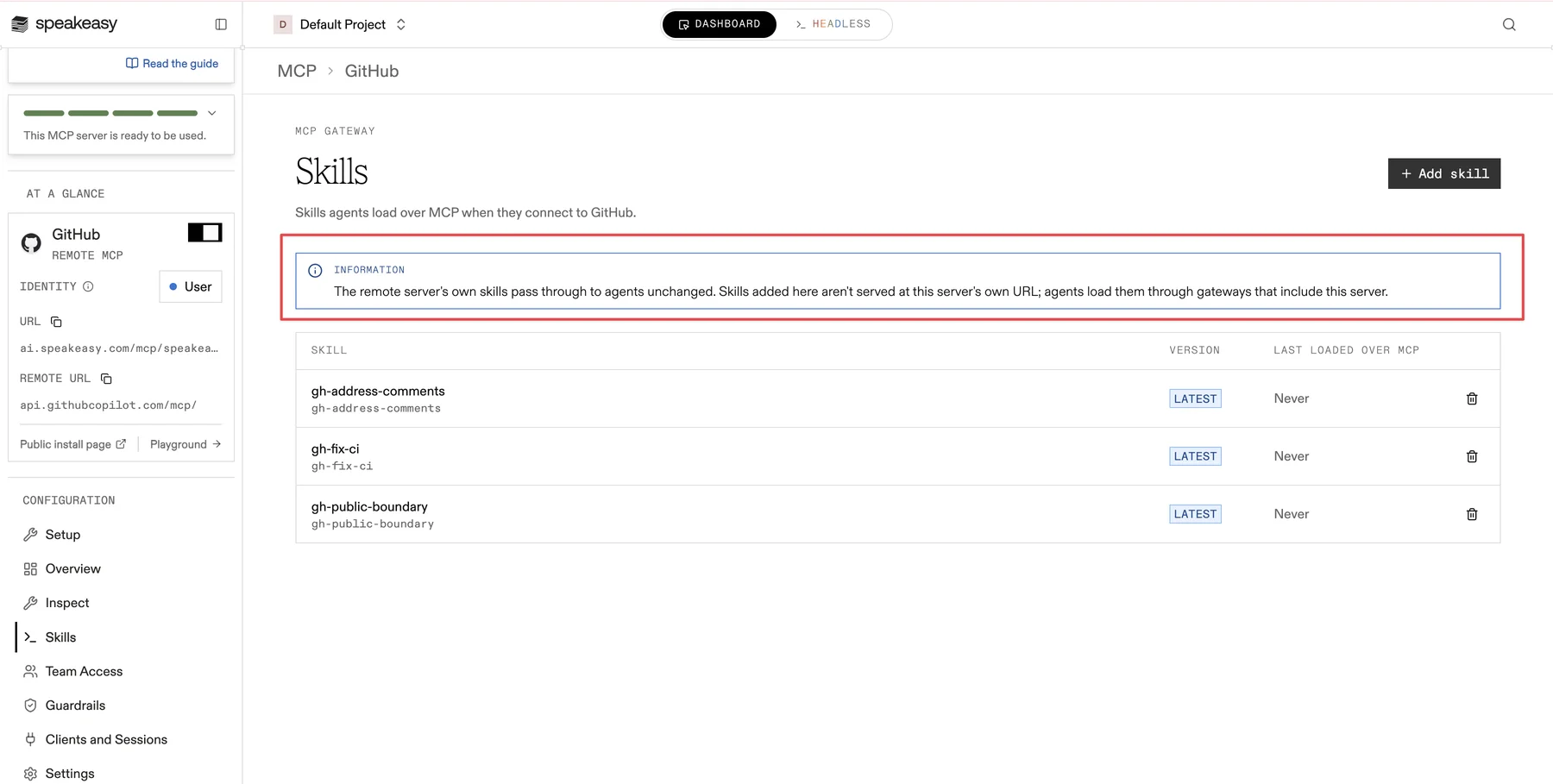
Section titled “Skills on remote servers”A remote server passes any skills its upstream serves through to agents unchanged. Skills added on a remote server’s Skills tab are not served at that server’s own URL. Agents load them through gateways that include the server.
Skill URIs
Section titled “Skill URIs”Every served skill is addressed by a skill:// URI that names its project and skill:
skill://<project-slug>/<skill-name>/SKILL.mdSkills built into the platform, such as those served by the Platform MCP, use the speakeasy namespace:
skill://speakeasy/<skill-name>/SKILL.mdEach entry in skills/list also carries a digest of the served manifest. The skill’s Usage tab shows the digest agents see for the current version, which helps confirm which version an agent loaded.
Add skills to an MCP server or gateway
Section titled “Add skills to an MCP server or gateway”- Open the MCP server or gateway from MCP Gateway in the project sidebar.
- Select the Skills tab.
- Select Add skill, choose one or more project skills, and select Add.
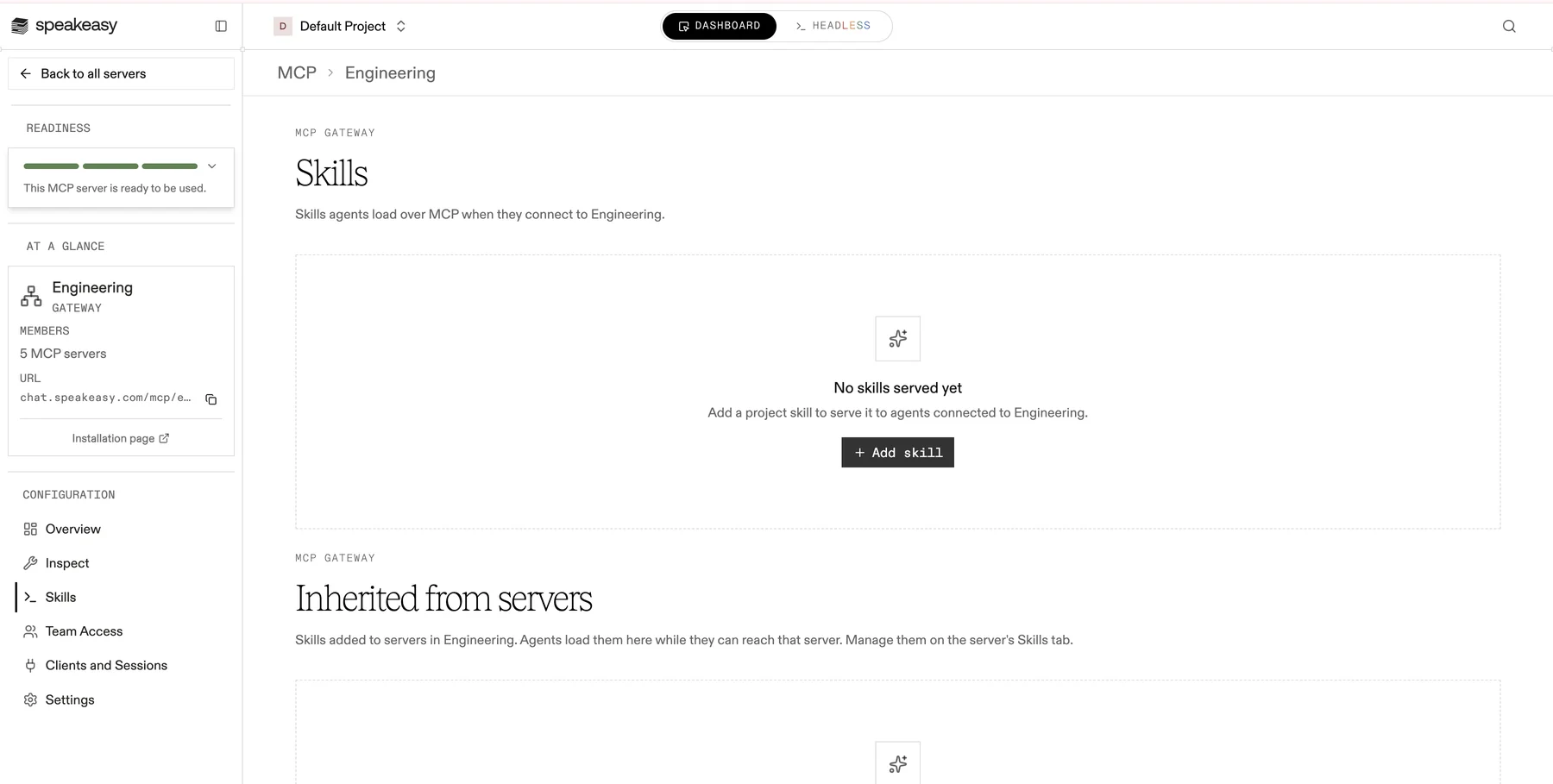
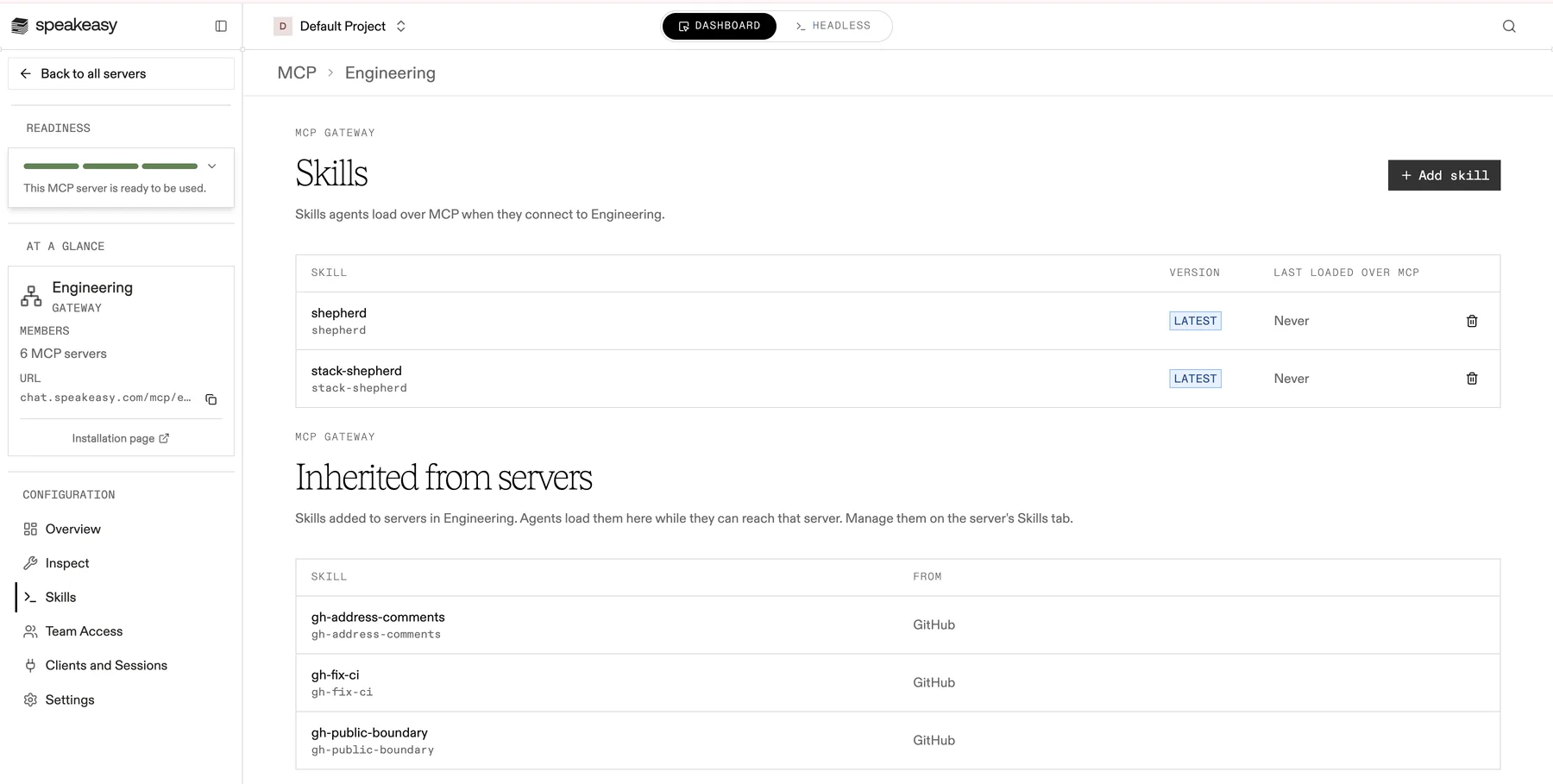
The Skills tab lists every skill the server or gateway serves, with the version it serves (Latest or the pinned version) and Last loaded over MCP, the last time an agent loaded it there. Select the remove button on a row, labeled Stop serving, to stop serving a skill. The skill, its versions, and its plugin distributions stay.
On a gateway, the Skills tab also has an Inherited from servers section. It lists the skills added to member servers, with the server each one comes From. These rows are read-only on the gateway. Manage them from the member server’s own Skills tab.
Serve a skill from the organization gateway
Section titled “Serve a skill from the organization gateway”The organization gateway has no project page, so skills are added to it from the skill itself:
- Open the skill from MCP Gateway > Skills.
- Select the Usage tab.
- In the Served over MCP section, select Add to organization gateway.
The Served over MCP section lists every MCP server and gateway that serves the skill, when it was last loaded over MCP, and the digest of the current version. Each row links to the place where that link is managed, and the organization gateway row can be removed from here.
Serve skills from an agent
Section titled “Serve skills from an agent”The Platform MCP exposes the same links to agents:
link_skill_to_mcpserves a skill from one MCP server, one gateway, or the organization gateway, optionally pinned to a version.unlink_skill_from_mcpstops serving it there.list_skill_distributionsreturnsserved_by, the MCP servers and gateways that serve the skill, next to its plugin distributions.
Both write tools are available only to organization administrators and require explicit confirmation, the same as distribute_skill.
Test in the Playground
Section titled “Test in the Playground”The Playground loads skills from the selected server the way a connected agent does. When the server serves skills, the Playground adds a load_skill tool whose description lists the served skills. When the model calls it, the Playground reads the skill’s SKILL.md over MCP, and the read is recorded as a skill load like any other.
Observe skill loads
Section titled “Observe skill loads”Every resources/read of a served skill is recorded as a skill activation, with the served version, the caller, and the session. A load through a gateway is recorded in the project that owns the skill. Repeat reads of the same version in one session count once.
- Tool Logs lists skill loads under the Skills type. The Loaded via filter separates loads over MCP from loads reported by agent Hooks.
- MCP Insights shows a Skill loads card when skills are in the selection, split into loads over MCP and loads from hooks.
- On the skill’s detail page, MCP loads count toward its activations alongside activations captured from developer machines, and the Served over MCP section shows when it was last loaded over MCP.
Limits
Section titled “Limits”- A served skill is a single
SKILL.mdfile. Additional files in a skill directory are not served over MCP. - Agent gateways do not serve skills.
- Served skills are not listed in
resources/list. Agents discover them withskills/list.