SDKs
Manage OpenAPI specs with Speakeasy
Use this guide only for managing OpenAPI specs independent of generating SDKs.
For the quickstart to set up SDKs, see the SDK Quickstart.
This guide walks through the process of managing OpenAPI specs using the Speakeasy API Registry and CLI. This is also known as a “source-only workflow” as it only uses the sources feature of Speakeasy workflows.
Prerequisites
Section titled “Prerequisites”- A Speakeasy account and CLI installed. Log in here to create an account.
- An OpenAPI spec for the API
Overview
Section titled “Overview”To get started, create a GitHub repository. Something like company-specs or company-openapi are common repository names.
Initialize a new workflow file by running speakeasy configure sources and follow the prompts to add in the OpenAPI spec and any
overlays. Make sure to give the source a meaningful name as this will be the name used for the API Registry in the workspace dashboard.
A common repository structure will look like the following:
company-specs├── .speakeasy/│ ├── workflow.yaml├── specs│ ├── openapi.yaml│ ├── ...├── overlays│ ├── overlay.yaml│ ├── ...├── overlayed_specs # This folder includes specs that have been modified by overlays│ ├── openapi_modified.yaml│ ├── ...└── .gitignoreThe workflow file will be generated in the .speakeasy folder and will look like the following:
workflowVersion: 1.0.0speakeasyVersion: latestsources: my-api: # This is the name of the source used in `speakeasy configure sources` inputs: - location: specs/openapi.yaml registry: location: registry.speakeasy.com/your-company/your-company/my-api outputs: - location: overlayed_specs/openapi_modified.yamltargets: {}Publishing spec changes
Section titled “Publishing spec changes”Any time a new version of the OpenAPI spec should be published to the API Registry, run:
speakeasy run -s targetThis will publish the spec to the API Registry as a new revision for the source my-api.
Optionally tag the revision of a spec by running:
speakeasy tag apply -n v0.0.2This will tag the most recent revision of the spec with the tag v0.0.2.
API Registry
Section titled “API Registry”This will show up as the latest revision in the API Registry tab in the dashboard.
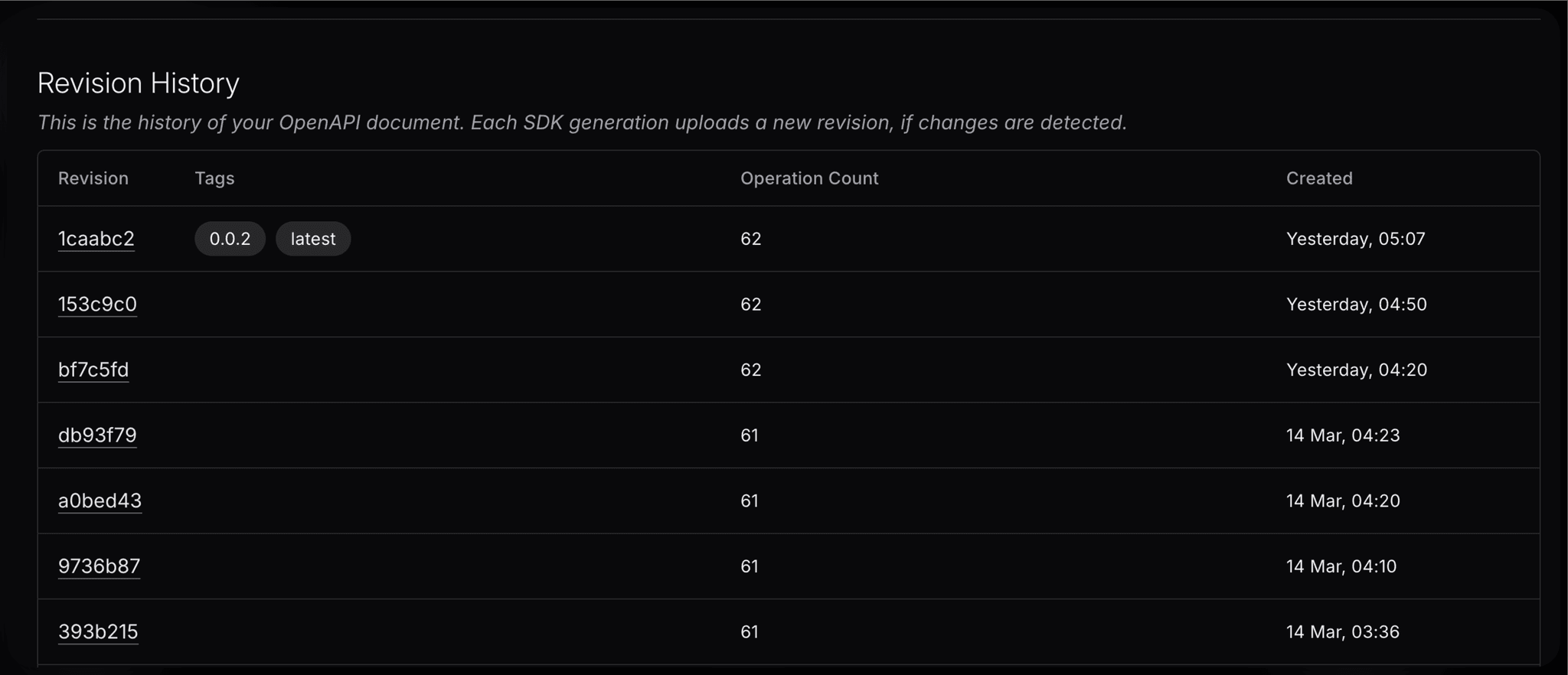
The API Registry can be used to:
- Track changes to specs, view detailed change reports, and download past versions of the spec.
- Create a stable public URL for sharing a particular revision of the spec.
- Use the registry URI as a source for generating SDKs, for example:
registry.speakeasy.com/your-company/your-company/my-api.
Triggering downstream SDK generation
Section titled “Triggering downstream SDK generation”For teams that manage SDKs in separate repositories, the spec repo can trigger SDK generation in downstream repos when changes are made. This pattern is useful when:
- A central team manages the API specification
- Multiple SDK repositories need to be generated from the same spec
- SDK generation should be triggered automatically when the spec changes
- SDK PRs should be created in downstream repos for review before merging
Architecture overview
Section titled “Architecture overview”┌─────────────────────────────────────────────────────────────────────────┐│ Spec Repository ││ ┌─────────────┐ ┌─────────────────────────────────────────────┐ ││ │ OpenAPI │ │ GitHub Actions Workflow │ ││ │ Spec │───▶│ 1. Runs `speakeasy run` to tag spec │ ││ │ (PR change) │ │ 2. Triggers downstream SDK workflows │ ││ └─────────────┘ │ 3. Updates PR comment with status │ ││ └─────────────────────────────────────────────┘ │└─────────────────────────────────────────────────────────────────────────┘ │ │ gh workflow run ▼┌─────────────────────────────────────────────────────────────────────────┐│ Downstream SDK Repos ││ ┌──────────────────────────┐ ┌──────────────────────────┐ ││ │ TypeScript SDK │ │ Python SDK │ ││ │ - Pulls tagged spec │ │ - Pulls tagged spec │ ││ │ - Generates SDK │ │ - Generates SDK │ ││ │ - Creates PR │ │ - Creates PR │ ││ └──────────────────────────┘ └──────────────────────────┘ │└─────────────────────────────────────────────────────────────────────────┘Setting up downstream SDK repositories
Section titled “Setting up downstream SDK repositories”Each downstream SDK repository needs a workflow that accepts workflow_dispatch inputs. After running speakeasy configure github, modify the generated workflow to accept these inputs:
on: workflow_dispatch: inputs: force: description: "Force SDK regeneration" required: false default: "false" feature_branch: description: "Branch for SDK changes" required: false environment: description: "Environment variables (e.g., TAG=branch-name)" required: falsePass these inputs to the workflow executor:
jobs: generate: uses: speakeasy-api/sdk-generation-action/.github/workflows/workflow-executor.yaml@v15 with: mode: pr force: ${{ inputs.force }} feature_branch: ${{ inputs.feature_branch }} environment: ${{ inputs.environment }} secrets: github_access_token: ${{ secrets.GITHUB_TOKEN }} speakeasy_api_key: ${{ secrets.SPEAKEASY_API_KEY }}The SDK repo’s .speakeasy/workflow.yaml should reference the registry with a $TAG variable:
sources: my-api: inputs: - location: registry.speakeasyapi.dev/your-company/your-company/my-api@$TAGRequired secrets
Section titled “Required secrets”On the spec repository, configure these secrets:
| Secret | Description |
|---|---|
SPEAKEASY_API_KEY | Authenticates the Speakeasy CLI. Obtain from the Speakeasy Platform API Keys page. |
DOWNSTREAM_SDK_TOKEN | A fine-grained GitHub PAT with actions: write, contents: write, and pull-requests: write permissions on all downstream SDK repos. |
On each downstream SDK repository:
| Secret | Description |
|---|---|
SPEAKEASY_API_KEY | Authenticates the Speakeasy CLI. Can be the same key as the spec repo or a separate key. |
Example implementation
Section titled “Example implementation”A complete working example is available in the examples-downstream-spec-repo repository, which triggers SDK generation in:
The example includes workflows that:
- Trigger SDK generation when a PR is opened on the spec repo
- Update the spec PR with comments showing generation status and links to SDK PRs
- Automatically merge or close SDK PRs when the spec PR is merged or closed